Posted on

How To Use AirPods Live Translation Feature On iPhone

During the iPhone 17 event, Apple announced the new AirPods Pro 3 earbuds alongside Live Translation functionality. Rumored for months, this feature is not only available for Apple’s latest earbuds, but also for AirPods Pro 2 and AirPods 4 owners running iOS 26.

While Apple says Live Translation works more seamlessly if the two people having a conversation are both wearing AirPods, it’s possible that you’re the only one using them, and then you can show your iPhone so the other person can understand what you’re saying in your language.

So far, reviewers have praised this feature as one of the best available in the market. Apple uses its Apple Intelligence platform to power AirPods Live Translation, meaning nothing leaves your device, as everything is processed locally. Here’s everything you need to know about the new AirPods Live Translation feature, which languages are supported, and how to make the most out of it.

Requirements and step-by-step instructions

José Adorno/BGR

To take advantage of the AirPods Live Translation feature, users need to have an iPhone 15 Pro or newer and AirPods with the H2 chip, which include AirPods 4, AirPods Pro 2, and AirPods Pro 3. In addition, they can’t have their Apple Account set for a European country, as Apple has this ongoing issue with the European Commission and the Digital Markets Act, which has even led to a delay in features for UK users.

So far, users can translate back and forth between these languages: English (U.S. and UK), French, German, Portuguese (Brazil), and Spanish (Spain). With iOS 26.1 beta, Apple is planning to expand to more languages like Italian, Japanese, Korean, Chinese (Simplified and Traditional). Now that you know that, follow the steps below:

  • Make sure your iPhone is running the latest iOS version and that your AirPods have been updated to the latest firmware.
  • Put your AirPods on your ears and press and hold both stems until you hear a sound.
  • Siri will then say: “To use Live Translation with your AirPods, you’ll need to download languages on your iPhone.”
  • You can tap the Notification or go to Settings, AirPods Translation (Beta), and download the languages you want to use.

Apple might make Live Translation mainstream

José Adorno/BGR

While there are many smart AR glasses and earbuds on the market promising to do the same by using OpenAI’s ChatGPT, Apple is using its own models to ensure a seamless translation. What’s interesting about this functionality is that right after the person stops talking, Siri will take over and start to translate what they said.

If they don’t have AirPods on, you can open Apple’s Translate app. As you speak, the iPhone will translate what you said to their language, so they can follow the conversation. Apple says everything is processed on your iPhone, and this is why the translation works fast.

In addition, since Apple is also making this functionality available for AirPods 4 and AirPods Pro 2, most people won’t have to buy new hardware to take advantage of this feature (as long as they have an iPhone that can run Apple Intelligence). The company will also add support for more languages as it continues to make the translation as fast and as accurately as possible.

Source

Posted on

Thinking About Upgrading Your iPhone With Verizon? Here’s 4 Things

Rivernorthphotography/Getty Images

Waiting years or even longer to upgrade your iPhone is a great way to save money, but it also can leave you with a slow, antiquated device. If your iPhone isn’t compatible to run iOS 26, you may be missing out on some really cool features. It may be time to upgrade to the latest iPhone with iOS 26 if you’re struggling with an older one with a busted Lightning connector. If it’s been a while since you’ve made the jump, or you’re simply thinking about switching carriers, then the Verizon mobile network may be the way to go.

Whether you’re a new customer or a returning customer, Verizon makes it easy to upgrade your iPhone on a semi-regular basis thanks to its early upgrade program. While brand-new customers may be eligible for additional offers and promotions, virtually anyone can get involved in the early upgrade program so long as they own or have paid off a certain portion of their device, the device itself meets Verizon’s standards, and you properly return your device to the carrier should you need to.

If you own your device, the company can work with you towards a trade-in value of a new phone, and the company even accepts smartwatches and tablets that you can trade in for credit towards a new device as well. However, if you’re interested in updating your iPhone more frequently, the early upgrade program may be the way to go.

Only certain iPhone models are eligible for early upgrades

Simpleimages/Getty Images

If you’re looking to take advantage of Verizon’s early upgrade program, only certain iPhone models are eligible. For this program, any model from the iPhone 14 to the latest iPhone 17 series is acceptable, and any model from the lineup is fine. That means if you have an iPhone 17 Pro or Pro Max, you’re eligible, but Verizon will also accept baseline, Plus, Pro Max, and mini models. You will also need to have used the iPhone with Verizon’s mobile services for 30 days, and have paid off at least 50% of the device’s retail price.

In addition to being available only for specific models, the device must also meet certain criteria regarding its condition. The iPhone must have a functioning battery and the ability to power on and off. The screen must be intact and functioning; there can be no breaks or cracks in the glass. You also need to ensure that the charging port is present, operational, and free of water damage and corrosion. All password-protection features must be disabled or turned off, including things such as Find My iPhone. Devices for trade-in will be valued based on their condition and market value.

For the iPhone, there are a few more carrier-specific requirements. For the device to be eligible, it needs to be the same device that you originally purchased through your device payment agreement, a Certified Like-New Replacement issued to you by Verizon, or a replacement phone provided by a device protection option that Verizon has approved, such as AppleCare or something offered by a Verizon-Approved Retailer.

Upgrading early can be time-sensitive

Jetcityimage/Getty Images

So long as your account isn’t past due and you own the device you’re looking to replace, you can upgrade a device on your Verizon account at any time if you purchase the new phone at retail price. If you are interested in taking advantage of the early upgrade program, you’ll once again need to meet certain criteria.

If you plan to enter into a device payment agreement, which essentially involves financing the device over a period of time, you are eligible to upgrade as long as your original agreement is paid off, or you purchased the device at a discount after signing a 2-year contract, and it has now ended. You can also be eligible for the early upgrade program if you pre-order any eligible device through Verizon’s device payment agreement and activate it. There may also be a $40 upgrade fee whenever any line changes to a new phone.

Something else to keep in mind is that Verizon has a stipulation requiring any early upgrade purchase of a new qualifying device to be made either through a device payment agreement or financed through a Verizon Visa Card. This method must be the same as the method you used when you bought your previous device. So, if you purchased your last device through Verizon Visa Card financing, you must do so again for the new device as well.

You’ll need to return your old device

Wongsakorn 2468/Shutterstock

If your old device is eligible for the early upgrade program, you’ll likely need to return it to Verizon. For this, you may need your carrier information and IMEI number, but should you complete the transaction online, Verizon will send you the new device alongside a protective envelope. You will place the old device in the envelope and pack it into the new device’s box. Apply the return label to the box, and deliver it to the carrier listed on the label or request a pickup. Remember to keep the tracking number.

Should you need a replacement, the fastest way to get a new shipping label will be through the My Verizon app.

  1. Open the app, ensure you’re logged in, and then select the Me tab.

  2. Tap Orders from the Account links area.

  3. Scroll down to the bottom and select “Documents & Receipts.”

  4. Under the Orders section, select “View orders.”

  5. Locate your order and then select “View details” to view delivery information.

Failing to return your old device within 30 days after upgrading will result in the remaining balance of the original device payment agreement appearing on your next bill. There’s also a chance that your original device may be sent back to you if it does not meet Verizon’s specifications, including the old phone not being in working condition, the company receiving it too late, or it not being the correct device. Verizon will provide reasoning for the return when it sends back your old device.

Find the value of your old iPhone

Wongsakorn 2468/Shutterstock

Remember that you can check your upgrade eligibility at any time through the Device overview section on My Verizon. You can also make any upgrades from this page. Upon scrolling down to view your devices, you should see the words ‘Upgrade now’ under any eligible device. You can also select a device and then choose ‘Check Upgrade Options’ to view more details.

You can also check the trade-in value of virtually any phone through Verizon’s Trade-In page. Simply tap Get started, answer a few questions about yourself and your device, and then Verizon will provide some information regarding the value of the device. Should you decide to trade in your phone to Verizon at that time, the company will send you a prepaid shipping package so that you can return the phone to them. From here, Verizon will thoroughly evaluate the phone and send you a Verizon gift card or credit your account directly for the price of the old device.

An important thing to remember is that you can call Verizon and talk to a representative at any time. While it is possible to trade in your device online, it may be far easier to accomplish this in person. You can use Verizon’s store locator to check for any available locations near you. Otherwise, enjoy your new iPhone!

Source

Posted on

iFixit Explains The iPhone 17 Pro’s ScratchGate: Blame Apple, Not

Wongsakorn 2468/Shutterstock

The iPhone 17 Pro and iPhone 17 Pro Max scratch more easily than expected, which is surprising considering the handsets are more durable than their predecessors. The Pros feature an aluminum unibody chassis that extends to the back and the Ceramic Shield 2 (front) and Ceramic Shield (back) glass covers that add to their structural strength. That’s what the “ScratchGate” term means. Coined on Friday, when the iPhone 17 models and iPhone Air started selling in stores, ScratchGate went viral as users in China and then the rest of the world noticed the new iPhones scratched easily, especially the Pros. Images like the ones below started spreading on social media.

YouTuber Zack Nelson (JerryRigEverything) said earlier this week that ScratchGate is real and explained why the iPhone 17 Pro models scratch so easily and where they’re most likely to see damage. The camera plateau’s sharp edges are the most likely places to be damaged by accidental scratches, and that’s because of Apple’s design choice for those edges. Apple went for sharp corners around the camera plateau instead of creating a curvature, and that’s where the paint will chip away when coming into contact with objects like coins and keys that you may keep in the same pocket.

Well-known repair company iFixit has corroborated Nelson’s finding, providing more details about the reasons why the iPhone 17 Pro models are prone to scratching, especially around the camera bump. iFixit delivered the same conclusion. It’s Apple to blame for the scratches. Fixing them isn’t easy.

Would a titanium iPhone 17 Pro scratch?

iFixit talked to David Niebuhr, an expert in materials who teaches mechanical engineering at California Polytechnic State University, about ScratchGate. He advised iFixit to use a level 4 pick (from a Mohs surface hardness kit) to simulate the effect of coins and keys on the surface of the iPhone 17 Pro models. iFixit scratched the flat sides and the edges of the camera plateau. The video above and iFixit’s iPhone 17 Pro teardown blog post contain several images taken with a microscope that show how the metal reacted.

The scratches on flat surfaces are only skin-deep, and they won’t show the aluminum layer under the anodization. It’s the corners of the camera plateau that will take heavy damage, or “spalling.” iFixit explains that the anodization process combined with the geometry of the camera plateau is why the iPhone 17 Pros scratch easily. Both aluminum and titanium can be anodized, and the latter forms a harder titanium oxide layer on the exterior. But Niebuhr told iFixit the difference between the two would not account for the spalling that appears.

It’s the shape of the camera plateau’s corners that’s causing scratches at the edges. Niebuhr told iFixit that a thicker oxide layer wouldn’t have prevented the scratches. It would have made them worse. “Apple could have prevented this by making a more gradual curve and avoiding a relatively sharp corner,” Niebuhr told iFixit. While the iPhone 17 Pro and iPhone 17 Pro Max can be relatively easily repaired, there’s no fixing the scratches. The camera plateau can’t be replaced as it’s part of the unibody chassis. For that, getting a case or a skin that protects the aluminum, especially those sharp edges, should be one of the first things to do with your iPhone 17.

Source

Posted on

A Man’s iPhone 3GS To iPhone 17 Upgrade Went Viral:

Michael M. Santiago/Getty Images

Beloved Marvel actor Chris Evans made waves a few years ago when he upgraded from an iPhone 6s to an iPhone 12 after eight years of using the former. Like many others, Evans loved the thin design and the home button. The actor’s iPhone upgrade received all that attention because he’s a famous star, but plenty of iPhone users might have been in a similar situation. People keep their smartphones for longer than they used to. According to Assurant data for the first quarter of 2025, the average age of an iPhone that’s traded in is 3.79 years, and growing.

Fast-forward to the iPhone 17 series, and we have an even more extreme upgrade case going viral on social media. A man upgraded his 2009 iPhone 3GS to the brand-new iPhone 17 Pro, recording the entire stunt on the 16-year-old iPhone, including his experience with Apple retail store employees. As evident in the Instagram video, some were amused to see him use such an old iPhone model, while others praised him. They all told him the iPhone 3GS has no trade-in value, but one staff member advised him to try to resell the handset rather than recycle the device with Apple. Collectors might appreciate the aging device and offer a better price, as is the case with the original iPhone. However, it turns out the stunt was fake, and the user hadn’t actually upgraded from a 16-year-old iPhone. That said, there’s something nostalgic about seeing the world through an iPhone 3GS, which makes this stunt wholesome.

It was all a publicity stunt

Alex Greenberg documented his iPhone 3GS upgrade to the iPhone 17 Pro, recording his early visit to an Apple store to reserve the 1TB blue iPhone 17 Pro model he wanted. While he shared the clip on Instagram only a couple of days ago, it’s likely he purchased his handset on Friday, when the iPhone Air and iPhone 17 models started selling in stores. The short line in front of the Apple store indicates it’s the iPhone launch day. All three iPhone 17 models are sold out online, at the time of this writing.

Greenberg uploaded a second clip on Tuesday on Instagram where he came clean. The entire thing was a stunt. He does have a working iPhone 3GS model, which he used to record the video above. But he’s a longtime iPhone user who owned several iPhone models over the years. He actually upgraded from an iPhone 15 model, not the iPhone 3GS. That’s something he nearly gave away in the original video when he mentioned the iPhone he usually buys, before realizing that he was “upgrading” from an iPhone 3GS.

The second video also provides a key correction for the upgrade video that went viral. Greenberg initially said he was upgrading from the 2008 iPhone 3G in that video, not the iPhone 3GS that was launched a year later. Still, it’s impressive that a device made in 2009 still works after so many years. The video quality, while clearly shaky, is impressive for a handset that features only a 3-megapixel rear camera capable of shooting 480p video. Greenberg’s second video, seen below, was also shot with the same iPhone 3GS model.

Source

Posted on

7 Electronics You’re Not Allowed To Pack In Your Carry-On

Frame Stock Footage/Shutterstock

Air travel these days is more security-conscious than ever, as even the seemingly innocuous can cause an emergency. For example, in 2024, a passenger’s laptop caught fire on a Breeze Airways flight, leading to a forced landing. Due to a process known as thermal runaway, batteries can sometimes be unpredictable – spontaneously overheating, and in extreme cases, emitting smoke or fire. Therefore, the U.S. Transportation Security Administration (TSA) maintains an encyclopedia of rules and regulations on what items it allows on a flight, to ensure the safety of passengers.

You’re generally allowed to carry everyday electronics in carry-on luggage, including phones, laptops, and smartwatches. You can even cram in your hair straighteners and curling irons, although these electronics have certain TSA restrictions.

You don’t want to unknowingly add prohibited electronic items to your carry-on luggage, and end up with a delay to your travels. To help you avoid security hassles and to keep everyone safe, here are seven electronics you shouldn’t have as part of your carry-on.

Stun guns and tasers

Seanfboggs/Getty Images

The TSA bans stun guns, tasers, and electric shock devices from airplane cabins, and for good reasons. These devices release a sudden bolt of electric shock, immobilizing the receiver. While the basic operation is similar, a stun gun requires close range, and tasers can fire projectiles from a distance. Now imagine the panic in the cabin if someone sneaks one of these on with the wrong intentions. Therefore, for everyone’s safety, these devices should be kept out of the cabin. If you want to carry a stun gun or a taser with you, it may be permitted in your checked baggage, but with some conditions. 

The rules focus on preventing activation and safely managing the lithium batteries. You must make the devices inoperable, by engaging the built-in safety locks and removing the power source. If the device runs on a lithium battery, it must be powered off and protected from accidental activation. If you have a spare lithium-ion battery, you must carry it with you in the cabin – never in a checked bag.

Power banks beyond certain limits

slexp880/Shutterstock

A power bank is a useful gadget that comes in handy when travelling. On a long flight, you can rely on this portable charger to keep your device running. Though many aircraft come with charging ports, if your device uses a USB-C port and the airline has a Type A, then it’s a waste. Generally all power banks under a 100 Watt-hour (Wh) rating are allowed in carry-on bags, but they are completely prohibited in checked baggage. However, if you are flying to go camping with drones, cameras, or mini-projectors, a power bank above this limit may be required for sustained use of these devices. Plus, high-performance laptops like the MacBook Pro, Dell XPS 17, and ASUS ROG work best with power banks over 100 Wh for extended charging.

You need prior permission from airlines to pack 100–160 Wh power banks, and all power banks over 160 Wh are prohibited from passenger baggage. With recent incidents involving these gadgets, the airlines have gotten even stricter. For example, in South Korea, after a power bank in an overhead cabin caught fire, it was ordered that all portable chargers be kept with passengers or below the seat. 

Samsung Galaxy Note 7

George Frey/Getty Images

While smartphones are allowed on a plane, the infamous Samsung Galaxy Note 7 is an exception. Released with great pomp and fanfare in 2016, the reviews praised the Note 7 for its 3,500 mAh battery and premium processor at the time. On paper, the phone looked impressive, but soon videos of it went viral with reports of overheating, fire, and smoke emission. On 5 October 2016, a replacement Galaxy Note 7 on a Southwest Airlines flight started emitting smoke just before takeoff, adding a final nail to the coffin. Soon after the FAA ordered a complete ban on the controversial Note 7, which is still valid. Samsung had no option but to recall the devices or offer replacements.

The phone’s poor design, thin insulation, and welding defects were attributed as the reasons for frequent mishaps. Samsung tried damage control and released a non-exploding Galaxy Note 7R, a refurbished Note 7, but it was too late. If you have to hear from the FAA/TSA not to carry a phone on an airplane, that’s a bad sign. Samsung’s reputation plummeted, with around 40% of users back then vowing to never buy another Samsung phone, a Note 7 recall survey found. If you own a Samsung Galaxy Note 7, do remember it’s outright banned from airplanes; carrying it with you will only make it end up in the trash bin before you board a plane.

Certain smart bags are not allowed

Debalina Ghosh/Getty Images

Everything around us is getting smarter, from fans to doors to even window curtains. Why would an essential like a bag stay behind? Smart bags allow you to plug in your dying phone for charging, track it with GPS, or lock it to enable anti-theft measures. Some smart bags even come with a motorised wheel, making travel more convenient. 

They mostly operate on a lithium-ion (Li-ion) battery, and you will be disallowed from bringing the bag as carry-on if it has unclear Wh labeling or is rated more than 160 Wh. Although the FAA allows up to 100 Wh battery smart bags in the cabin, some airlines, like United Airlines, Delta, and American Airlines, allow them only if the battery is removable. This is to ensure that the cabin crew can handle the batteries in case of any fire hazard, as they are trained for that very situation. 

The FAA rules outline that smart bags can be checked only if the batteries have a tiny wattage of less than 2.7 Wh, or a lithium content of no more than 0.3 g, similar to an Apple AirTag tracker. If batteries are bigger, they must be removable, and you must carry them in the cabin. These batteries fall under the FAA’s spare battery policies that allow 0–100 Wh batteries in carry-on, and up to two 101–160 Wh batteries per passenger with airline approval.

Power tools and drills

Michael M. Santiago/Getty Images

Airplanes are not workshops where one can pull out the power tools and start an expo. Tools like drills, drill bits, impact drivers, nail guns, angle grinders, and any tool above seven inches are barred from being carried in the cabin. Sharp-edged tools like chisels and grinders can be used as weapons and, therefore, are best kept away, no matter if they are equipped with a battery or not. If you insist on traveling with these, where do they go? In your checked luggage, of course.

Power tools go into your checked cargo, but ensure that any batteries installed are switched off and protected to prevent accidental activation. Airlines, as per the FAA’s spare battery rules, allow you to carry Li-ion batteries in the cabin, but they must be individually safeguarded. Furthermore, damaged or recalled power tools and batteries are prohibited, unless rendered safe, so it’s always best to double-check your gear before you make the trip to the airport. 

Hoverboards

Irina WS/Shutterstock

Hoverboards, also known as self-balancing wheels, are fun self-riding vehicles that are battery-operated and use a gyroscope and sensors to keep the rider balanced. You might assume with it being a battery-powered gadget, airlines would allow it in carry-on luggage. However, there are no special rules set by the FAA, and the TSA has left the decision to the discretion of the airlines. Almost all the airlines, including American Airlines, United Airlines, Delta Air Lines, Hawaiian Airlines, and JetBlue, don’t allow hoverboards on their airplanes.

The reason why they’re not permitted is because most consumer hoverboards do not come with easily removable batteries, making it difficult for cabin crew to handle them in case of a fire. Hence, airlines have no choice but to prohibit the gadgets. So, if you are planning to bring one to an airport, prepare for airline staff to have a ride on it while you fly.

Cordless power saws

Allora Empire Art/Shutterstock

Those sharp edges on a power saw are enough for it to be banned from being carried in an airplane cabin in any capacity. You are allowed to add it to checked luggage, but only if you sheath and properly wrap it, plus double-check it’s completely turned off and protected to prevent accidental activation. Ultimately, it’s up to the TSA agents and airlines to make the final call whether to permit such a tool or not. 

Many cordless portable power saws use Li-ion batteries, and they must follow the FAA’s battery policies just like other power tools. If you are uncertain whether your tool will be allowed in checked baggage, it’s best to contact the TSA beforehand and ensure you have the correct details to avoid a tangle at security. If it is allowed, and you pack it wrong, your beloved power saw could be left behind with the airport staff.

Source

Posted on

The UK government’s AI Growth Zones strategy: Everything you need

The government is on a mission to make the UK an artificial intelligence (AI) superpower, by accelerating the adoption of the technology across the public and private sectors to supercharge the economy.

According to the government, embracing AI will generate efficiencies in the way that businesses and public sector organisations operate, but achieving this will require the UK to develop the homegrown datacentre infrastructure needed to host compute-intensive AI workloads.

To this point, the government outlined a commitment in January 2025 – following the publication of its AI opportunities action plan – to expand the UK’s sovereign compute capacity by at least 20-fold by 2030. And this is where the government’s AI Growth Zones strategy comes into play, which was another of the standout inclusions in the Action Plan.

But what are AI Growth Zones? And how are they expected to help the UK government achieve its AI-focused aims and objectives? 

What is an AI Growth Zone?

According to the government, AI Growth Zones are designated sites that are well-suited to housing AI-enabled datacentres and their supporting infrastructure. Ideally, these zones should have “enhanced access” to power supplies of at least 500MW and sympathetic planning support. This is because datacentres are notoriously power-hungry entities, and siting them in areas where energy is in short-supply could slow down the time it takes to bring one of these new AI server farms online. 

This is also why the government is prioritising areas where it is possible to fast-track the process of securing planning permission for a new datacentres, because there are numerous examples of similar projects being kicked into the long grass because of planning issues.

To address both these points, the government has said it’s looking to build AI Growth Zones in de-industrialised parts of the country that can be readily redeveloped to speed up the time it takes to bring them online.

Has the government done anything else to fast-track the development of datacentres?

It is assumed the government’s decision to prioritise applications for AI Growth Zones in existing de-industrialised areas is because it will make it easier for datacentre developers to get sign-off for their projects because these areas have previously undergone development.

However, in addition to that, the government – since coming to power in July 2024 – has made a concerted effort to lower the planning barriers to datacentre developments in other ways.

This began with the launch of a consultation in July 2024, led by the Ministry of Housing, Communities and Local Government, seeking views on how to make immediate changes to the National Planning Policy Framework to fast-track the development of large-scale infrastructure developments, such as datacentres.

The government also vowed that planning decisions about large-scale infrastructure projects will be taken nationally, rather than locally. This has already resulted in deputy prime minister Angela Rayner reviewing decisions to block the builds of two datacentres because allowing them to proceed is in the interests of the national economy.

Are there any AI Growth Zones in operation yet?

The government confirmed in its January 2025 AI opportunities action plan paper that the location of the first pilot AI Growth Zone had already been decided on, and would be located in Culham, Oxfordshire, at the headquarters of the UK Atomic Energy Authority (UKAEA).

“The government and UKAEA will seek a private sector partner who would develop one of the UK’s largest AI datacentres, beginning with 100MW of capacity and with plans to scale up to 500MW,” the document stated. “The pilot would pioneer innovative public-private models to deliver secure, dedicated public sector computing capacity, supporting key national priorities.”

It is also understood the site will be used as a testing ground for research into sustainable energy sources, as part of the government’s commitment to powering its AI ambitions with green energy.

How does the government decide where to build AI Growth Zones?

A month after the AI opportunities action plan dropped, the government announced in February 2025 that it was inviting local and regional authorities across the country to submit bids for their areas to become home to AI Growth Zones.

Secretary of state for science, innovation and technology Peter Kyle said at the time: “These new AI growth zones will deliver untold opportunities – sparking new jobs, fresh investment and ensuring every corner of the country has a real stake in our AI-powered future.  We’re leaving no stone unturned in how we can harness expertise from all over the UK to deliver new opportunities, fresh growth, better public services and cement our position as an AI pioneer.”

The government has also indicated that it is particularly interested in AI Growth Zone proposals that could bring at least 500MW AI compute capacity online by 2030.

How much interest has the government had from local authorities wanting to house AI Growth Zones?

In April 2025, the government confirmed that 200 local authorities across the UK had expressed an interest in their areas becoming AI Growth Zones, and that it would begin progressing some of these bids by the end of that month. The idea being that councils that have submitted successful bids will be notified sometime in the summer of 2025.

What areas are vying to become AI Growth Zones?

The government claimed in February 2025 that it had received interest from site owners in Scotland, Wales, the North East and North West of England about the possibility of creating an AI Growth Zone in these regions.

Since then, details about specific areas that want to be in the running to become AI Growth Zones have started to emerge, with North Lincolnshire Council known to have thrown its hat into the ring.

The council claims becoming an AI Growth Zone would attract £15bn in private business investment to the area, and create 1.5 gigawatts of AI processing capacity, with plans to build four AI-enabled datacentres in the region.

The City of Doncaster Council has also applied for consideration for the city to become an AI Growth Zone, as part of a broader push by the local authority to establish a Centre of Excellence for AI in the region.

Another bid is also known to have been submitted as part of a collaboration, including The University of York and North Yorkshire Council, as well as other private sector entities.

When will the AI Growth Zone winners be announced?

The UK government initially stated that it would be announcing which bids to become AI Growth Zones had succeeded in the summer of 2025, but it was not until 17 September 2025 that an update was provided on where the next AI Growth Zone would be sited. 

On that date, the government confirmed that two sites in the North East will be the location of the UK’s second artificial intelligence (AI) Growth Zone, with one of the developments also set to be the launch site for OpenAI’s Stargate UK endeavour.

The zone itself will be made up of two distinct sites near to Newcastle. One at Cobalt Park, which is billed as being the UK’s largest office park, and another in Blyth, Northumberland.

On 25 September 2025, the government confirmed that it would be launching a task force to underpin the launch of its AI growth zone in the North East of England, comprising tech firms, local universities, and skills providers who will work together to create jobs and ease any planning issues that arise from the creation of the growth zone. 

Media reports in mid-July 2025 seemed to suggest that a former steelworks in Teeside, Middlesborough, had been selected by the government as the second confirmed AI Growth Zone.

However, in a statement to Computer Weekly, a spokesperson appeared to play that down.

“We have regular conversations with local authorities and regional leaders across the UK – including Teesside – to deliver the range of major infrastructure projects the British public rightly expect,” the spokesperson said.

“These are projects that will unlock new investment, new jobs, and revitalise local communities by giving them a leading role in driving forward the government’s Plan for Change.”

Source

Posted on

Will AI Actually Start Taking Jobs? Here’s What We Know

vesperstock/Shutterstock

Artificial Intelligence (AI) has seen an overwhelming boom in recent years, often with public backlash following. Software using AI claims to have human-like intelligence, and companies are scrambling to jump on board this new technology. Microsoft is pushing its AI Copilot into multiple aspects of its new Windows 11. Google’s AI Overviews for search results are seen as helpful by some and annoying by others. Some people are fascinated by new AI technology and use it daily. However, others see it as unreliable, inaccurate, and a cheap imitation of human capabilities. Hanging over all opinions is also the question of whether AI can ever become conscious, and what that means for the future of humanity.

With companies integrating AI into operations, one major concern is the impact it will have on the job market for humans. People fear being replaced by AI and having nowhere to go. The loss of income with no available human jobs is a high source of stress that is slowly spreading around the world.

Will AI actually start taking human jobs? Unfortunately for employees, it already has. Many companies have laid off employees in favor of being an AI-first business. However, this has not always turned out the way the companies anticipated, and worried workers can still have hope for things to change course.

Where AI has taken over human jobs

Tattoboo/Shutterstock

Companies see AI as a way to reduce the cost of human labor and boost efficiency so they can be more profitable. Some positions being replaced include customer service jobs, analytical jobs, graphic design jobs, and positions in the technology field. It is especially bad for young workers who haven’t yet had time to develop specialized skillsets to help them stand out. Some people are even turning to ChatGPT to replace their therapists, though professionals warn this is a bad idea.

Microsoft Corporation feels human interaction isn’t needed when it comes to support operations. It laid off 6,000 workers in May 2025, with most of them being programmers. PayPal has launched PayPal Assistant to replace its customer service workers with AI. It seems harder than ever to reach an actual human when you need customer service help these days.

Amazon’s CEO, Andy Jassy, released a statement to workers in June 2025 that focused on how proud he is of their AI initiatives. After 14 paragraphs of this, he then dropped the bomb that they will need fewer workers now and will be laying off across the next few years. Fiverr’s CEO and founder, Micha Kaufman, said in a LinkedIn post in September 2025 that his company is adopting an AI-first mindset. Due to this, it will be laying off 250 workers.

Humans still prove their value as workers

PeopleImages/Shutterstock

Jan Hatzius is Goldman Sachs’ Chief Economist and Head of Global Investment Research. He believes that though AI will replace some jobs, it will actually open up opportunities for new jobs. In a statement recorded by CNBC News, he said, “We remain skeptical that AI will lead to large employment reductions over the next decade, primarily because AI-related innovation will create new work opportunities that help offset job losses from automation.”

Companies are also learning that their customers don’t necessarily want human interaction replaced by AI. Taco Bell tried AI in the drive-thru, which did not go over well. The language app Duolingo upset users by saying it was replacing its contract workers to be an AI-first company. Now, the company’s tone has changed after the backlash, emphasizing that it hasn’t reduced its hiring operations and that AI actually cannot replace humans.

Fintech company Klarna laid off hundreds of customer service workers in favor of AI. Now that the company has also backtracked. It is promising that humans will always be there for customers in need, that high-quality human customer support should be the priority, and that focusing too much on cutting costs results in a lower quality of company offerings. All this gives hope to a worried public that the AI boom may fizzle out, with it being there to assist in operations, rather than take them over.

Source

Posted on

iPhone 13 Pro Max Trade-In Conspiracy Goes Viral On TikTok:

Michael M. Santiago/Getty Images

Apple made changes to the iPhone 17 prices this year without raising them. The standard iPhone 17 still starts at $799. The iPhone 17 Pro models have the same prices as their predecessors, with the distinction that Apple removed the 128GB storage option from the smaller Pro variant. Finally, the iPhone Air replaces the iPhone Plus model, but it costs as much as the 256GB iPhone 16 Plus did last year. That said, the new iPhones are still expensive devices. You can get better deals by trading in older smartphones, including previous iPhone models.

You’ll see commercials saying you can save up to $1,100 with trade-ins of an iPhone 13 Pro or newer. Apple mentioned the trade-in discount during the iPhone 17 launch event a few weeks ago. It turns out these promotions convinced some TikTok users that the iPhone 13 Pro Max is the best iPhone there ever was, and Apple is now trying to convince you to trade it in for a newer iPhone 17 model. The conspiracy theory clip below (via The Verge) received almost 7 million views, at the time of writing.

@motiv8_tray

#newiphone #iphone17 #iphone17promax #iphone17air #iphone

original sound – motiv8

However, that’s hardly the case. Apple and carrier partners aren’t going after the iPhone 13 Pro Max like it’s the holy grail of smartphones. Yes, the iPhone 13 Pro Max was a great handset, and the best iPhone Apple ever made until that title transitioned to the iPhone 14 Pro Max. Following that logic, the iPhone 17 Pro Max is the best iPhone model ever made, and the one you can buy for less than its starting price with a trade-in. But trading the iPhone 13 Pro Max won’t give you that $1,000 discount. The confusion comes from the way Apple worded this promotion at the end of the iPhone 17 event.

The iPhone 13 Pro Max isn’t the best iPhone of all time

Nyc Russ/Getty Images

“We also have amazing offers, from Apple and our partners,” Apple’s marketing chief Greg Joswiak said after announcing prices for the new phones. “You can get up to $1,100 off when you trade in an iPhone 13 Pro or newer, in any condition.” The important keywords in such offers are: “or newer” and “up to.” The iPhone 13 Pro Max is not a guaranteed $1,100 discount. The newer the handset and the better the condition, the more money you’ll get back.

As The Verge points out, you’ll only get up to $320 for trading in the iPhone 13 Pro Max towards an iPhone 17 purchase. Carriers might have much better deals, as long as you agree to their terms and conditions. As for why everyone, including Apple, might be mentioning the four-year-old iPhone 13 Pro model during these promotions, that’s how things work. Last year’s iPhone 16 trade-in promos targeted iPhone 12 or newer devices. The year before that, it was the iPhone 11 and newer. Next year, the iPhone 14 will likely be mentioned in similar marketing promos.

You can trade in older devices too. You don’t need an iPhone 13 to get a discount. You should check with your carrier to see how much your current device is worth to them. On that note, a viral conspiracy theory shouldn’t motivate you to keep using the iPhone 13 Pro Max for one more year. The handset will still offer a great iOS 26 experience for one more year, but you can upgrade to the iPhone 17 if you want to, without thinking you’ll be giving up on the best iPhone Apple ever made.

Source

Posted on

Search Live Available On Android And iPhone: Google’s AI Mode

Tada Images/Shutterstock

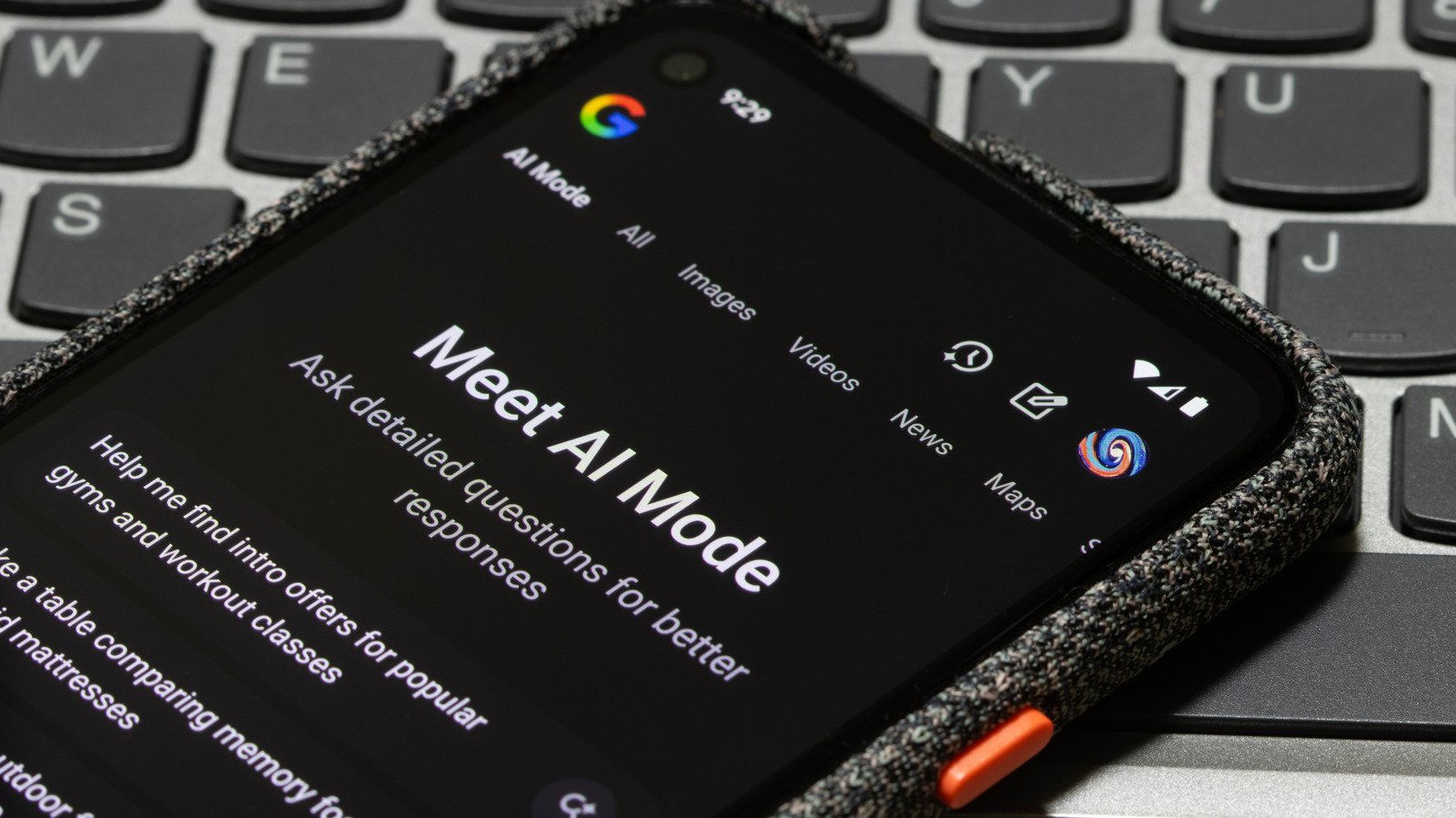
Google unveiled Search Live at I/O 2025, a new AI product that brings the multimodal AI capabilities of Project Astra to Google Search on mobile phones. Put differently, Search Live also allows the AI to see what you see in the real world in addition to hearing your voice commands. The AI will provide answers in real-time to the questions you might have about what it can see. However, most of the new features Google showed at the event were made available to Labs users, rather than the general public. Four months later, Google launched Search Live officially in the U.S.

Android and iPhone users can try the new Search Live feature without going through Labs experiments. A new button in the Google app on Android and iPhone, and in Google Lens, will let them have interactive voice conversations in Google’s AI Mode, with the AI having access to the camera’s live video feed.

How to use Search Live on Android and iPhone

Google detailed the new Search Live functionality in a blog post on Wednesday. Search Live will work in the Google and Google Lens apps, but only English is supported.

Users will have to open the Google app and tap a new Live icon that appears under the search bar (image above). Once they do that, they’ll share the camera feed with the AI, and the AI will be able to see what they see in real-time. Users can ask questions about their environment, as seen in the examples Google posted on YouTube.

A similar procedure is available if users are already pointing the smartphone camera to something when using Google Lens. They can tap the new Live button that appears at the bottom of the screen (image below). Camera sharing will already be enabled in this scenario. All you need to do is start asking questions, and the AI will respond.

What can Search Live do?

Google

Google also detailed a few types of interactions you could have with Search Live. For example, users might use Search Live while traveling to ask the AI questions about their new surroundings and find points of interest. Another example concerns playing board games with family and friends while on vacation. Rather than reading the rules for each new game, you can engage the AI via Search Live and ask questions about your options.

Google shared a few YouTube Shorts videos that show how easy it is to have the AI provide instructions for crafting “the perfect cup of matcha,” getting help for setting up a home theater system, or completing school homework. In all instances, the smartphone user fires up Search Live on the handset, points the camera to their surroundings, whether it’s the kitchen, the TV setup, or an elephant toothpaste experiment for school, and asks AI Mode questions about the task at hand. The AI is able to recognize what it sees in the video stream and provides quick answers to the user’s questions.

Source

Posted on

Should you run VMware 7 unsupported?

After 2 October 2025, VMware version 7 will no longer be supported, and organisations will need to consider how they take their server virtualisation strategy forward.

Shane O’Rourke, senior director of global VMware support services at Spinnaker Support, said this deadline arrives at the same time as Broadcom’s wider licensing changes. He warned that while VMware customers with perpetual licenses may still have rights to download newer binaries, renewing support almost always means moving to a VMware Cloud Foundation (VCF) subscription. This can be a costly upgrade, especially in organisations that are not using the full VMware suite.

“I’ve spoken to organisations trying to renew part of their footprint while transitioning the rest elsewhere, only to be told it’s all or nothing,” said O’Rourke. “Others were offered exceptions early on, only for those exceptions to be pulled at the last minute.”

The third-party support company has spoken to a number of organisations looking at options to continue running VMware 7. From the feedback he has received, O’Rourke said: “There’s a lack of trust.”

While Broadcom has made it clear it is simplifying the VMware product portfolio, by stopping perpetual licensing of VMware and bundling products into VCF subscription, he said people were concerned about what Broadcom planned to do going forward. For IT leaders looking at their VMware estate long-term, O’Rourke added: “This can be a gamble. In the old VMware world, when you were building your software-defined datacentre, you could adopt VMware components taking a pick-and-mix approach in order to be successful within your environment.

“Whereas, when Broadcom moved to VCF, customers had no choice what to take on, even if they weren’t going to use some of the VMware products,” he said.

For some organisations, this approach is leading to price hikes, because they are having to pay for products they do not require. All of this is well understood, but two years ago, when Broadcom acquired VMware, version 7 was the most prevalent and most stable version of the virtualisation platform, even though version 8 had been released. “Now, with the move to VCF from VMware 8 onwards, for a lot of customers, version 7 is the last version they have on a perpetual licence,” said O’Rourke.

While some organisations may be entitled to upgrade to version 8, he said they will no longer receive patches and updates for version 7, even if they have a VMware support contract. Customers with perpetual licenses may still have rights to download newer versions of VMware, but according to O’Rourke, renewing support almost always means moving to subscription.

VMware vSphere sits at the centre of most environments; when failures occur, they rarely stay contained to a single component. In his experience, unexpected product defects, subtle interoperability issues or behaviour changes introduced elsewhere in the ecosystem can create problems that would normally be escalated to VMware engineering. However, after 2 October, that option disappears for VMware version 7.

As a company offering third-party support, O’Rourke said that while it cannot provide patches, Spinnaker Support has plenty of experience maintaining a stable environment for its customers.  

Instead of tackling the issue from a product viewpoint, he said: “We look at how a customer has adapted VMware in their environment. How has it been configured? What are their use cases?

O’Rourke said the approach has been a success. “I can honestly say I have not seen any issue that we haven’t been able to fix within a customer’s environment,” he added.

Source