Posted on

Preparing for post-quantum computing will be more difficult than the

The transformation needed for organisations in the UK to be ready for the threat of post-quantum computing will make preparations for the millennium bug, which threatened computer systems in 2000, “look easy”, cyber chiefs said today.

Ollie Whitehouse, chief technology officer (CTO) at the National Cyber Security Centre (NCSC), said preparing for post-quantum cryptography (PQC) will take “a complex change programme” and will be a “colossal task”.

The 10-year, UK-wide PQC programme will require organisations to identify every instance of cryptographic code, to understand whether it is vulnerable to attack by a quantum computer, and put plans in place to mitigate the risk. 

It mirrors the massive effort that the UK government and companies undertook to fix software throughout their estate when it threatened to malfunction on the first day of the year 2000 because of the way programmers calculated dates.

The risk today is that the development of a large-scale quantum computer in the future will compromise widely used cryptographic authentication techniques used to secure banking and other transactions, and to verify the authenticity of people online.

Nation states are also concerned about the potential for hostile nations to intercept, collect and store sensitive communications with the anticipation that they will later be able to develop a quantum computer capable of breaking their encryption.

Predicting when the first quantum computers capable of breaking today’s encryption algorithms will be developed is difficult, but technology suppliers are coming to a consensus that usable quantum computers could be available by the 2030s at the earliest.

The NCSC, part of GCHQ, issued guidance in March that set out a staged timeline for the UK’s migration to post-quantum cryptography – which uses encryption techniques that are not capable of being easily broken by quantum computers – by 2035.

“Over the last 30 years, cryptography has pervasively been adopted in all manner of software. And we’ve got far more software than we ever had 25 years ago,” said Whitehouse. “By virtue of that, the discovery activity, let alone the migration activity, is at least as complex, if not more so, than the original Y2K challenge”.

UK government departments involved in sensitive work have already deployed post-quantum cryptographic standards, while large companies, such as Google, have begun to deploy the technology in their cloud services.

UK government departments involved in sensitive work have already deployed post-quantum cryptographic standards, while large companies, such as Google, have begun to deploy the technology in their cloud services

A consultancy scheme, announced by the NCSC today, will offer help and expertise to organisations that want to deploy PQC in their products or networks.

The NCSC has advised organisations to identify which cryptographic services will need upgrades and to develop a migration plan by 2028. 

That will be followed by executing high-priority upgrades between 2028 and 2031, and a complete migration to PQC for all cryptography by 2035.

The aim is not to cause panic, but to ensure a smooth transition to post-quantum cryptography over the decade, say security officials.

Small and medium-sized companies will be able to rely on managed service providers to provide PQC upgrades for them. But for larger organisations and those in critical sectors, PQC will require extensive planning and investment.

The NCSC introduced the guidelines partly to provide ammunition to information security chiefs in critical industries to present to company boards to help them make a case for funding the transition to post-quantum cryptography.

The guidelines also aim to put the brakes on over-enthusiastic suppliers putting pressure on organisations responsible for critical national infrastructure to upgrade to PQC products that are not fully formed or appropriate for them.

Artificial intelligence (AI) poses another challenge for companies, giving them less time to patch their systems to protect them against the discovery of new security vulnerabilities before they are potentially exploited by automated cyber attacks.

Whitehouse said organisations must better manage their “technical debt”, a measure of the cost of updating software that may have been rushed out before it was fully ready or fully secure.

At the same time, technology suppliers will need to design and maintain products and services in a way that offers resilience against cyber attacks.

Not doing so risks repeating avoidable security failures that have manifested since the rise of the internet, said Whitehouse.

“Without radical and sustained interventions, we are at real risk of repeating the last 30 years, but with far graver consequences, if we do not address the fundamental market failures which have manifested,” he added.

Source

Posted on

‘Lopez Voice Assistant’ emails aren’t a scam, they’re about the

Class action settlement emails aren’t always a scam. If you recently received a Lopez Voice Assistant message, this is likely related to the Lopez vs. Apple Inc. settlement, and you can now reclaim part of a $95 million payout over allegations of Siri spying on private conversations.

The 2019 class action lawsuit revolved around Apple allegedly violating users’ privacy by recording their conversations and forwarding them to third-party contractors. While Apple agreed to the settlement earlier this year, the company denied the allegations that it was spying on users. That said, if you received an email about the settlement from info@lopezvoiceassistantsettlement.com, you’re entitled to a part of this payout.

As noted by The Verge, if you owned a Siri-enabled device, including an iPhone, iPad, Apple Watch, HomePod, or Mac, in the US between September 2014 and December 2024, and experienced Siri activating “on its own” while you were engaged in a private conversation, you can claim up to $20 per device for as many as five eligible devices on the settlement website.

While Apple still claims that Siri wasn’t spying on users, how can users trust the company? Earlier this year, when it accepted the settlement, Apple said it was committed to “its longstanding privacy commitment with Siri.”

Tech. Entertainment. Science. Your inbox.

Sign up for the most interesting tech & entertainment news out there.

By signing up, I agree to the Terms of Use and have reviewed the Privacy Notice.

“Privacy is a foundational part of the design process, driven by principles that include data minimization, on-device intelligence, transparency and control, and strong security protections that work together to provide users with incredible experiences and peace of mind,” Apple said.

“This applies to all of our products and services, including Siri, which has been engineered to protect user privacy and is the most private digital assistant.”

The company then made it clear that Siri voice data is not used for marketing profiles or made available for ads:

Apple has never used Siri data to build marketing profiles, never made it available for advertising, and never sold it to anyone for any purpose. We are constantly developing technologies to make Siri even more private, and will continue to do so.

The statement also explains how Siri protects user privacy. Apple explained that the assistant would use on-device processing whenever possible.

Apple also teased the arrival of the smarter Siri in Apple Intelligence, explaining how the Private Cloud Compute servers protect the privacy of Siri interactions that require server-side AI processing.

With that in mind, don’t forget to look at your Lopez Voice Assistant emails to ensure you get paid what Apple owes you.

Source

Posted on

iOS 19 may get AI-powered battery feature originally planned for

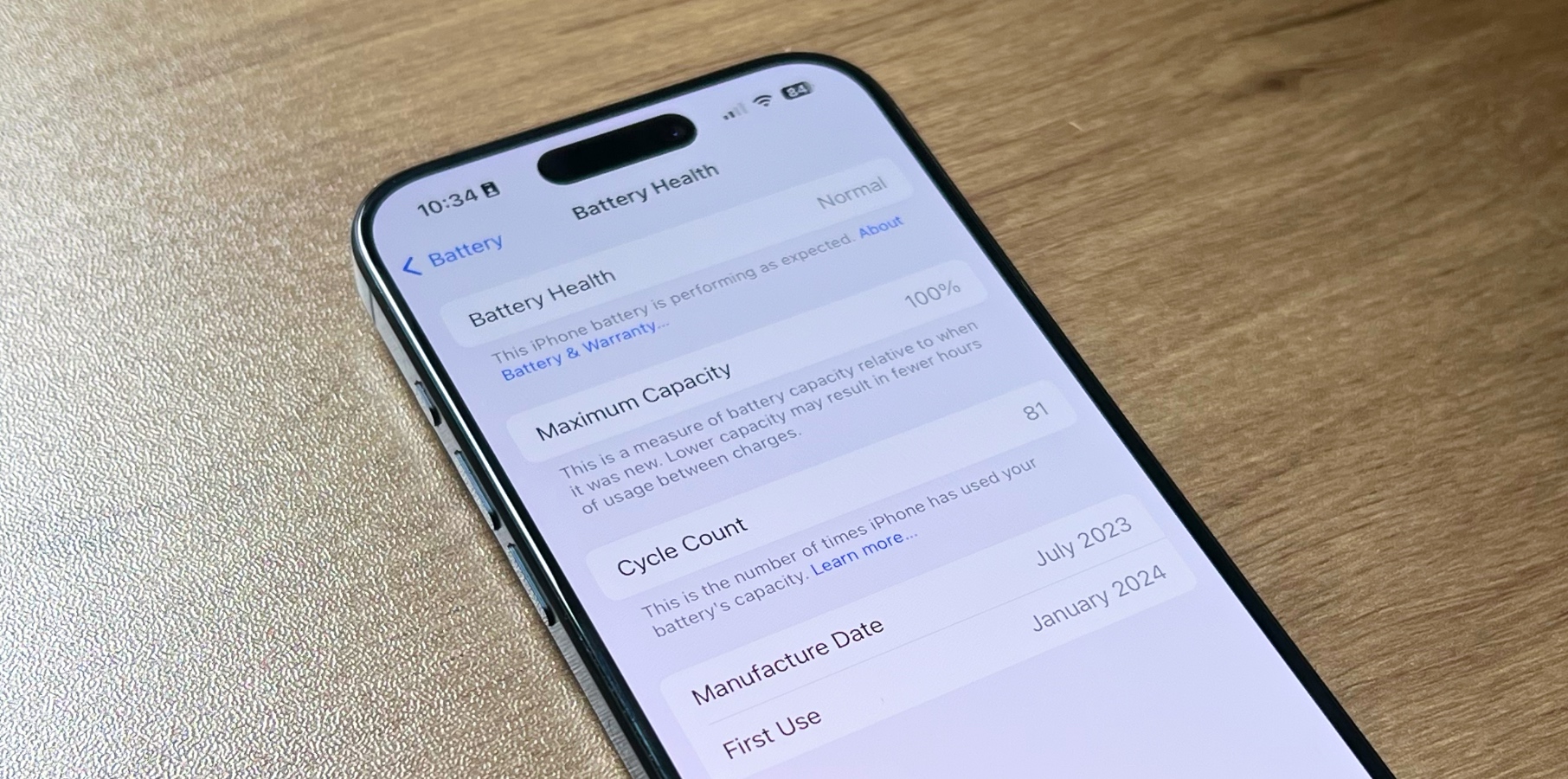
Less than a month before the WWDC 2025 keynote, Bloomberg‘s Mark Gurman reports on another iOS 19 feature Apple will likely introduce at the conference. According to the journalist, Apple is readying an AI-powered battery management mode for iOS 19, which will “analyze how a person uses their device and make adjustments to conserve energy.”

However, as innovative as this function might be, it’s part of another delayed iOS 18 Apple Intelligence feature. Later last year, now MacWorld‘s Filipe Espósito reported for 9to5Mac that Apple was preparing a new BatteryIntelligence framework during the iOS 18.2 beta.

At the time, the journalist pointed out that this feature would estimate the time necessary to recharge your phone. Since this function wasn’t introduced during the iOS 18 cycle, it’s only natural that it is part of the planned Apple Intelligence functions that were postponed for unknown reasons.

That said, Mark Gurman expects this AI-powered battery feature to be part of the new Apple Intelligence functions. The journalist explains that Apple is “using battery data it has collected from users’ devices to understand trends and make predictions for when it should lower the power draw of certain applications or features. There will also be a lock-screen indicator showing how long it will take to charge up the device.”

Tech. Entertainment. Science. Your inbox.

Sign up for the most interesting tech & entertainment news out there.

By signing up, I agree to the Terms of Use and have reviewed the Privacy Notice.

This tool might be especially useful with Apple’s newest iPhone models, as the company is expected to introduce an all-new Wi-Fi modem for the iPhone 17 series. Later next year, the company wants to power the iPhone 18 lineup with proprietary Wi-Fi and 5G chips, which could benefit from this powerful integration.

Not only that, but with rumors suggesting the iPhone 17 Air won’t have a good battery life (and reports already suggesting a Smart Battery Case is in the works), any help will benefit users.

Below, you can learn more about the latest iOS 19 rumors.

Source

Posted on

Galaxy S25 Edge just answered 3 big questions ahead of

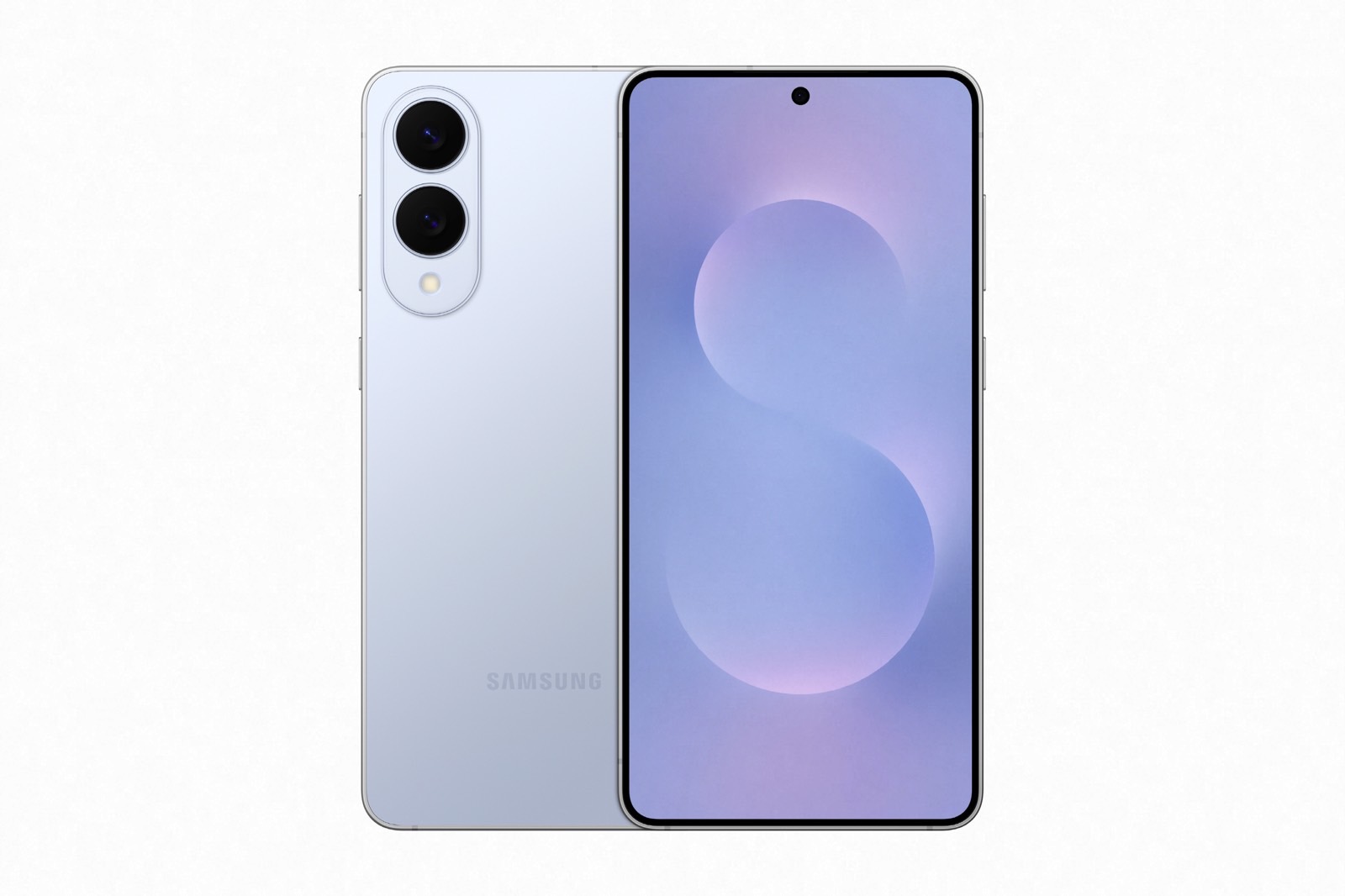
The ultra-thin Galaxy S25 Edge is finally official. Samsung unveiled the phone late on Monday, several months after teasing it at the main Galaxy S25 Unpacked event of the year.

Samsung can now brag that it launched a slim candybar phone well before Apple, even though we all know the Galaxy S25 Edge only happened because word got out that Apple was making an ultra-thin iPhone to replace the Plus version.

The excitement around the Galaxy S25 Edge in January proves there might be plenty of interest from regular consumers for such devices. I’m one of them. For months, I told you I wanted an iPhone with a display as big as the Plus and Pro Max, but without the thickness and extra weight.

The iPhone 17 Air will be that device, and I’m willing to accept the compromises Apple needs to make to release an ultra-thin phone this year.

Tech. Entertainment. Science. Your inbox.

Sign up for the most interesting tech & entertainment news out there.

By signing up, I agree to the Terms of Use and have reviewed the Privacy Notice.

However, I have some concerns, so it’s great to see the Galaxy S25 Edge come out before the Air. Samsung just addressed my biggest questions about ultra-thin phones, and it’s mostly good news.

Will the Galaxy S25 Edge bend?

Bendgate will instantly come up when you think about an ultra-thin iPhone. But this isn’t 2014. The iPhone 17 Air might be thinner than the iPhone 6, but it won’t bend. That much I’m certain even before Apple unveils the Air.

While I wait, I do like what I’m seeing from Samsung. The Galaxy S25 Edge has a titanium frame, a design and durability feature reserved for the Galaxy S25 Ultra until now.

The glass panel on the front of the Galaxy S25 Edge is a new Corning Gorilla Glass Ceramic 2 cover, while the back is protected by Corning Gorilla Glass Victus 2 cover tech. The latter is what Samsung uses for the Galaxy S25 Plus’s display, which is quite telling. The two phones have the same 6.7-inch displays, but the Galaxy S25 Edge will be more durable.

Galaxy S25 Edge: The slim profile. Image source: Samsung

I would still put a screen protector and a case on an ultra-thin phone, but I like what Samsung is doing here. Yes, using accessories will make the phone feel thicker, but I use accessories on regular handsets too, and that makes them even bulkier.

By the way, the Galaxy S25 Edge weighs just 163g compared to 190g for the Galaxy S25 Plus.

With that in mind, I expect the iPhone 17 Air to be quite durable, both in terms of the metal frame and the cover glass. The design has long been decided, and the phone should be mass-produced soon. It’s not like Apple can react to Samsung’s moves, but Apple is likely similarly concerned with the iPhone’s durability.

How bad is the battery life going to be?

Forget Bendgate; battery life is going to be the number one question people will have about the iPhone 17 Air. I expect Apple to advertise it as all-day battery life, just like Samsung does. Well, Samsung says the Galaxy S25 Edge will offer a “long-lasting battery you’ll love,” which is definitely not the best way to advertise battery life for ultra-thin phones.

The Galaxy S25 Edge features a 3,900 mAh battery, which is smaller than the Galaxy S25’s 4,000 mAh battery. The Plus and Ultra have 4,900 mAh and 5,000 mAh batteries, respectively.

Samsung says the Galaxy S25 Edge will last up to 24 hours for video playback, or 5 hours fewer than the smaller 6.2-inch Galaxy S25. That’s a 17% drop in battery life, and something power users might not necessarily like, especially with charging speeds not exceeding 25W.

I would expect Apple to make similar battery life compromises for the iPhone 17 Air, but I still think the iPhone 17 Air will last about a day. I can’t dream of iPhone 16 Pro Max battery life, and I’m ready to recharge the Air every night.

The one thing that I was hoping for this year’s ultra-thin phones will apparently not happen. I thought the Galaxy S25 Edge and iPhone 17 Air would feature new carbon-silicon batteries, which pack more density in the same footprint. Since Samsung didn’t say anything about the battery tech during the event, it means we’re looking at a traditional battery. Apple will likely use a traditional battery, too.

What is this thing going to cost me?

I wasn’t surprised to see the Galaxy S25 Edge’s starting price, considering what rumors said. The phone would cost at least as much as the Galaxy S25 Plus, which starts at $999, if not slightly more. We now know you have to pay $1,099 for the 256GB version.

I have no idea whether Trump’s tariffs forced Samsung to raise the starting price beyond what they had wanted, but I do know you’ll get perks if you preorder the phone. Also, the handset’s price will drop in the coming months, so there’s no reason to hurry to buy it.

I also know the price is in line with what the Edge has to offer. Think of it as a lighter version of the Galaxy S25 Ultra, the top-of-the-line Galaxy S model you can buy right now, when it comes to hardware.

Galaxy S25 Edge: The camera module. Image source: Samsung

The Ultra has extra telephoto cameras for better zoom, a built-in S-Pen stylus, a larger battery life, and a screen with an anti-reflective coating applied to it. All of that would cost you an extra $200 compared with the Galaxy S25 Edge.

What does that tell me about the iPhone 17 Air? I expect the phone to cost about as much as an iPhone Plus, if not slightly more. That means we’re looking at a $899+ cost before considering tariffs. Rumors say Apple is already looking to raise the iPhone 17 prices without tying the price hike to tariffs.

Could the iPhone 17 Air match the $999 starting price of the iPhone 16 Pro? Yes, if Apple raises the prices across the board. Otherwise, I can’t see how Apple will justify a higher price tag than the Plus cost.

While the Galaxy S25 Edge is a Galaxy S25 Ultra “Light” type of phone, the iPhone 17 Air will not be an iPhone 17 Pro “Light” phone. Apple will make more compromises compared to Samsung; that much is certain. The iPhone 17 Air won’t have a titanium frame, and it’ll rock a single-lens camera on the back. Also, the phone will ditch physical SIM cards.

With that in mind, I don’t see how the iPhone 17 Air can match or exceed the iPhone 17 Pro price.

Source

Posted on

Here’s why the Ecovacs Deebot T80 OMNI is the hottest

This is a sponsored article. All content and opinions expressed within belong to the author.

The robot vacuum and mop market is as crowded in 2025 as it has ever been. That means a product has to be really special in order to separate itself from the pack. After spending the past couple of weeks testing out the brand-new ECOVACS DEEBOT T80 OMNI robot vacuum and mop, I can safely say that I’m blown away by how special this new model is.

Available on Amazon

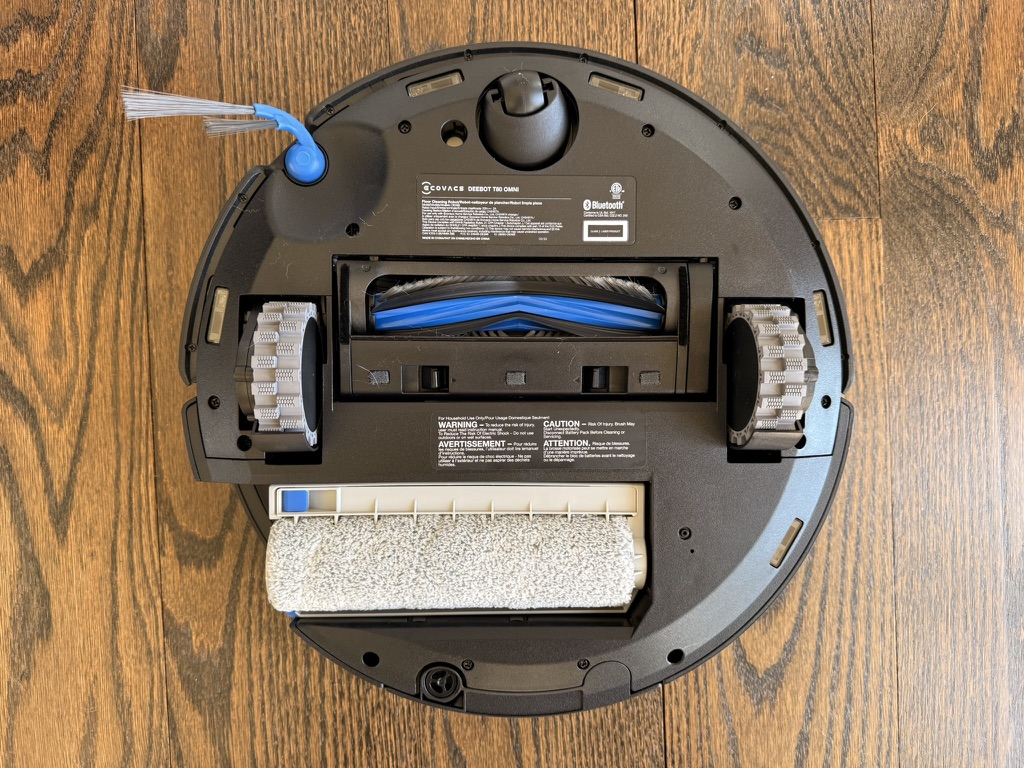
ECOVACS’s new OZMO Roller Mop on the T80 OMNI is nothing short of groundbreaking. It outperforms every other robot thanks to its high-pressure scrubbing system. Plus, it has a special Instant Self-Washing feature that cleans the roller mop internally as it scrubs your floors. It’s remarkable, and it’s only the tip of the iceberg.

I’m already convinced that the ECOVACS DEEBOT T80 OMNI is the most impressive new robot vacuum and mop combo of 2025. Here, I’ll explain why it might just be the best home cleaning device you can get right now.

Tech. Entertainment. Science. Your inbox.

Sign up for the most interesting tech & entertainment news out there.

By signing up, I agree to the Terms of Use and have reviewed the Privacy Notice.

OZMO Roller Mop is the star of the show

Most people think of these great little autonomous cleaning gadgets as robot vacuums first and robot mops second. That’s normally fine, but I’d suggest flipping things around for the ECOVACS DEEBOT T80 OMNI. It’s a very powerful vacuum with ultra-strong suction, sure, but there’s no question whatsoever that the mopping features take center stage on this model.

ECOVACS used its next-generation OZMO Roller Mop design on the T80 OMNI, and it’s incredible. This setup uses a wide single mop roller that’s just like the ones on those upright wet-dry vacuums that everyone is obsessed with right now. The typical spinning mop pads that you find on most robot vacuums do a good job, but they can’t compete with a roller design like this one. The T80 OMNI’s mop design also lets it apply far more downward pressure than you get with most robot vacuum and mop devices, which is obviously a big advantage.

Image source: Jonathan S. Geller for BGR

In my testing, the mop on the T80 OMNI outperformed every other robot vacuum and mop that I’ve tried. That’s saying a lot because I’ve tested so many top-of-the-line robots over the years. The T80 OMNI does an amazing job with wet and dry messes alike. I tested things like mud and freshly spilled orange juice, as well as sticky ice pop stains that were left on the floor overnight. I even tried a little bit of microwaved chocolate as an approximation for something that a pet might leave as an unwelcome surprise. No matter what I threw at it, the T80 OMNI’s mop cleaned it up with no problems at all.

Another thing I love about this model’s mopping capabilities is what ECOVACS calls Instant Self-Wash. Unlike other robot mops, the DEEBOT T80 OMNI doesn’t smear little bits of residue all across your floors. Instead, it has a special system that self-washes the mop as it cleans your floors. This way, you know that all the water being used to mop is clean water, while the dirty water is stored in a separate internal reservoir.

TrueEdge 2.0 reaches into corners and tight spaces

As if all that wasn’t enough, there’s another awesome mopping feature that helps set the ECOVACS DEEBOT T80 OMNI apart from other models. It’s called TruEdge 2.0 Adaptive Edge Cleaning. Now that I’ve tried it, I’m not sure I can live without it.

There are two components to ECOVACS’s TrueEdge 2.0 setup on the T80 OMNI.

First, there’s the curved side brush with two extended bunches of bristles. This design lets it reach far into corners and go right up to chair legs or obstacles on your floor. It definitely has impressive reach, and I found that it did a good job of swiping dirt and dust out of corners.

Second, we have the really cool part, which is the mopping component of TrueEdge 2.0. When the ECOVACS DEEBOT T80 OMNI approaches a corner or any other tight space, the mop roller actually extends out so that it can reach as far as possible on the side of the robot.

Here’s a graphic that shows what it looks like:

Image source: ECOVACS

Below, you’ll find a graphic from ECOVACS that shows how much farther into corners the T80 OMNI’s mop can reach (blue) compared to a traditional robot mop (red).

Image source: ECOVACS

The same technology is used to get as close as possible to things like furniture feet and even obstacles on the floor, such as toys and power cords. The T80 OMNI has much better mop coverage than any other model I’ve tested.

T80 OMNI has a powerful vacuum, too

As impressive as the DEEBOT T80 OMNI’s mopping features are, it’s also an extremely capable robot vacuum.

When it comes to suction, you can rest assured that this model has an ultra-powerful motor that won’t leave any debris behind. According to ECOVACS, max suction power is rated at a whopping 18,000Pa. That means it’s one of the strongest robot vacuums in the world right now. It also means the wind noise can get a bit loud when the motor is really cranked up, but it’s worth the extra noise. Plus, since the T80 OMNI’s fan speed is adaptive, it’s only noisy for a little while when it really needs to work hard.

Available on Amazon

I tested this model with everything from typical dust and crumbs to soil, crunched cereal, crushed potato chips, and other little bits of food. I also put some wet pieces of grass and chopped up wet leaves on the floor. The T80 OMNI tackled it all with ease.

Then, I did something that I was actually very scared to try: I put some glitter on the floor directly in the robot’s path.

This was pretty nerve-racking because I thought that the vacuum might just blow it all around my house and I would be picking it up for months. Thankfully, the T80 OMNI sucked it up and left almost nothing behind.

Image source: ECOVACS

All of my testing up to this point was done on hard floors, so the next thing to do was to tackle some rugs and low-pile carpets. I had no doubt that the ECOVACS DEEBOT T80 OMNI would handle regular dirt and dust without any problems, and I was correct. The robot automatically boosts suction when it needs to, so regular debris on carpeting is no match for it. My dog is a heavy shedder though, so I was curious to see whether or not the T80 OMNI could handle all that dog hair.

Other robot vacuums tend to have trouble with my dog’s shedding on carpets, but not this model. I can’t believe how thoroughly the DEEBOT T80 OMNI vacuums pet hair off of rugs and low-pile carpeting. It’s incredible.

ZeroTangle 3.0 really works!

Getting pet hair and people’s hair off the floor is only half the equation when it comes to robot vacuums. It’s equally important to actually transfer that hair to the debris bin, as opposed to just wrapping it around the roller brush and getting it all tangled.

Again, my pet is a very heavy shedder, which means most roller brushes on robot vacuums start getting tangled right away. There are some models — even high-end models from top brands — that I need to detangle as frequently as once a week. But the ZeroTangle 3.0 tech on the T80 OMNI works astonishingly well.

Image source: Jonathan S. Geller for BGR

The special curved design of the side brush prevents it from getting wrapped in hair. If you own any other robot vacuum right now, I can guarantee that you find hair wrapped around your side brush every time you clean it. That isn’t going to happen anymore with the T80 OMNI.

ZeroTangle 3.0 also covers the robot vacuum’s main roller brush. It has special V-shaped rubber fins and bristles that direct hair toward the center of the brush. There are also comb teeth inside that pull hair off the main brush as it spins. All of those components team up to do a better job of preventing tangles than any other robot vacuum I’ve tested.

This robot is sleek and slim

Vacuuming and mopping performance are obviously the most important factors here. But if you’re like me, a robot cleaning device’s design is also crucial.

At first glance, it might seem like most robot vacuums look the same. While it’s true that most of them have the same basic shape, there are important differences. One key example for me personally involves models with advanced mapping and navigation systems that utilize LiDAR. They often have a big bump on top, like the DEEBOT T30 pictured below:

Image source: Jonathan S. Geller for BGR

99% of the time, that bump on the top is no big deal. But when models like the T30S get to two of the bed frames on the top floor of my house, the bump hits the side panels so they can’t fit underneath. Of course, if a robot is too tall to fit under the beds, it leaves a ton of dirt and dust on the floor. My dog has free reign of my house, and he spends tons of time in the upstairs bedrooms. That means I can’t use a robot cleaner up there unless it can fit under all the beds and suck up all the hair he sheds.

Thankfully, the ECOVACS DEEBOT T80 OMNI robot vacuum and mop has a very slim profile that fits under all the furniture in my home. In fact, at just 98mm tall, it’s one of the slimmest robot vacuums on the market. Even though it has LiDAR and other advanced features, this model doesn’t need the extra dome on top because the sensors are built into the front.

It should go without saying that this is important even to households without pets. Dust builds up very quickly underneath beds and other low furniture, and it can wreak havoc on kids or anyone with allergies.

Image source: Jonathan S. Geller for BGR

Aside from the slim stance, the T80 OMNI has a very sleek and modern design. Smooth lines and curves on the top give it a unique and elegant look. The lid on the OMNI Station dock also has a curved design that matches, so the complete package looks fantastic in any home, regardless of your decor.

Tons of other great features

Here’s a quick rundown of some of my favorite ECOVACS DEEBOT T80 OMNI features that haven’t already been covered:

  • OMNI Station: The charging station that comes with the T80 OMNI is fantastic. I already mentioned the sleek design, but this base station covers both form and function. The internal clean and dirty water reservoirs are nice and big, and the station automatically empties the robot’s debris bin each time it docks. Then it cleans and dries the mop with hot air, so you don’t need to worry about odors. Also worth noting is the fact that you can go for as long as 150 days without having to clean or empty the OMNI Station.
  • AIVI 3D 3.0: Other robot vacuum companies are just starting to hop on the AI bandwagon, but ECOVACS has been using AI for years. In its latest iteration, AIVI has better object and obstacle recognition than any other robot vacuum and mop I’ve used. It gets right up close to objects on your floor without touching them, so it can clean as much floor space as possible.
  • 20mm ground clearance: Is ground clearance something you really need to worry about? Well, both of my upstairs bathrooms have marble thresholds that most robot vacuums can’t clear. That means I either have to clean those floors every week myself, or I have to remember to lift my robot vacuum into each bathroom. Thankfully, the T80 OMNI can get in and out of my bathrooms with ease.
  • Optional plumbing hookups: If you want to really live the dream, you can buy the version of the T80 OMNI that hooks up directly to your plumbing. That way, the OMNI Station refills the clean water tank on its own and flushes away dirty water automatically.

Available on Amazon

Should you buy one?

This is a very easy question to answer because the ECOVACS DEEBOT T80 OMNI robot vacuum and mop is as close to perfect as you can get right now. Yes, you should buy one.

Image source: Jonathan S. Geller for BGR

ECOVACS’s latest and greatest DEEBOT has a powerful vacuum that sucked up everything I could think to throw at it. The T80 OMNI also has the most impressive mop I’ve ever seen on any robot, period. It performs more like an upright wet-dry vacuum than a robot mop, applying tons of pressure as it mops your floors. It also self-washes as it cleans, so it doesn’t just smear dirty water around your house like some other models do.

Thanks to the T80 OMNI’s low-profile design, it fits into tight spaces where other models can’t go. It also reaches farther into corners when it’s vacuuming and mopping, thanks to ECOVACS’s TrueEdge 2.0 tech. As a pet owner and a person with long hair myself, I also really appreciate the ZeroTangle 3.0 roller brush.

The bottom line is that the ECOVACS DEEBOT T80 OMNI is one of the best models you can get right now, and you won’t be disappointed if you order one.

Available on Amazon

Source

Posted on

Apple reveals 19 new iOS 19 features ahead of WWDC

Apple has just announced several iOS 19 accessibility features via a press release. Although the company only says these functions are coming “later this year,” this means they’ll be part of the iOS 19 update.

This is not the first time Apple has announced big accessibility features ahead of the WWDC keynote, and it’s a trend the company has followed for at least a couple of years. With today’s announcements, Apple says iOS 19 will bring Accessibility Nutrition Labels, a new Magnifier app for Mac, a new Braille Access feature, and more.

“At Apple, accessibility is part of our DNA,” said Tim Cook, Apple’s CEO. “Making technology for everyone is a priority for all of us, and we’re proud of the innovations we’re sharing this year. That includes tools to help people access crucial information, explore the world around them, and do what they love.”

Here’s what you need to know about iOS 19’s upcoming features:

Tech. Entertainment. Science. Your inbox.

Sign up for the most interesting tech & entertainment news out there.

By signing up, I agree to the Terms of Use and have reviewed the Privacy Notice.

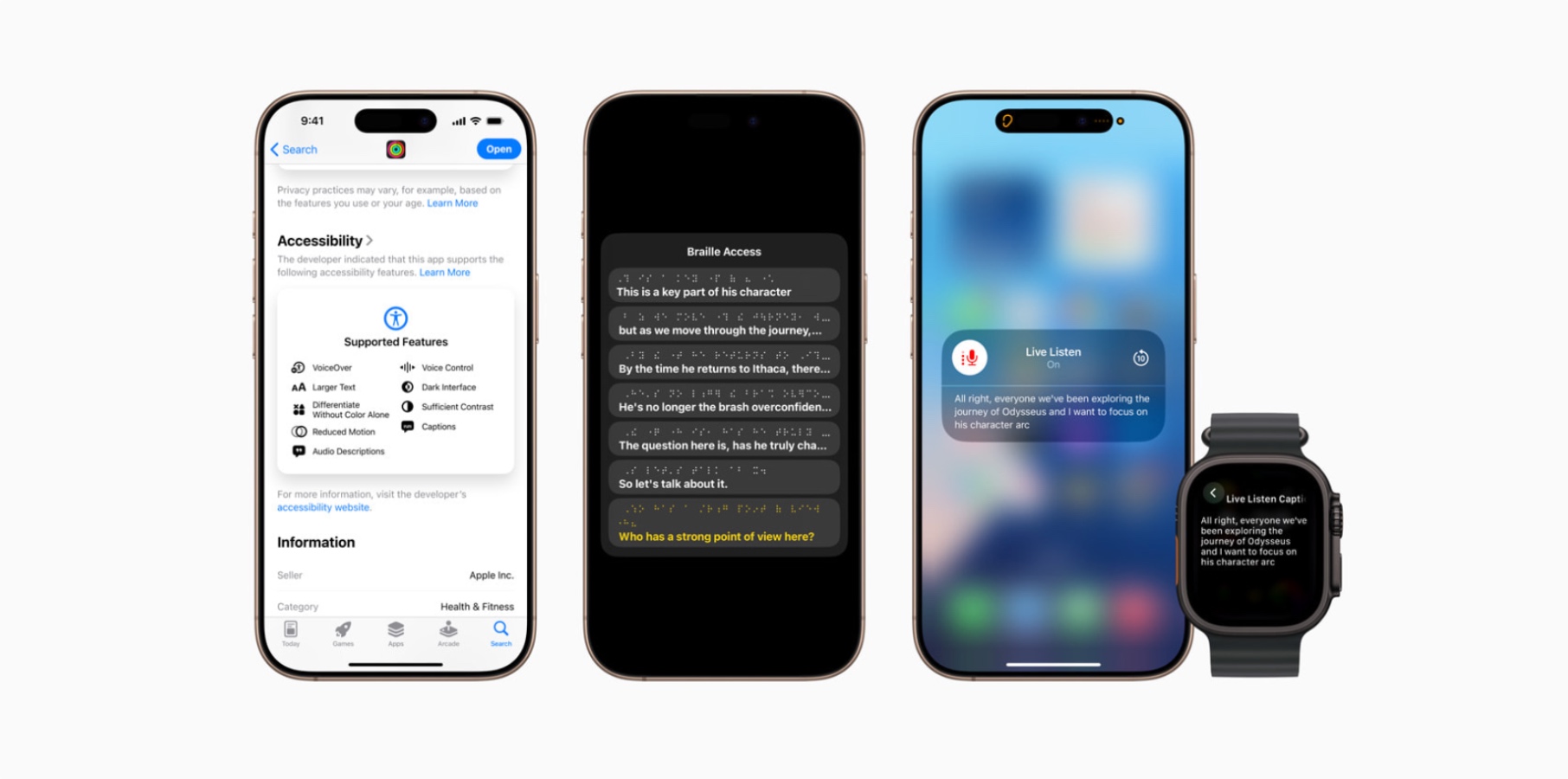
Accessibility Nutrition Labels: This feature adds a new section to App Store product pages highlighting accessibility features within apps and games. This includes  VoiceOver, Voice Control, Larger Text, Sufficient Contrast, Reduced Motion, captions, and more. Accessibility Nutrition Labels will be available on the App Store worldwide.

Magnifier for Mac: The Magnifier app for Mac connects to a user’s camera so they can zoom in on their surroundings, such as a screen or whiteboard. Magnifier works with Continuity Camera on iPhone as well as attached USB cameras, and supports reading documents using Desk View. With customized views, users can adjust brightness, contrast, color filters, and perspective to make text and images easier to see. Views can also be captured, grouped, and saved to add to later on.

New Braille Experience: iOS 19 will bring an all-new experience that turns iPhone, iPad, Mac, and Vision Pro into full-featured braille note takers integrated within the Apple ecosystem. Users can easily open any app by typing with Braille Screen Input or a connected braille device.

Accessibility Reader: This new systemwide reading mode is designed to make text easier for users with a wide range of disabilities. It allows users to customize text and focus on the content they want to read.

Apple Watch Live Captions: Deaf or hard-of-hearing users can take advantage of Live Listen controls on Apple Watch for Live Captions. Apple Watch serves as a remote control to start or stop Live Listen sessions, or jump back in a session to capture something that may have been missed. With Apple Watch, Live Listen sessions can be controlled from across the room, so there’s no need to get up in the middle of a meeting or during class.

Enhanced View with Apple Vision Pro: Blind or low-vision users can use Vision Pro’s advanced camera system to magnify everything in view, use VoiceOver for Live Recognition to describe surroundings, find objects, read documents, and more.

There are even more accessibility features coming with iOS 19

  • Background Sounds now include EQ settings, auto-stop timers, and new Shortcuts actions for better focus and relaxation.
  • Personal Voice can now generate a natural-sounding voice in under a minute using just 10 phrases, with support for Spanish (Mexico) added.
  • Vehicle Motion Cues expands to Mac, with new customization options for animated onscreen dots across iPhone, iPad, and Mac.
  • Eye Tracking gains switch and dwell selection options. Typing is now easier across devices with a new dwell timer, fewer steps, and QuickPath support.
  • Head Tracking enables easier control of iPhone and iPad through head movements, similar to Eye Tracking.
  • Switch Control adds support for Brain-Computer Interfaces (BCIs), allowing users with severe mobility disabilities to control devices without physical movement.
  • Assistive Access introduces a simplified Apple TV app and new developer tools for creating tailored experiences via the Assistive Access API.
  • Music Haptics now lets users customize haptic feedback for entire songs or vocals only, with adjustable intensity settings.
  • Sound Recognition adds Name Recognition, alerting deaf or hard-of-hearing users when their name is called.
  • Voice Control introduces a programming mode in Xcode, vocabulary syncing across devices, and support for more languages, including Korean, Arabic, and Russian.
  • Live Captions expand to more languages, including English (India, UK, Australia, Singapore), Mandarin, Cantonese, Spanish, French, Japanese, German, and Korean.
  • CarPlay now supports Large Text and enhanced Sound Recognition, including alerts for a crying baby, horns, and sirens.
  • Share Accessibility Settings lets users temporarily share their settings with another device—ideal for borrowed phones or public kiosks.

Source

Posted on

AI training gap puts Europe at a disadvantage

European businesses are falling behind those in the US when it comes to using artificial intelligence (AI) at work, a report from Forrester has found.

The analyst firm reported that more firms in the US than in Europe provide regular AI training to their employees. The research also showed that many decision-makers wrongly assume their organisation has offered staff formal AI training. In other cases, AI training might not be mandatory or not very effective.

“If you ask other employees whether they’ve received formal AI training, the response is 52% in the US and only 39% in Europe,” the European employees are falling behind US workers on AI skills report stated.

Forrester principal analyst Indranil Bandyopadhyay, a co-author of the report, said: “Europe’s lagging AI confidence, competence and investment are critical challenges in an increasingly AI-driven economy.”

Forrester analysts believe the training gap may reflect misconceptions about employees’ interest in AI. The survey found that in Europe, 62% of decision-makers believe their company’s non-technical employees feel motivated to learn how to use AI. When employees were asked the same question, the proportion claiming to be motivated to learn to use AI was 55%. In the US, however, the results were nearly identical for decision-makers and employees, at 63% and 64% respectively.

The analyst firm has previously recommended that organisations establish formal AI training programmes to reduce fear of the technology among European workers. In a 2024 future of work survey, Forrester reported that 7% of workers fear job losses due to automation in the next year, 32% think this will happen in the next two to five years and 28% fear it will happen in the coming six to 10 years.

To reduce this fear, which Forrester said can undermine the willingness of employees to use AI at work, analysts urged organisations to ensure employees are familiarised with AI through training and given demonstrations of the opportunities the technology can bring to the workplace.

Europe’s lagging AI confidence, competence and investment are critical challenges in an increasingly AI-driven economy Indranil Bandyopadhyay, Forrester

The European employees are falling behind US workers on AI skills report recommends using a blend of different learning techniques to offer the best path toward AI competencies.

“By layering formal learning – in classrooms and online – with social learning, enabling peer-to-peer connections, and empowering on-the-job experiences based on learning by doing, employees are provided with a manageable path toward AI proficiency,” the report stated.

It suggests using 10% formal learning, 20% social learning and 70% on-the-job experiences. “The key is to weave these different approaches to learning into an intertwined ‘learning fabric’,” the report noted.

Forrester also recommends that business leaders repeat rounds of formal learning for employees to keep them up to date with the speed of technological change in AI. It suggests that European business leaders embrace social learning practices, such as champions programmes.

Bandyopadhyay said: “European leaders should focus on structured AI training programmes, ethical AI use and fostering employee readiness to trust and collaborate with AI systems. By failing to take these steps, Europe risks losing ground in the AI race, along with the productivity and innovation it brings.”

Employees also need to be involved in the design and implementation of generative AI (GenAI) systems, according to Forrester. This will help them understand the reasoning behind GenAI process design, which Forrester believes will ensure the uptake of GenAI systems.

Overall, Forrester found that employees who trust their manager are more likely to have been through formal AI training for work than those who do not trust their manager.

Source

Posted on

ChatGPT Deep Research just got an upgrade you should try

I’ve used ChatGPT’s Deep Research feature since OpenAI first made it available. I love the in-depth reports more than my usual chats with AI. A lot more effort goes into creating Deep Research reports, as ChatGPT spends more time “thinking” through the topic and collecting the required data from the web.

You can use Deep Research for any type of topic. It doesn’t have to be scientific or work-related. For example, I use ChatGPT Deep Research for more trivial stuff, like planning a museum trip in Tokyo. I also used ChatGPT Deep Research to find out how Lufthansa has been treating its customers after damaging their luggage (spoiler: it’s decidedly not great). I even use Deep Research for shopping. I ask ChatGPT to give me information about certain products I’m interested in, since the AI is much faster at combing the web for details.

I have a few issues with the ChatGPT Deep Research experience, some of which I’ve already explained. For example, OpenAI doesn’t mark the Deep Research reports in the chat history, so you might lose track of them. There’s no way to group them automatically. Also, ChatGPT doesn’t have a podcast creation feature for Deep Research reports like Gemini does. That would make content consumption even easier.

OpenAI has just addressed a different glaring problem with ChatGPT Deep Research: the inability to export the reports as PDFs. You can do that now, and weirdly enough, that somewhat fixes all my issues with this AI feature.

Tech. Entertainment. Science. Your inbox.

Sign up for the most interesting tech & entertainment news out there.

By signing up, I agree to the Terms of Use and have reviewed the Privacy Notice.

“You can now export your deep research reports as well-formatted PDFs—complete with tables, images, linked citations, and sources,” OpenAI said on X. “Just click the share icon and select ‘Download as PDF.’ It works for both new and past reports.”

The feature has rolled out to ChatGPT Plus users, even in Europe, as I can now turn ChatGPT Deep Research reports into PDFs.

The Share button you want is the one that doesn’t have “Share” written on it. Image source: Chris Smith, BGR

That said, OpenAI’s instructions are a bit misleading. When they say the “share icon,” they don’t mean the share button at the top of all ChatGPT chats, which lets you share links to chats with others.

Instead, the Deep Research reports have their own share icon, as shown below. That’s the one you’ll want to tap to bring up the large “Download as PDF” button. You also get a “Share Link” option for the report, so there’s really no reason the PDF button shouldn’t be included in the main share menu of a ChatGPT chat.

Once the PDF is generated, it downloads automatically. For example, my Tokyo museums Deep Research report is a 13-page PDF that I’ve saved on my computer.

Tap Download as PDF to get your ChatGPT Deep Research report in PDF format. Image source: Chris Smith, BGR

So, how does this new functionality solve my other problems? For one, I can download all the Deep Research reports that matter to me as PDFs. That makes finding them much easier than before.

Even better, I could upload these PDFs to Gemini or NotebookLM and have Google’s AI create podcasts based on the Deep Research reports ChatGPT put together for me.

Support for downloading Deep Research reports as PDFs is rolling out to ChatGPT Plus, Team, and Pro users. Enterprise and Edu users will have to wait a little longer to get it.

Source

Posted on

Android 16 is getting a huge redesign, and this is

The main Google I/O 2025 keynote happens a week from now, but that event will probably be so Gemini AI-heavy that Google decided to give Android a special presentation on Tuesday, in the form of an Android Show event streamed on YouTube.

The company announced various novelties coming to its Android-powered ecosystem, including expanded Gemini access to wearables and cars, better security features for Android (including scam protections and anti-theft features), and a rebrand of Find My Device, now called Find Hub. But there’s no question that the fresh coat of paint Android got was a standout announcement from Google’s Android-centric mini event.

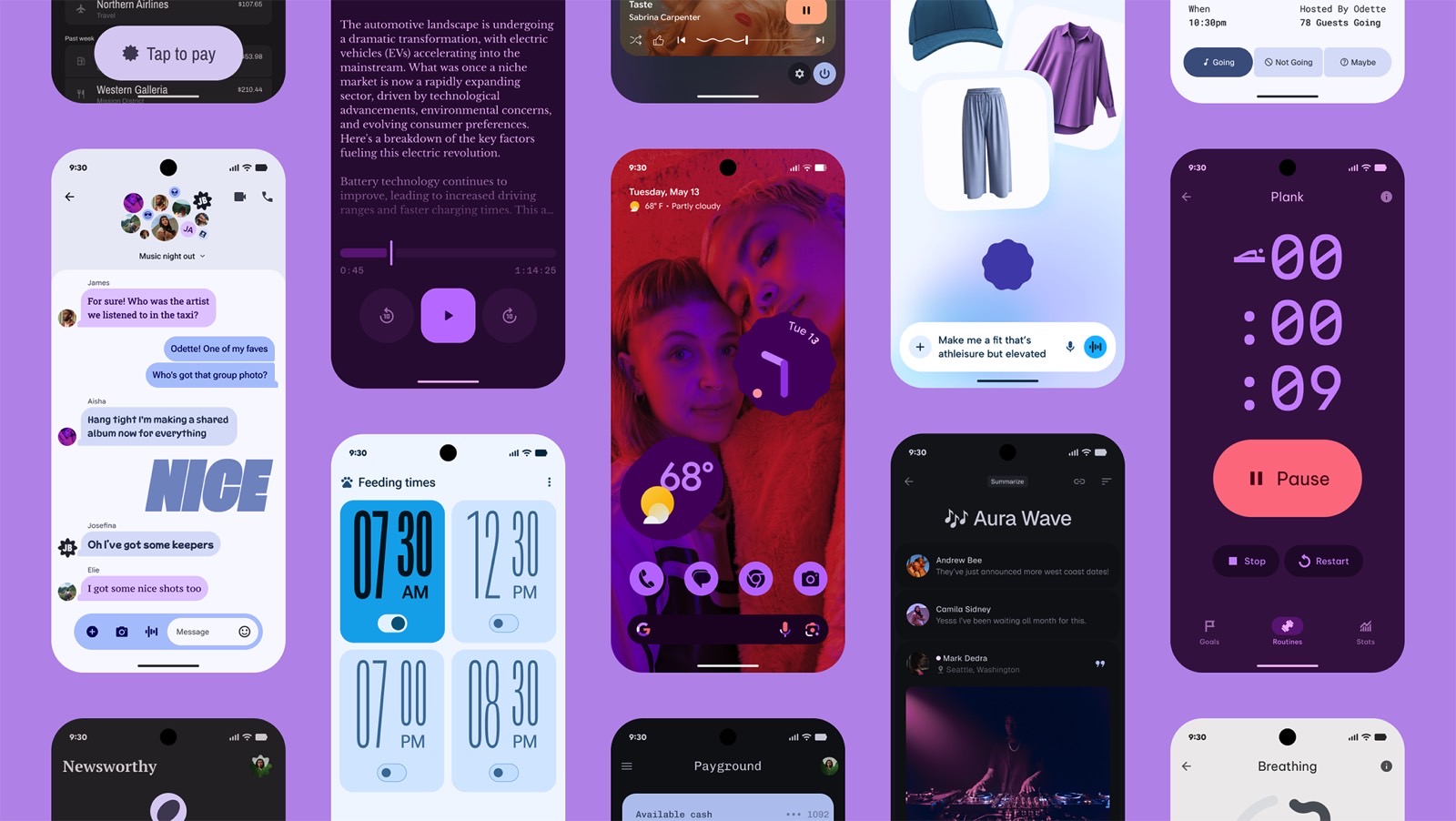
Android 16 will usher in a new era of design called Material 3 Expressive. If it sounds familiar, that’s because Google accidentally leaked the Material 3 Expressive announcement a few days ago, revealing the massive design overhaul coming to Android.

As we learned from the leaked blog, Material 3 Expressive is meant to improve not just the look of your Android 16 phone and tablet, but also the usability of apps. Google conducted various studies to understand how mobile device users interact with their gadgets and developed ways to make apps more user-friendly than before, without compromising their appearance.

Tech. Entertainment. Science. Your inbox.

Sign up for the most interesting tech & entertainment news out there.

By signing up, I agree to the Terms of Use and have reviewed the Privacy Notice.

Material 3 Expressive is an evolution of Material You, shaped by what Google has learned. The new design changes, seen in the images above and below, will be immediately obvious to longtime smartphone users, especially Android fans.

Android 16 Material 3 Expressive design: New effects for dismissing notifications. Image source: Google

The UI in Google’s examples pops immediately. It has a distinct personality, and that’s likely what Google is aiming for. It wants its apps to elicit emotion, and the Android 16 design language is set to deliver that while keeping your color and theme customizations in place.

You’ll see more colorful menus, floating toolbars that take up less space, and buttons that stand out, showing you exactly what you need to tap.

Android 16 Material 3 Expressive design: The background blur. Image source: Google

Google is also introducing more shapes for UI elements, offering developers a variety of choices for their apps. While the Material 3 Expressive design will debut with Google apps on Android 16, Google is encouraging developers to adopt it as well.

Google has also paid close attention to typography in Material 3 Expressive to better highlight the UI elements you’re most likely to use.

Overall, Android 16 apps should feel more dynamic than before, with new animations and added fluidity throughout the system.

Android 16 Material 3 Expressive design coming to Google apps, including Fitbit, Gmail, and Photos. Image source: Google

In practice, that means you can dismiss a notification individually from a group on your lock screen. You’ll feel the snap as it’s separated, along with a haptic rumble for tactile feedback.

Other actions, like closing apps or adjusting volume, will trigger similar responses. Google is also adding background blur effects to create a sense of depth while you focus on apps and menus in the foreground.

Android 16’s Material 3 Expressive redesign also includes a new Live Updates feature that works similarly to the iPhone’s Dynamic Island around the front camera cutout.

Android 16 Material 3 Expressive design: Live Updates for Uber Eats. Image source: Google

Live Updates let you interact with apps that need regular checking, without opening them. Think delivery apps like Uber Eats, which let you track your order on the lock screen via tappable Live Updates.

The Live Update button appears at the top of the screen, just to the left of the selfie cam.

That said, Android 16’s big Material 3 Expressive redesign isn’t rolling out immediately with Android 16 this summer. It’ll follow the OS launch in June, with Pixels getting first access to Google’s redesigned apps. More updates will roll out throughout the year.

Google listed a few apps that are set to receive the Material 3 Expressive treatment down the line, including Gmail, Fitbit, and Google Photos.

Android 16 Material 3 Expressive design is coming to Wear OS 6 wearables. Image source: Google

Material 3 Expressive isn’t limited to phones and tablets. Wear OS 6 smartwatches will see similar UI improvements. The new animations and responsive feedback won’t impact battery life—Google says Wear OS 6 should deliver up to 10% longer battery life across supported devices, according to a media briefing BGR attended.

As for Google apps on iPhone, it’s still unclear whether they’ll adopt the Material 3 Expressive design or continue to follow the iPhone’s design standards.

You can read more about Material 3 Expressive in Google’s blog post. Developers looking to get started on customizing their apps for Material 3 Expressive should check out this link.

Source

Posted on

Government launches £8.2m plan to encourage girls into AI

The government has plans to increase the number of girls taking maths at A-level in a bid to encourage more girls into careers in artificial intelligence (AI).

The Department for Education (DfE) is investing £8.3m, as part of the government’s Advanced Maths Support Programme, in offering support to 400 disadvantaged secondary schools in England in the hopes of getting thousands of girls into advanced maths classes.

Education secretary Bridget Phillipson explained this investment in underprivileged areas aims to close the “barriers to opportunity” for certain pupils who may otherwise not consider a maths qualification or AI career: “Today’s brightest maths minds are tomorrow’s AI pioneers, and this government is opening the door for groups who have so far been left behind in the AI revolution.”

Unfortunately, a child’s socio-economic background can stand between them and certain educational pathways, and digital exclusion across the UK means approximately 1.7 million households in the UK have no internet access, further exacerbating the UK technology sector’s diversity gap.

This only serves to cause problems in the future – with AI already in danger of being built with inherent bias, there are concerns that if the teams developing AI technologies are not diverse, the probability of systems being created with bias will only increase.

As highlighted by the DfE, only a third of the pupils who currently take maths at A-Level are girls, and women only make up around 22% of those working in AI or related careers.

The DfE’s new investment is part of the government’s Plan for Change laid out in December of 2024, part of which aims to level the playing field when it comes to education across the country to make sure children are given equal access to education regardless of their socio-economic background or where in England they are from.

The government is particularly focused on this due to its AI opportunities action plan, which lays out how it plans to increase AI adoption, create AI jobs and bolster the UK’s economic growth.

Ensuring more girls are able to gain support to study maths at an advanced level, including skills needed for a career in AI in the future, tackles both the government’s plans for providing equal access to education and for developing the skills the UK will need for future careers.

Girls are often deterred from tech careers, partly because they feel the subjects they would need to study for a technology career in the future are “too hard”, though some admit to going on to regret the decision not to take these subjects.

Starting in September, the recently updated Advanced Maths Support Programme will feature both teacher and student training surrounding the maths skills needed for an AI career, to ensure teachers are capable of delivering these skills, and girls are aware of what is involved in an AI-led future.

To further develop the education system to reflect the ongoing need for digital and AI skills, the education secretary has implemented a group of experts to advise on how best to achieve this goal for students between the ages of five and 18.

The plan to get more girls into AI careers via accessible maths education was one of the recommendations already made by the Digital, AI and Technology Task and Finish Group, made up of experts from organisations such as University College London, the Raspberry Pi Computing Education Research Centre at the University of Cambridge, and the BCS Schools and Colleges Committee.

Science secretary Peter Kyle said of the plan: “AI is the defining technology of our generation, improving our public services, sparking fresh economic growth, and unlocking the jobs of the future. We can only harness that potential if we have a pipeline of talent equipped with the skills they need for the jobs of tomorrow.

“This package of support will help us deliver our Plan for Change and do exactly that. This is the first step in our plan to give every young person in the country the opportunity to develop the tools which will put them front and centre in delivering our AI-powered future.”

Source