Posted on

Do Yourself A Favor, Never Buy These PC Parts Used

Om.Nom.Nom/Shutterstock

Building a PC is one of the great joys of PC gaming, and once you build one, you’ll never go back. But it can get expensive quickly. Even a budget PC build will cost you around $500 to $800, and that’s before you add in a monitor and peripherals. Buying used PC parts is a viable alternative that can knock off a few hundred dollars if you shop smart. The problem with buying used is that you could get scammed or end up with parts that don’t work as advertised. 

That’s why you need to be selective when shopping for used PC parts. Do your research, ask the buyer lots of questions, and test the part, if possible. But, if that’s not possible, it’s better to stay away from certain PC parts, especially ones that are impossible to judge based purely on looks. Otherwise, you might end up with used PC parts that need to be replaced almost immediately, costing you more money in the long run. 

3 PC parts you should never buy used

Vershinin89/Shutterstock

If there’s one PC component you should never buy used, it’s the power supply unit (PSU). While a used PSU may pass the eye test, the only way to know if it functions properly is by installing it in your system, at which point it may be too late. A bad PSU can damage your PC or even catch on fire, so it’s best not to leave it up to chance. It’s always recommended to get one you trust. 

Graphics cards (GPUs) are so expensive these days; at the time of this writing, even Nvidia’s budget RTX 5050 costs $250. Wanting to buy used is understandable, especially when buying new is impossible because cards are out of stock. While you can find a great deal on a used GPU, you’re just as likely to get scammed by receiving the wrong graphics card; one that’s been used for mining crypto, which can have a negative effect on performance; or, in some cases, no card at all. Rather than gamble your money on what is probably the most expensive part of the system, spend the extra cash on a new card. That way, if anything happens to it, you can get a refund through the warranty.

CPUs are delicate components that can easily be damaged, which is why it’s best to get a new one that comes in the right packaging. You won’t have to worry about the CPU having bent pins or being ruined by static electricity, a real concern when handling a processor. Buying new is also worth it if you’re a gamer, as new CPUs sometimes come bundled with a game —AMD’s new Zen 5 processors come bundled with “Monster Hunter Wilds,” for example. 

3 more PC parts you should buy used

aileenchik/Shutterstock

If you’re looking to save some money, buy a used air cooler. While air coolers are not expensive, hovering around $150 on the high end, you can get one for even cheaper by buying used. Since there are no electronics onboard, what you see is what you get with an air cooler, meaning it can pass the eye test. Just make sure there is no visible damage, such as dents or bent cooling fins — you can always replace a worn or damaged fan.

PC cases come in a wide range of colors and sizes, and many cost less than $100. But if you want a high-end case, buying used is a great idea. You may even find a case that has been discontinued or out of stock, making your build more unique. And if you are replacing an existing one, there are plenty of ways to repurpose your old PC tower. 

One more thing you should buy used is memory, more commonly known as RAM. More memory is great for gaming and using creative software, but it can get expensive. It gets even pricier if you get faster memory or RAM sticks with RGB. As long as you get the right kind of RAM for your system, there’s nothing wrong with buying used. It’s worth noting that, while RAM can degrade and fail over time, it’s not an issue most PC owners face. 

Source

Posted on

MX Fiber extends gigabit access across south-east Mexico with optical

Despite boasting one of the country’s largest populations, the south-east Mexico region has long lacked high-quality network infrastructure, but aiming to close this digital divide, Mexican comms provider MX Fiber has announced that it is creating a digital backbone in the region spanning 1,800km.

MX Fiber specialises in communication infrastructure assets, with a focus on long-haul and metropolitan fibre optic networks in Mexico. Currently, it owns and manages over 800km of existing networks, and the new infrastructure is being built on Nokia’s Flex-Grid DWDM technology and 1830 Photonic Service Switch (PSS).

The backbone is intended to lay the digital foundation to support economic revitalisation and modern services for communities, businesses and government projects. Customers across Chiapas, Tabasco, Quintana Roo, Campeche and Veracruz will soon benefit from faster internet, enhanced cloud access and support for data-intensive applications. These areas have long lacked sufficient infrastructure.

The infrastructure supports throughput up to 2.4Tbps and is designed to offer scalable 10G, 100G and 200G services, which Nokia said makes it ideal for next-generation cloud, enterprise and government workloads. Indeed, the comms tech provider claimed the added capacity would transform connectivity for datacentres, industrial zones and subsea transport hubs, laying the groundwork for smarter commerce, transportation, public services, mobility and digital inclusion.

Commenting on the deployment, MX Fiber CEO Nestor Bergero said: “We are very happy to work with Nokia to deploy a proven, optical solution that delivers massive capacity and high-quality services at a lower operational cost. This solution is crucial to supporting our customers and to the success of mega-projects such as the Interoceanic Corridor of the Isthmus of Tehuantepec and Maya Train, which are designed to spur economic development in the region. We look forward to continuing to grow and evolve with Nokia.”

Javier Falcón, vice-president of network infrastructure, Latin America, at Nokia, added: “This is a major step forward for digital inclusion and economic empowerment in south-eastern Mexico. We’re honoured to support MX Fiber with world-class optical technology that delivers scale, reliability and future-ready performance.”

The Nokia 1830 PSS is built to allow for upgrades to 400G and 800G without disrupting existing services. Nokia said that built-in dynamic network management and real-time performance monitoring via optical time-domain reflectometry (OTDR) will give MX Fiber customers “the peace of mind that their connectivity is robust, responsive and ready for future demands”.

The new network in Mexico is the latest in a series of recent deployments in the Latin American region by Nokia to support digital inclusion.

In Brazil, the tech firm formed a partnership with telecoms infrastructure organisation Solis Tower Telecom do Brasil, which it said would offer a flexible and competitive digital agriculture solution, bringing much-needed connectivity to agribusinesses in rural parts of Latin America’s largest country. The partnership aims to expand private wireless networks that will help deliver gains in productivity, efficiency and sustainability, and ultimately an increase in food production. It will also drive digital inclusion and bring reliable connectivity to many farming communities in rural or plantation areas.

In addition, Nokia is working with operator Global Fiber Peru to deploy a subaquatic and future-proof optical, IP and fibre broadband network in the South American area known as the three-border region – where Peru, Colombia and Brazil adjoin. It is one of the most remote and least connected areas in the world, but the tech provider said it is endeavouring to reduce this considerable digital divide.

Source

Posted on

What boards should look for in a CISO

Over the years, I’ve seen how dramatically the chief information security officer (CISO) role has evolved and how, in many boardrooms, that evolution is still catching up. Cyber security has moved to the top of the agenda, and rightly so. Yet, despite the growing urgency, I still see boards unsure of what they should really be looking for in a CISO.

It’s not just about hiring someone with the right credentials or technical pedigree. Choosing the right security leader is one of the most important strategic decisions a board can make. Because today’s CISO isn’t just there to put out fires, they’re there to help prevent them from ever happening, and to do so in ways that protect the business while enabling it to grow.

The question is: what does a great CISO look like from the board’s perspective?

The role has outgrown its job description

It wasn’t long ago that most CISOs came up through the infrastructure or engineering ranks. The role was highly technical, mostly internal-facing, and focused on keeping systems running securely in the background. That’s changed.

Today’s CISOs are being asked to be much more than security architects. They’re expected to understand brand risk, interpret complex regulations, speak fluently to investors, and navigate global threat landscapes, all while ensuring their teams can respond at speed and scale when something goes wrong. In some cases, they’re signing off on financial filings and taking legal responsibility for incidents.

It’s a big job. And it requires more than technical skill. It demands business acumen, communication finesse, and a mindset rooted in partnership and accountability.

Risk translator, not just risk reporter

One of the most valuable skills a CISO can bring to the table is the ability to translate risk into language the board understands. This isn’t about dumbing things down. It’s about framing decisions in a way that’s aligned with business priorities.  

When the CISO presents, are they simply listing threats and vulnerabilities? Or are they clearly articulating what those risks mean to the business? Can they explain how a delay in patching a system might affect customer trust, revenue, or regulatory standing?

Great CISOs don’t just report risk. They help boards make informed choices about which risks to accept, which to mitigate, and where to invest. That level of clarity builds confidence, even in the face of uncertainty.

Strategic partner with a growth mindset

A strong CISO is someone who understands how the business operates, not just the security tools it runs on. They know which systems drive revenue, where data flows, and how customers interact with the product or platform.

Security shouldn’t be a blocker. It should be an enabler. Boards should be looking for CISOs who ask, “How can we secure this and make it easier for our teams to move fast?” That’s the kind of leader who contributes to innovation, rather than holding it back.

What works for me is treating security as a business function, not a separate domain. When security is woven into strategic conversations from the beginning, alignment becomes far easier, and that’s how you build momentum that actually sticks.

Comfortable in ambiguity

No matter how good your defences are, the nature of cyber security means that there’s always some degree of uncertainty. The best CISOs aren’t paralysed by that, they thrive in it. They know how to make decisions with incomplete information, how to guide a team through a fog of conflicting signals, and how to stay calm when the pressure is highest.

That kind of resilience can’t always be captured on a CV. Boards need to engage directly with candidates to get a feel for how they operate in crisis. Because when a breach happens, or a regulation shifts overnight – you want someone who brings stability, not panic.

Board fluency and cultural alignment

Technical knowledge is important. But at the board level, communication and leadership style often matter more.

Can this person hold their own in a boardroom full of seasoned executives? Do they instil trust? Are they able to challenge assumptions constructively and frame their input around enterprise risk, not just security checklists?

And just as importantly, ask yourself are they a good cultural fit? Every organisation has a different rhythm. Some are fast-moving and aggressive. Others are consensus-driven. The right CISO is someone who can adapt to that rhythm while still holding the line on what matters.

Where boards get it wrong

I’ve seen boards make some well-intentioned missteps in this space. One of the most common is hiring based on logo pedigree or technical certifications alone. Those things may look impressive, but they’re no guarantee of leadership ability.

Another trap is assuming that the CISO “owns” the risk entirely. In reality, risk is a shared responsibility. A good CISO facilitates conversations across the executive team. They don’t make unilateral decisions and they drive alignment and surface consequences.

And finally, there’s the tendency to view past incidents as an automatic red flag. Security is about continuous improvement. What matters isn’t whether a breach ever happened. It’s how the leader responded, what they learned, and what they changed as a result.

Lessons from both sides of the table

Having served on boards myself, I’ve seen how transformative it is when a company really understands and values the CISO role. The conversations shift. The investments become more strategic. And the security function starts to drive not just protection, but progress.

It’s also a two-way street. CISOs need to understand the language of the board. That means being able to speak to material risk, business impact, and long-term resilience.

If your CISO can bridge that gap, they’re not just a protector. They’re a partner.

Secure leadership starts at the top

Choosing the right CISO isn’t just a security decision. It’s a business leadership decision. And it’s one that can shape the future of your company more than almost any other executive hire.

So if you’re sitting on a board and evaluating security leadership, I’d encourage you to think beyond the job description. Ask how your CISO sees the business. Ask how they influence change. Ask whether you’ve given them what they need to succeed.

Because when you back the right CISO, you’re not just reducing risk. You’re building a smarter, stronger company.

Rinki Sethi is chief security officer at Upwind Security,a Bay Area cloud security specialist.

Source

Posted on

How To Enable YouTube’s Dark Mode Feature On iPhone

Photo Agency/Shutterstock

YouTube is definitely one of the must-have apps to install on the iPhone, as it provides quick access to entertainment and plenty of helpful videos that can help you when you’re in a bind and need a quick tutorial or review. But watching YouTube isn’t always easy on the eyes, especially if you’re dealing with low-light environments or when watching clips at night. Thankfully, you can enable YouTube’s Dark Mode directly from the YouTube app with a few taps in the Settings menu.

You can set the YouTube appearance to match the device theme, in which case YouTube will auto-switch between the light and dark themes, matching your iPhone’s appearance. But Dark Mode might provide YouTube users an improved viewing experience during the day as well, so you might want to choose Dark Mode for all YouTube use, regardless of your experience.

In what follows, I’ll give you a step-by-step guide to turning on YouTube’s Dark Mode on the iPhone, but the same procedure is also available on other devices, including iPad, Android phones and tablets, and the YouTube web app.

How to turn YouTube’s Dark Mode on the iPhone

Chris Smith, BGR

Before customizing your YouTube theme preference, you have to make sure the YouTube app is installed on your iPhone. If it’s not, you’ll have to download it from the App Store. (As a reminder, older iPhones and iPads have lost access to the YouTube app.) Once you load the app, you’ll want to log into your YouTube (Google) account, especially if you have access to a YouTube Premium subscription. You can also use YouTube without an account if you choose to.

Here’s how to enable Dark Mode when signed into your YouTube account:

  1. Tap your profile picture in the bottom right corner of the app’s menu bar.
  2. Tap the Settings icon in the top right corner (the wheel icon).
  3. Tap the General menu (the wheel icon again).
  4. Tap the Appearance menu.
  5. Tick Dark Theme in the list of options on the next screen.

As soon as you choose Dark Mode in the menu, the app’s theme will switch to Dark Mode. The obvious exception is making the change at night, with the YouTube app having the “Use device theme” option enabled. In this scenario, the YouTube app will already be displaying the Dark Theme. Once you’ve made your selection, you can return to watching videos by pressing the “<" arrow at the top left of the screen until you leave the Settings section. You can return to the "Appearance" menu later to change your experience again. The same steps above apply to the iPad version of the YouTube app.

Source

Posted on

5 Instructions That Can Improve Your ChatGPT Prompts

Photo Agency/Shutterstock

ChatGPT is one of the most popular AI chatbots in the world, and it didn’t take long for OpenAI to get the platform on all our phones, tablets, and computers. There’s a lot you can get out of using ChatGPT, from answering questions to comparing products, building itineraries, and so much more, but it all starts with a user prompt.

Think of user prompts as a digital blueprint for your AI pal to follow. If you’ve been using ChatGPT for a while and are having trouble getting the bot to deliver the type of responses you’ve been aiming for, that initial blueprint you’re laying out might need some additional work. To assist, we’ve put together this list of five instructions that can improve your ChatGPT prompts, including altering your communication style and giving the AI tool clear instructions. While these suggestions won’t bring about perfect results from every query, they should certainly help pave the way toward a better AI experience.

Lead with clarity and context

Vithun Khamsong/Getty Images

ChatGPT does its best work when you take the time to fill your prompts with as much detail as possible. This isn’t to say you won’t get any type of useful response when you enter a more open-ended prompt, such as, “Tell me about the rides at Walt Disney World,” but the more context and direction you provide up front, the better the results will be.

A reworked version of that example prompt might read something like, “Tell me about the best rides at Walt Disney World for children ages 6 and younger.” A good rule of thumb is to think about the type of audience your prompt is intended for. If ChatGPT knows who it’s thinking for, you’ll likely receive responses that are more thorough and well crafted. The more clarity you can provide early on, the fewer chances you’ll have of the AI asking for clarification down the road. Home in on your prompt’s who, what, where, when, and why for the kinds of personalized results ChatGPT is renowned for.

Assign tone and roles

aileenchik/Shutterstock

ChatGPT does a remarkable job at wearing whatever hat you tell it to wear, and it delivers the best results when these hats are well labeled. The best way to do this is by giving the AI assistant a clearly defined role. Let’s say you’re fresh out of college and pricing out a New York City apartment for your first post-grad job. Instead of spending hours steeped in confusing Zillow entries, you can fire up ChatGPT and say, “Act as an NYC realtor who specializes in finding apartments for recent college graduates.” When I put that prompt into ChatGPT, the AI responded in a friendly and congratulatory tone and informed me that it would prioritize budget, safety, commute, and lifestyle.

To customize the response further, you can even tell ChatGPT what tone to use. When I refined my prompt to say, “Act as a brief, no-nonsense NYC realtor,” the AI immediately switched gears from happy-to-hold-your-hand to … New York City. ChatGPT NYC edition: “Alright, kid, here’s the deal. You just got outta school, you’re broke but think you’re rich, and you want an apartment in the city that doesn’t smell like old pizza and regret. I get it.” See how changing up the tone can make a big difference?

Use the formatting you want to see

Mijansk786/Shutterstock

Many of us are familiar with the phrase “lead by example,” an adage that also helps to tighten the bolts of ChatGPT’s responses. When typing out prompts, picture what it would be like to receive a giant text message with zero punctuation. For the record, it’s terrible — your brain doesn’t know where to start and stop reading. Just as it’s confusing for you, it can throw off ChatGPT, too, so it pays to put a little thought into how you type your prompts — especially if you want to get clear, thoughtful responses in return.

Now, this isn’t to say you need to cross every T and dot every I in your prompts, but organizers like commas, colons, and periods go a long way toward the AI delivering a response that’s just as structured and coherent. ChatGPT also likes delimiters, sequences, and lists. When you format your prompts accordingly, you’re doing two things: giving ChatGPT a better shot at comprehending all the information you’re feeding it, and also providing a kind of format framework for the AI to follow. This should lead to results that are much easier to comprehend.

Work collaboration into your ChatGPT prompts

Tada Images/Shutterstock

Sometimes, it doesn’t hurt to put ChatGPT in the driver’s seat. If you’re struggling to fill out a prompt, you can always key in what’s locked and loaded in your head, with instructions to follow up. For example, I wrote a ChatGPT prompt that went something like, “I want to save [mystery dollar amount] by August 2026. Ask me questions to help you help me reach this goal.” Because the AI knew I’d be providing more information, it delivered a response that was broken up into several questions (such as “How much do you already have set aside?” and “What’s your monthly after-tax income?”), and proclaimed this would help us “reverse-engineer my savings plan.”

ChatGPT is also designed to fill in the gaps when it knows information is missing from a prompt. Sometimes called the “blank line” prompt, these queries intentionally — or unintentionally — leave out information or include a fill-in-the-blank for ChatGPT to complete. And you’d be surprised at just how adept the AI is at filling in the gaps. In many cases, the AI won’t even need to ask you for further clarification (unless you tell it to).

Take time to refine your communication

Alex Photo Stock/Shutterstock

If at first you don’t succeed, just tell AI to try again. There’s a good chance that ChatGPT will deliver results that require tweaking from time to time. Word changes and additional context in your prompts are always a solid place to start with result revisions. You can also ask ChatGPT to provide a more straightforward or more complex response, a shift in tone, or something as specific as a result in the form of crayoned kid drawings.

ChatGPT is constantly improving and evolving, but at its core, it’s a deep-learning model that — more often than not — will bring its A-game when supplied with the kind of prompts our five instructions reinforce. The same goes for other AI chatbots, too, including popular competitors like Google Gemini and Microsoft Copilot. From one platform to the next, these AI companions are designed to clear the fog for us humans as much as possible, so why not take an extra few seconds on your prompts to get as much out of them as humanly possible?

Source

Posted on

Simplify Your Next Big Trip With The Latest Update To

Tripsy

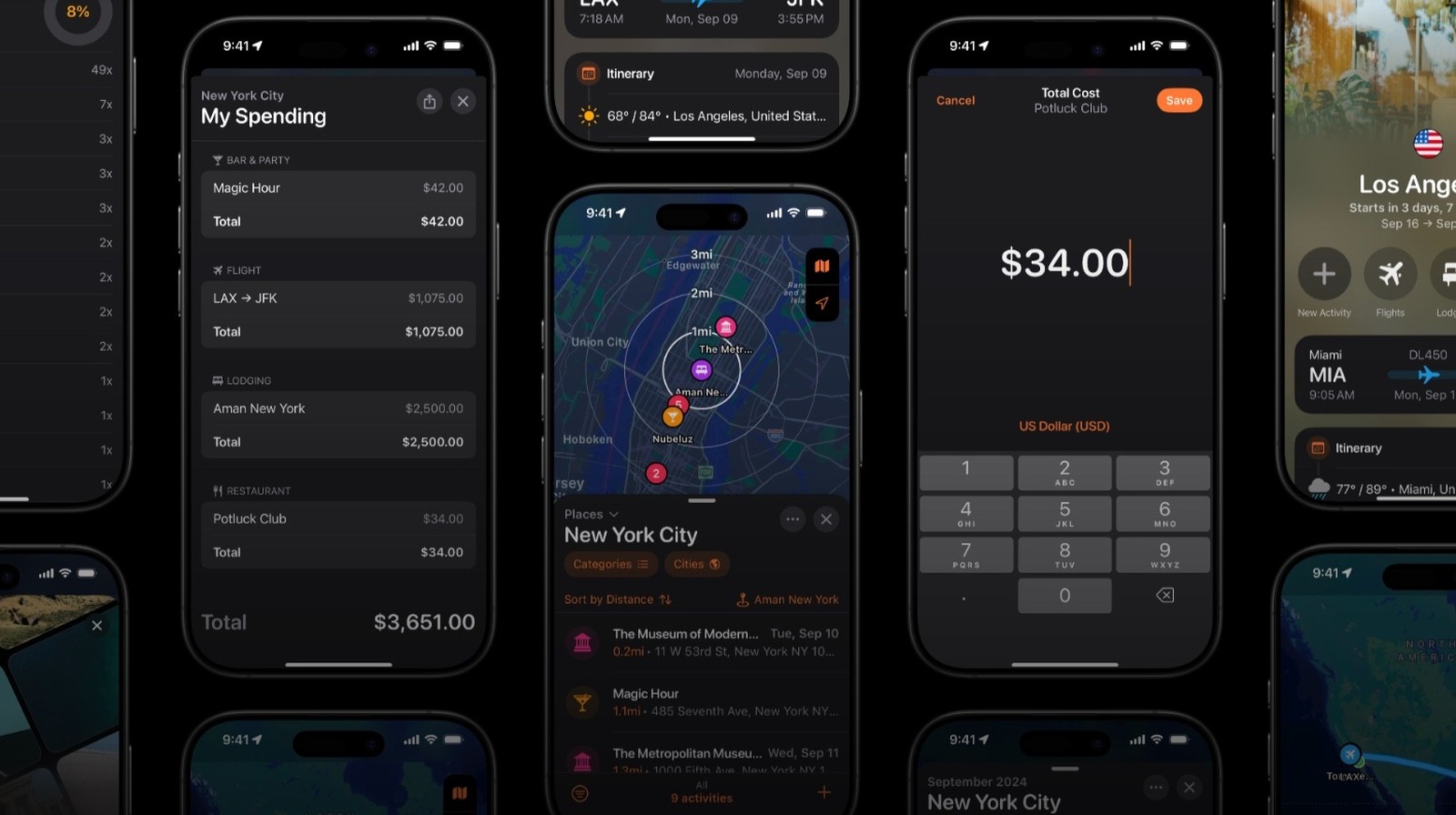
Tripsy, the 2024 iPhone App of the Year finalist, has just gotten a major update. With version 3.5, the app now offers a revamped experience when planning a trip together with friends or family members, as well as for tour guides.

Created by Brazilian developers, Tripsy is by far one of the best options for those trying to organize a trip. This update is all about sharing on social media, being more collaborative, major improvements, and bug fixes ahead of the releases of iOS 26 and iPadOS 26 this fall.

For example, Favorite Guests is one of the key features introduced in Tripsy version 3.5. When traveling with a partner or close friend, the app will suggest them to be part of your next trip. They can also create trips and add you automatically. After all, there is nothing more exciting than receiving a notification from your best friend or loved one who has already started planning your next European vacation.

New features landing on Tripsy

Tripsy

Tripsy’s latest update goes far beyond Favorite Guests, though. Users can now set permissions for each guest, which changes how they interact with Collaborator and Read-only capabilities. For those who love planning trips, it’s now possible to create a trip for someone else. You just have to turn off the “travelling together” option, and the next trip you plan will be just for your friend.

The app also enhances assigning activities, filtering them, and getting notifications from collaborations:

  • Activities to specific guests: If you’re traveling with several friends, they can now add specific information to the trip, such as their flights and hotels, so that everyone will know when people are arriving and where they’re going.
  • Filter activities by guests: When a trip has many activities to organize, you can use a filter to only show the things you’re responsible for; this way, you can ensure everything goes as planned, and you aren’t overwhelmed by the full itinerary.
  • Notifications: In the latest version of Tripsy, you’ll get a notification every time someone adds a new activity to your trip, which helps avoid duplicate events during planning.

Finally, you can now see your friends’ trips, share your adventures on social media, and so much more. Tripsy is free to download, but a subscription is required to take advantage of all the features. You can download the app on the App Store.

Source

Posted on

UK work visa sponsors are target of phishing campaign

Cyber criminals are exploiting Home Office branding in a newly identified phishing campaign that targets holders of UK immigrant sponsor licence holders participating in the government’s Sponsorship Management System (SMS).

The SMS is designed for employers sponsoring visas in the Worker and Temporary Worker categories, and institutions sponsoring visas in the Student and Child categories. It is used primarily to manage the creation and assignment of sponsorship certificates for prospective employees or students, and to report changes of circumstances for sponsored immigrants.

The unidentified actors behind the campaign, which was identified by Samantha Clarke, Hiwot Mendahun and Ankit Gupta of the Threat Research Team at email security specialist Mimecast, seem primarily to be seeking to compromise credentials for downstream financial exploitation and data theft.

“This campaign represents a significant threat to the UK immigration system, with attackers seeking to compromise access to the Sponsorship Management System for extensive financial and data exploitation,” the team said.

“The threat actors deploy fraudulent emails impersonating official Home Office communications, typically sent to general organisational email addresses with urgent warnings about compliance issues or account suspension. These messages contain malicious links that redirect recipients to convincing fake SMS login pages designed to harvest User IDs and passwords.”

The systematic campaign starts with phishing emails that at first glance will appear to the target to closely mimic a genuine Home Office notification. These messages present as urgent notifications or system alerts requiring prompt attention, but in reality, direct users to fake login pages to capture the victims’ SMS credentials.

A deeper technical analysis by the Mimecast team found the perpetrators are using captcha-gated URLs as an initial filtering mechanism, followed by redirection to the attacker-controlled phishing pages, a direct clone of the genuine article – complete with pilfered HTML, links to official UK government assets and minimal albeit critical changes to the form submission process.

“The threat actors demonstrate advanced understanding of government communication patterns and user expectations within the UK immigration system,” said the team. 

What is the goal of the phishing attack?

The goal of the phishing attack appears to be twofold, targeting both organisations legitimately sponsoring immigrants to the UK, and the immigrants themselves.

Once they have compromised their primary victims’ SMS credentials, the attackers pursue multiple different monetisation objectives, said the Mimecast team. Chief among these appears to be the sale of access to compromised accounts on dark web forums to facilitate the issuance of fake Certificates of Sponsorship (CoS), and to conduct extortion attacks on the organisations themselves.

However, a murkier – and potentially more lucrative – avenue for exploitation involves the creation of fake job offers and visa sponsorship schemes.

Computer Weekly understands that some downstream victims seeking to move to the UK have been defrauded of up to £20,000 by the cyber criminals for seemingly legitimate visas and job offers that never materialise.

Next steps

For Mimecast customers that may be at risk from this phishing campaign, the firm has already implemented comprehensive detection capabilities enabling its email security platform to detect and block incoming emails associated with it, and is continuing to monitor for any developments.

In general, organisations using the SMS service should consider taking the following steps:

  • Deploy email security capabilities to detect government impersonation and suspicious URL patterns, and implement URL rewriting and sandboxing to analyse links prior to user interaction.
  • Establish and enforce multifactor authentication (MFA) on SMS access, rotate these credentials frequently and monitor SMS accounts for strange access patterns or login locations that don’t add up.
  • Engage those with access on genuine Home Office communications and official email domains, emphasising the importance of verifying urgent notifications before taking action, coupled with general phishing-awareness training and simulations.
  • Set up verification procedures for SMS-related communications, incorporate SMS compromise into incident response protocols and, where possible, segregate SMS duties to ward off single-point-of-failure scenarios.

The Home Office has been contacted for comment.

Source

Posted on

iPhone Stuck In SOS Only Mode? Here’s How To Fix

Carrastock/Getty Images

Your iPhone’s status bar is a helpful dashboard that provides a glance at the vital signs of your smartphone. You’re probably used to seeing the Wi-Fi and cellular data icons in this indicator field, along with your iPhone’s battery status. But there may come a day when you see something a bit less familiar. Specifically, we’re referring to signs like “SOS Only,” “No Service,” or “Searching.”

When your iPhone is in SOS Only mode, it means the device isn’t connected to a cellular network. As a result, you won’t be able to make regular phone calls or send text messages, but you may be able to reach out to emergency services like police, fire, coast guard, and other life-saving teams if you’re in the U.S., Canada, or Australia. “No Service” or “Searching” indicates your iPhone or iPad (Wi-Fi + Cellular) has zero carrier connection, so you won’t even be able to reach out to emergency services.

How to get your iPhone out of SOS mode

Fiordaliso/Getty Images

Let’s say your iPhone entered SOS mode on a day trip to the mountains. Once you return home — where you know your carrier has got you covered — your phone still shows the SOS icon. One of the first things you can try doing is an attempted reconnect to your carrier. To do so, head to Settings and turn on Airplane Mode. Wait for 15 seconds, then turn it back off. You can also turn Airplane Mode on or off via your phone’s Control Center.

If you’re still seeing the “SOS” message in the status bar, go ahead and restart your iPhone or iPad. When your device boots back up, there’s a good chance it won’t be in SOS mode anymore. It’s also not a bad idea to make sure your iPhone is running the latest version of iOS. 

Should you still see “SOS” in the status bar, your carrier may actually be experiencing some type of outage. Whether it’s a localized issue or some kind of nationwide disruption, your carrier’s official site and third-party services like Downdetector.com might give you the scoop on what’s happening. You may also want to check your carrier’s social media platforms or use another phone to contact customer support.

You could also be stuck in SOS if you’re traveling outside the country and you didn’t turn on data roaming. To turn this feature on, head to Settings > Cellular Data > Cellular Data Options, then toggle Data Roaming on. Additionally, if your iPhone is a dual-SIM model, one of your carrier lines could be inactive. To review, tap Settings > Cellular, then select the line you want to investigate. If the line is toggled off, simply turn it back on.

How to use Emergency SOS

Hadrian/Shutterstock

When in SOS mode, your phone is outside of your carrier’s coverage net and is technically “borrowing” data from a rival network temporarily. Apple also introduced a feature called Emergency SOS via Satellite with the iPhone 14 and later, which automatically activates when your phone isn’t connected to a carrier. You’ll be prompted to send an emergency text via satellite, at which point, your iPhone will direct you on where to go and what to do.

Your iPhone can also make an Emergency SOS call manually. For all countries except India, you can make an Emergency SOS call by pressing and holding the side button and either volume button simultaneously. After an Emergency SOS call is finished, any emergency contacts you’ve set up will receive a text message, unless you choose to ignore this option. Your iPhone will even share your location if it’s able to.

You can also make changes to your Emergency SOS settings by tapping Settings > Emergency SOS on your iPhone. From here, you’ll be able to enable or disable the activation settings for Emergency SOS, as well as manage your emergency contacts.

Source

Posted on

How To Use Instagram’s ‘Vanish Mode’ (And Why You Might

D3sign/Getty Images

Even online, it’s nice to find some privacy, although accomplishing this seems to be getting more difficult with each passing day. However, Instagram’s Vanish Mode can be useful for keeping secrets. It brings a Snapchat element to the platform, as messages you send in this mode will automatically disappear. From planning a friend’s surprise party to hiding your late-night arguments about what’s inside the moon, sometimes it’s good to not leave a trail. (Now, if Instagram is going to copy Snapchat, maybe it will finally release the iPad app it’s supposedly working on?)

Enabling Vanish Mode on iPhone or Android is easy. It simply involves swiping up from the bottom of any individual chat window. This makes it a super convenient way to bounce back and forth between a casual conversation and something that needs to be confidential. However, there are also some things you should know about it, as Vanish Mode isn’t an impenetrable fortress. While it’s going to be good for keeping a conversation between friends more personal, there are some things to bear in mind if you think it’s going to keep anything and everything private. First, though, let’s talk more about how to use Vanish Mode.

How to use Vanish Mode on Instagram

PixieMe/Shutterstock

Whether you’re using iOS or Android, all it takes to enter Vanish Mode is opening Instagram, selecting Messages in the top-right corner of your feed, selecting a chat with someone, and then swiping up from the bottom within the chat. It will say Vanish Mode at the top of the screen if successful, and swiping up again will disable it. Anything sent while in this mode will erase once you leave the chat or disable the feature. 

The big things to remember with Vanish Mode are that it needs to be enabled for each individual chat, and it’s not going to work with group messages. If you have notifications enabled, you’ll still receive one should someone send you a message while using this feature. Tapping the notification will enter you into the Vanish Mode chat with them. You’ll also receive a notification if they send messages outside this mode, as you would typically expect.

Switching back and forth between Vanish Mode and a regular Instagram conversation is pretty easy, as the feature is unobtrusive. Your Vanish Mode conversation starts as soon as you enable it, so messages that were there before enabling it will still be present. Once you exit this mode, your conversations will once again be saved within the chat until the feature is turned on again.

Protecting your privacy with Vanish Mode

Farknot Architect/Shutterstock

One of the largest reasons to enable this feature is for a state of privacy. Since messages evaporate once you leave the chat, Vanish Mode can be great for sending anything you don’t want to be permanent. When using this feature, users will be unable to forward, save, or copy any messages that disappear, and you can only use Vanish Mode while chatting with other Instagram accounts. Meta also notes that certain professional accounts cannot use this feature.

While privacy is the goal, the system isn’t perfect, and it still requires a level of trust. Even though messages vanish, users are able to take screenshots or recordings of the chat window before they do. Instagram will provide a notification should a user do this, but it’s also possible for someone to use a physical camera to record the conversation, which Instagram likely won’t detect.

If someone invades your privacy, it’s important to remember you can report messages sent in Vanish mode for up to fourteen days after they’re sent. If you think a message violates Meta’s Community Standards, simply enter the chat with the offending message, select the user’s icon, tap Options (three dots), and then select Report. It works on both Android and iOS, but doesn’t work with group chats, and knowing how to report messages can be just as important as knowing about the controversial Instagram feature that may be sharing your location.

Source

Posted on

Researchers firm up ShinyHunters, Scattered Spider link

The ShinyHunters hacking collective responsible for a wave of cyber attacks orchestrated via Salesforce products is likely collaborating with the Scattered Spider gang that brought down systems at Marks & Spencer earlier this year, according to research.

In a report published 12 August, ReliaQuest researchers Kimberley Bromley and Ivan Righi argue that there is now plenty of evidence – albeit some of it highly circumstantial – suggesting a deliberate partnership between the two operations, both of which have previously been linked to the wider cyber crime network known as The Com.

They described a dramatic shift in ShinyHunters’ tactics that move the group well beyond its previous modus operandi, which centred largely on credential theft and database exploitation, to include “hallmark” Scattered Spider techniques.

These include the adoption of highly-targeted voice phishing, or vishing, campaigns that impersonate IT support staff to get victims to connect malicious apps – Salesforce Data Loader in the current campaign – that enable them to steal data, the use of Okta-themed phishing pages to trick their victims into entering their credentials, and the use of the legitimate Mullvad virtual private network (VPN) service to perform data exfiltration.

“These tactics align closely with Scattered Spider’s trademark methods and those of the broader collective, The Com, fueling speculation about active collaboration between the groups,” wrote Bromley and Righi.

Evidence adds up

The ReliaQuest team offered up more evidence of a link, saying that the two groups also appear to be targeting similar verticals – retail, insurance and aviation – during the same rough timeline, and they seem to be taking a similar approach in the naming conventions they used when registering their domains. Bromley and Righi warned that based on their analysis of domains registered that match the naming pattern convention favoured by ShinyHunters and Scattered Spider, it is likely that financial services companies should now be on high alert.

More evidence has recently emerged of the existence of an individual persona associated with ShinyHunters, known as Sp1d3rhunters. This account, which first popped up on the BreachForums data leak service in 2024, when it was linked to ShinyHunters’ breach of Ticketmaster, has allegedly claimed that ShinyHunters and Scattered Spider are the same, and moreover always have been.

“If these connections are legitimate, they suggest that collaboration or overlap between ShinyHunters and Scattered Spider may have been ongoing for more than a year,” said the researchers.

Broader significance

Conceding that it would be possible to spend months dissecting the clues that suggest ShinyHunters and Scattered Spider are working together, Bromley and Righi said it was important for defenders not to lose sight of the broader significance of the ongoing attacks – that they are successful not because of who orchestrated them, but because of how they were executed.

“Threat actors constantly rotate infrastructure, change names, and adapt their TTPs to evade detection and maximise impact,” they said. “As a result, tracking the behavioral patterns and evolving TTPs behind these campaigns is far more valuable than focusing solely on indicators of compromise (IOCs) or attribution.

“For security leaders, understanding this fluid and persistent threat landscape is critical to anticipating future attacks and making informed decisions about security strategy and resource allocation.”

They warned that the cyber attack campaigns were likely to continue regardless of whether the two groups are working together, or are one and the same, adding that others may also attempt to emulate the success of the high-profile attacks by adopting similar tactics.

“These recent campaigns showcase the effectiveness of a new wave of English-speaking threat actors highly skilled in social engineering,” they said.

Source