Posted on

Every Airline That Supports AirTag’s Share Item Location Feature

Apple Inc.

Released late last year as part of iOS 18.2, the Share Item Location feature for Apple’s AirTag has been one of the most useful additions introduced during the iOS 18 cycle. It’s now easier than ever to share the location of an AirTag I’m using with friends, family, and even airlines, which can help to ensure you never lose an item or a piece of luggage again.

With summer upon us, more people are finding out about this helpful feature as they head to the airport to go on vacation. Even better — this feature isn’t only available in the U.S. or on U.S. airlines. Since the Share Item Location feature launched in 2024, 30 airlines around the world have partnered with Apple to support it.

The feature helps bring peace of mind to your travels. After all, even before this feature was available, I was already tossing AirTags into all of my suitcases and contacting airlines in case they lost my luggage (which I’ve dealt with more than once). While we already taught you how to share a lost AirTag using the Find My app, here’s the list of airlines that support AirTag’s Share Item Location feature.

30 airlines support AirTag’s Share Item Location feature

José Adorno for BGR

At the time of writing, there are 30 airlines that officially support Share Item Location. That said, more airlines should be join this list soon — for example, Saudia just announced it now offers support for the feature. With that said, these are the countries and airlines that can track your AirTag:

U.S. airlines:

  • American Airlines
  • Breeze Airlines
  • Delta
  • JetBlue
  • United

Australia airlines:

Austria airlines:

  • Lufthansa Group/Austrian Airlines

Belgium airlines:

  • Lufthansa Group/Brussels Airlines

Canada airlines:

Finland airlines:

Germany airlines:

  • Lufthansa Group/Eurowings
  • Lufthansa Group/Lufthansa

Hong Kong airlines:

India airlines:

Ireland airlines:

Netherlands airlines:

New Zealand airlines:

Saudi Arabia airlines:

Singapore airlines:

Spain airlines:

Switzerland airlines:

Taiwan airlines:

Turkey airlines:

  • Ajet
  • Pegasus
  • Sun Express
  • Turkish Airlines

UK airlines:

  • IAG/British Airways
  • Virgin Atlantic

With AirTag’s Share Item Location feature, Apple’s Find My network provides an updated location of the Bluetooth tracker as long as one of your Apple devices is signed into your Apple Account and online. We are also still anxiously awaiting the release of AirTag 2, as it seems it’s only a matter of time before Apple upgrades its popular item tracker.

Source

Posted on

5 Prompts To Help You Get Started With ChatGPT Agent

José Adorno for BGR

Recently, OpenAI rolled out its new Agent Mode in ChatGPT for Plus, Pro, and Enterprise users. While we eagerly await for the upcoming GPT-5 models, this new feature brings the AI one step closer to completing tasks autonomously. This is especially beneficial because it evolves the tool from the standard searching and gathering data to actually saving people’s time on those tedious everyday tasks, such as thinking about what to make for dinner, booking a trip, finding the right pair of shoes to buy, and so on.

ChatGPT’s Agent Mode is especially useful when it comes to repeated routines, gathering information from the web, organizing results, and reminding users when it’s time to do something. It’s almost like having an actual personal assistant to run your errands for you.

If you’re a bit cautious about the amount of data you might be sharing with ChatGPT but want to get your head start with Agent Mode, I gathered some examples that could be a great way to get started with ChatGPT’s vision for the future. But before we jump into the prompts you should try with ChatGPT Agent Mode, you can only access this mode on the web, and you need to be a paid subscriber.

Easy prompts to get started with ChatGPT Agent Mode

José Adorno for BGR

Recipe rescue: Leave those nightly panic attacks because you don’t know what you’re cooking for dinner behind. You can ask ChatGPT to create a list of recipes for you by sharing the ingredients in your fridge and pantries. You can even take a photo of your fridge (with the door open) and type in a prompt like this:

  • “Every night at 6 PM, ask me what ingredients I have at home. Suggest 2 dinner ideas that take under 30 minutes to make.”

In time, the Agent will understand what you like and what you’d rather not have again, and the suggestions will improve as you continue to work with the AI agent.

Weekend chore planner: At some point every weekend, I’ll clean my house, do groceries, and complete other chores. ChatGPT’s Agent Mode can help you plan it all out with ease with a prompt as simple as this one:

  • “Every Friday, make a quick weekend checklist: groceries, cleaning, and a fun activity. Keep it simple, and no more than 5 items.”

Easy enough, and it won’t overwhelm you.

Subscription reminder: When the bill comes due at the beginning of every month, it usually becomes clear that I have more subscriptions than I actually need. Agent Mode can help you manage that with this prompt:

  • “On the last day of the month, remind me to check my subscriptions. Make a list of common services to review (you can add some suggestions) and ask if I want to cancel anything.”

Save yourself some money by having the AI remind you to cancel the services you’ve stopped using.

Agent Mode is easier to use than you might expect

OpenAI

While you can go more advanced, I’d say these are interesting ways to enjoy Agent Mode. Other possibilities include:

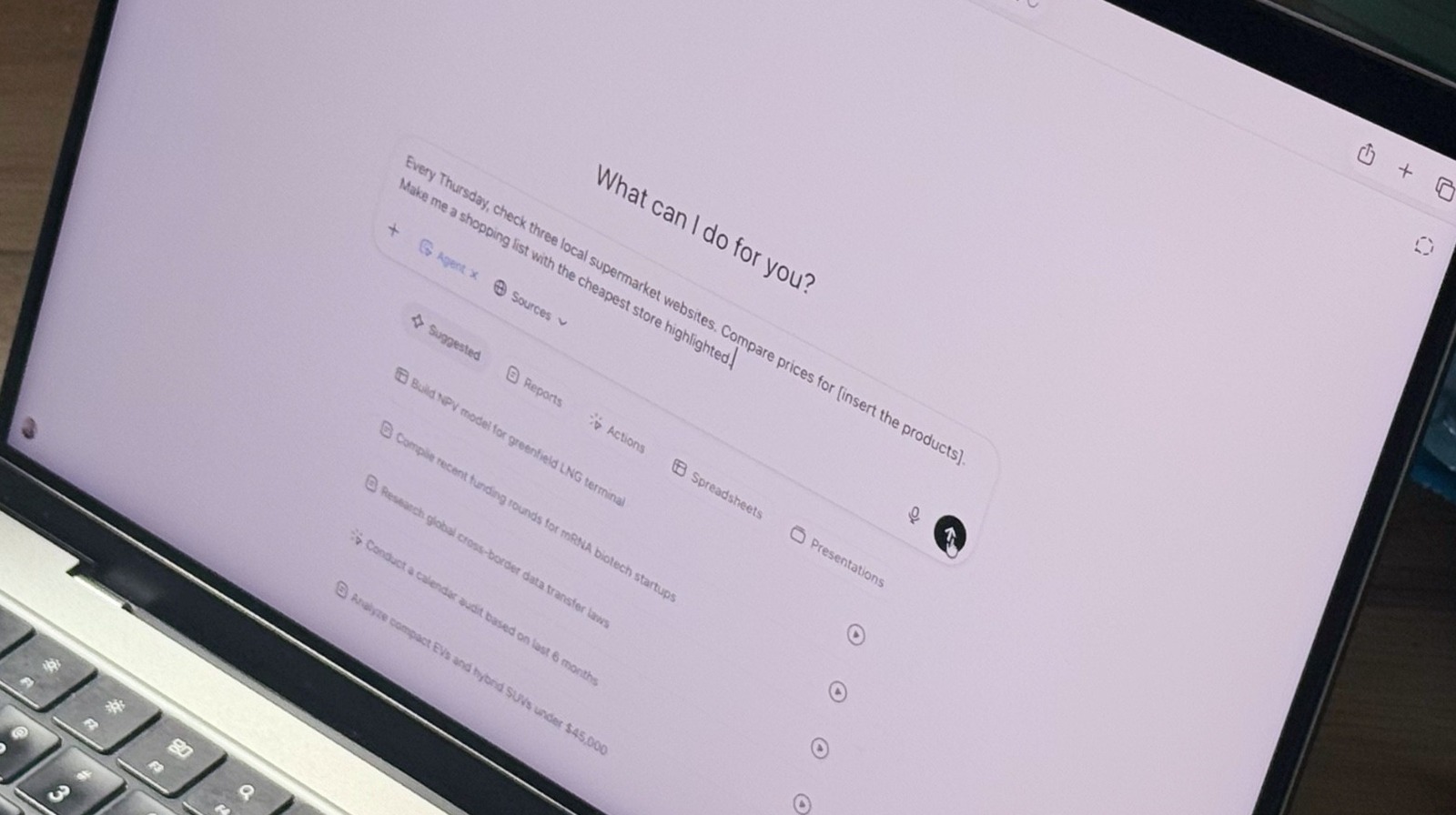
Grocery price tracker: Make sure you’re getting the best prices and visiting the right grocery store for your budget and shopping list before you leave the house by using a prompt such as this:

  • “Every Thursday, check three local supermarket websites. Compare prices for [insert the products]. Make me a shopping list with the cheapest store highlighted.”

Morning news condenser: If you want to stay on top of local, national, and world news, you can ask the ChatGPT Agent to go through your favorite news sources and get a summary of the top headlines for the day. Try this prompt:

  • “Every day at 7:30 AM, scan [insert the websites you usually check]. Summarize the top 5 headlines in 5 bullet points, and send them here.”

These are great ways to get started with ChatGPT’s latest tool.

Source

Posted on

2 Methods For Installing APKs On Your Chromebook

Marek Sowa/Shutterstock

When it comes to lightweight computing, it’s amazing how much you can do with a Chromebook. Made famous by brands like Asus, Dell, and Lenovo, most Chromebook models deliver fast boot times and zippy web performance, the latter being one of the main advantages of ChromeOS. In addition to apps like the Chrome web browser, most Chromebooks also have access to the Google Play Store. This means you’ll be able to download additional apps and games, including platforms like Netflix and Spotify, and video-conferencing tools like Zoom.

But what if there’s a test version of an Android app you’re dying to add to your Chromebook, and it’s not officially available on the Google Play Store yet? Fortunately, thanks to a process called sideloading, you’ll be able to install APKs (Android Package Kit) files on your Chromebook. Think of this as a backdoor method for manually uploading Android files to your machine. With APKs, you’ll be able to do things like access test builds of apps and install region-locked apps. You can also download an earlier version of an app, instead of the current version on the Play Store.

Fortunately, it doesn’t take much know-how to get your Chromebook ready to install APK files, and there are two methods to do so: activating your Chromebook’s Developer Mode or using ADB (Android Debug Bridge) with Linux.

Installing APKs in Developer Mode

CC Photo Labs/Shutterstock

Turning on Developer Mode isn’t too tricky, but doing so can be incredibly risky for the health of your Chromebook. First and foremost, you’ll want to triple-check you have all your most important files backed up to the cloud or an external drive, because once you activate Developer Mode, all of your Chromebook’s local data will be erased.

Developer Mode also disables a number of built-in system protections provided by ChromeOS, making your Chromebook far more prone to picking up a harmful virus or malware when you’re sideloading apps. Still, if you’re feeling brave enough, getting into Developer Mode is relatively simple. To get started, make sure your Chromebook is turned off. Then, press and hold both the ESC + Refresh keys, followed by the Power button. Don’t release the ESC + Refresh combo until you see a recovery message.

Next, press CTRL + D to activate Developer Mode. A pop-up window should appear, asking if you’d like to continue. Once you press Enter, your Chromebook will restart, which could take between 10-15 minutes. Now you’ll be able to install APKs via USB storage or from a developer site. Again, be careful of what you’re downloading, because ChromeOS won’t be there to back you up if a virus eats your Chromebook for lunch.

To revert to normal ChromeOS operations, just press the spacebar on the boot screen. Another pop-up will appear to let you know you’re exiting Developer Mode. Once you confirm, your Chromebook should revert to Normal Mode.

Installing APKs with ADB and Linux

CC Photo Labs/Shutterstock

A safer way to sideload your APK content — that doesn’t involve the scary Developer Mode — is by using your Chromebook’s built-in Android Debug Bridge (ADB) utility. Believe it or not, Chromebooks are fully capable of running Linux, and you’ll need to force yours to do so in order to sideload via ADB. All you have to do is navigate to Settings, then click Developers > Linux development environment (Beta). Toggle Linux on, click Install on the next screen, then follow the on-screen instructions.

To enable ADB mode, click Settings > Linux Beta > Develop Android apps > Enable ADB debugging. You’ll then be prompted to restart your Chromebook, and then it’s time to start uploading APK files.

Once you have one downloaded to your machine, drag and drop the file into My Files > Linux files. Next, open up your Chromebook’s Linux terminal (you’ll find the Terminal app in your app launcher) and enter the command line “sudo apt install adb.” When prompted, press Y, then Enter.

Once Linux finishes installing the packages, type “adb connect arc” to activate ADB mode. Now, when you type “adb install [APK file name].apk” into the terminal, ADB will sideload the APK you’ve chosen.

Source

Posted on

IoT connectivity revenues show strong rise

The year so far has seen a marked rise in the value and size of an internet of things (IoT) arena that has witnessed new technical standards, devices and evolving market complexities, and a study from Berg Insight has calculated that global IoT connectivity revenues increased by 12% annually to reach €14.2bn in 2024.

In The global M2M/IoT communications market report, the IoT market research firm projects that 2029 will see 6.4 billion IoT devices connected to cellular networks worldwide, generating annual connectivity revenues of €22.4bn.

Berg Insight estimates that the global number of cellular IoT subscribers increased by 14% in 2024 to reach 3.8 billion at the end of the year, corresponding to around 30% of all mobile subscribers. Over the next four years, the number of cellular IoT subscribers is forecast to grow at a compound annual growth rate (CAGR) of 11%, to reach 6.4 billion in 2029. During the same period, cellular IoT connectivity revenues are forecast to grow at a CAGR of 9.6%, from €14.2bn in 2024 to approximately €22.4bn in 2029. Meanwhile, the monthly average revenue per user (ARPU) is expected to drop from €0.33 to €0.30.

Another key trend revealed in the report was that IoT connectivity revenues are growing at a slower rate than the number of connections. According to the analysis, key performance indicators released by mobile operators in different parts of the world suggest that global IoT connectivity revenues increased by around 12% in 2024, while monthly ARPU dropped by 5%.

The top 10 mobile operators reported a combined active base of 3.3 billion cellular IoT connections at the end of 2024, accounting for 86% of the total 3.8 billion connections.

The report noted that China was the world’s largest market for cellular IoT connectivity services by volume, and cited China Mobile as being the world’s largest provider of cellular IoT connectivity services, with 1.42bn cellular IoT connections. Arch rivals China Telecom and China Unicom ranked second and third, with 628 million and 625 million connections, respectively.

According to data from the Chinese national telecoms regulator, the installed base in the country grew by 14% year on year to reach 2.7 billion IoT connections at the end of 2024, corresponding to about 70% of the global installed base.

Berg believes the role of the Chinese government is the main reason China is ahead of the rest of the world in the adoption of IoT. Authorities have actively endorsed large-scale IoT deployments as a method for addressing problems affecting society, such as crime, fire safety, energy conservation or traffic management. It added that the private sector is being directed and encouraged to do the same.
 
Vodafone ranked first among the Western operators and fourth overall with 204 million connections, followed by AT&T with 143 million in fifth place. Deutsche Telekom and Verizon had in the range of 56-60 million cellular IoT connections each. KDDI, Telefónica and Orange were the last players in the top 10, with about 49 million, 45 million and 37 million connections, respectively. The installed bases of the largest mobile operators grew at a rate of between 5% and 26% annually.
 
IoT managed service providers were also seen to be playing a key role in the ecosystem. The report noted that most players operate as full mobile virtual network operators (MVNOs), typically offering IoT connectivity services based on a mix of roaming and local access agreements, and sometimes value-added services targeted at vertical segments.

Notable examples cited by Berg Insight included 1GLOBAL, 1NCE, Aeris, BICS, CSL Group, Cubic, emnify, Eseye, floLIVE, Giesecke+Devrient, KORE, Monogoto, Onomondo, Semtech, Soracom, Tata Communications, Teal, Telit Cinterion, Velos IoT and Wireless Logic.

Altogether, IoT managed service providers had more than 200 million cellular IoT connections under management at the end of 2024 and around €1.8bn in annual revenues.
 

Source

Posted on

5 Raspberry Pi Accessories To Supercharge Your Next Project

Sabriel Smutny/Shutterstock

We may receive a commission on purchases made from links.

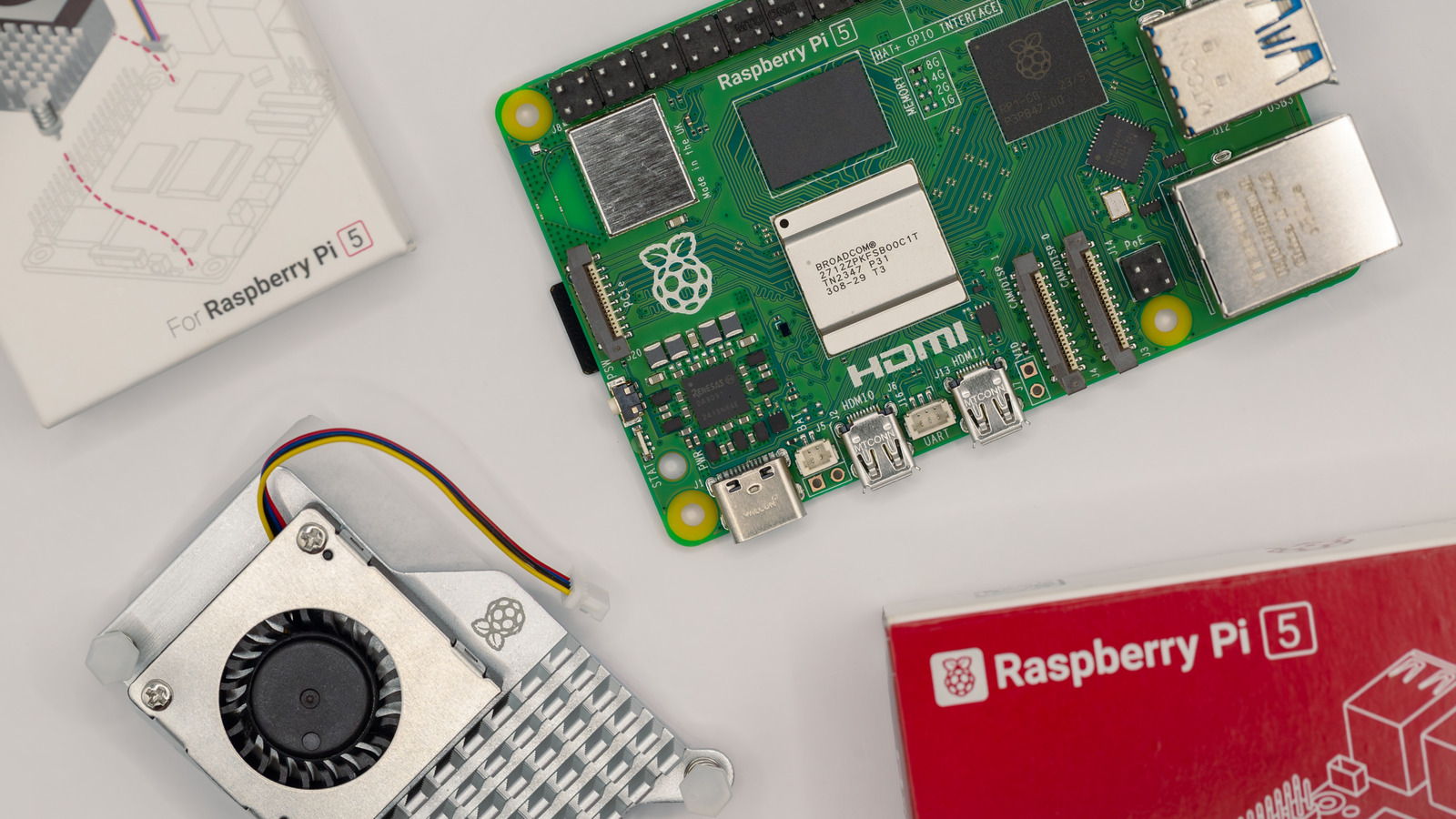
The Raspberry Pi single-board computer offers myriad ways to learn, explore, and create. It can be as simple as a small, portable computer or as complicated as an arcade cabinet. Whether you want to build a Telegram texting machine, a motion-activated camera, a network-wide ad blocker, or the perfect handheld emulator, the humble Raspberry Pi does it all, and you can do even more with a few accessories.

Accessories are crucial to the Raspberry Pi experience. While there are many projects that don’t require a single accessory, the best projects often require at least one. Some accessories, like a piezo speaker, are small and inexpensive, and others, like a camera or display, offer more possibilities but cost more money.

Although a bigger budget opens the door to more complex projects, there are great Raspberry Pi accessories for every budget. If you want to supercharge your Raspberry Pi projects, these are the top 5 Raspberry Pi accessories we recommend.

Raspberry Pi HQ Camera Module

Though there are other camera modules for the Raspberry Pi, this HQ camera module takes it a step further. It’s an interchangeable lens camera module with a 12.3-megapixel CMOS sensor, allowing you to customize your look and create high-resolution images. It can also capture video at 1080p.

So, what can you do with this camera module? The answer is a lot. With the HQ camera module, you can make a webcam for Zoom meetings and talking head recording. You can also make the camera turn photos into AI-generated images.

Using the Raspberry Pi HQ camera as a motion-activated security camera is one of the most popular uses. The camera can be set up to send you email alerts, which is great for keeping an eye on your home when you’re out of town. The motion-activated camera is also great for indoors, allowing you to monitor your pets while you’re at work. In addition to sending alerts, you can also access the camera feed at any point if you’re on the same network, an ideal situation for avid birdwatchers.

HiFiBerry DAC2 HD

Want to upgrade your sound system without spending a fortune? Despite what hi-fi audio snobs will tell you, it is possible with something like the HiFiBerry DAC2 HD. This Digital-to-Analog Converter (DAC) module, which converts a digital signal to analog sound, connects to the Raspberry Pi via the general-purpose input/output (GPIO) pins on the device and transforms your mini computer into a portable sound hub that lets you listen to all your music.

The HiFiBerry DAC2 HD is not a plug-and-play device. You’ll need to install software, but it’s nothing too hard. The hardest part is choosing the right software. Available software includes HiFiBerryOS, LibreELEC, Roon, and Volumio. Each software has its advantages and disadvantages. HiFiBerryOS is simple and lets you stream Spotify. Volumio is complex and more customizable, allowing you to stream your favorite music and podcast services. Finally, Roon is made for streaming your music library, which is kept on a server on your network and requires a subscription.

No matter which option you go with, you’ll be able to experience your music in a new light. Combined with a stereo and some nice speakers, you’ll have a high-end system on a budget.

SunFounder I2C Display Module

Nizzah Khusnunnisa/Shutterstock

The SunFounder I2C display is an inexpensive and easy-to-install component. There are many Raspberry Pi projects that, while they don’t require a display, would greatly benefit from one. The reason is that a simple I2C LCD display can elevate a project with a few lines of text. A project such as a music streaming device can work without a screen, but adding a screen makes the project more practical. It lets you see everything from the song title and the artist to what’s coming next in the queue.

In some cases, the display is much needed, like if you’re creating a weather station that tracks temperature, humidity, and air pressure. In that case, this tiny display can relay all the basic information you need, and it’s small enough that it doesn’t require a separate power source. So, while it may look simple and can’t do much more than display text, the SunFounder I2C display is quietly an elite accessory.

Raspberry Pi Sense HAT

The Sense HAT is an official Raspberry Pi accessory that is now iconic. It was initially developed for use on the International Space Station — it was co-developed with the European Space Agency — and it has since been a must-have accessory because it’s both packed with features and fun to use. The LEDs make the device stand out and lend themselves to quirky projects.

Onboard the Sense HAT are the following sensors: gyroscope, accelerometer, magnetometer, temperature, barometric pressure, humidity, and color and brightness. Essentially, this HAT can record everything in your immediate environment, and the accelerometer and gyroscope can be used for tracking speed and orientation.

There are projects galore for the Sense HAT, but creating a weather station is at the top of the list. You can track the temperature, humidity, and pressure of your surroundings, and you can keep track of it using the LEDs on the HAT. It’s not an efficient way to receive information, but the big, colorful LEDs make it fun.

Raspberry Pi M.2 HAT+

The M.2 HAT+, which is another official Raspberry Pi accessory, solves the many issues that come along with using a microSD card. This HAT allows for the use of M.2 NMVe SSDs with your Raspberry Pi. This is currently the fastest type of storage available. The M.2 HAT+ supports 2230 and 2242-size NVMe drives, which can typically be found with a capacity of 1 or 2 terabytes. There’s also a Raspberry Pi SSD kit, which comes bundled with the HAT and either a 256 GB or 512 GB NVMe drive.

In addition to expanding storage, NVMe SSDs are much less prone to failure compared to a microSD card, and the transfer speeds make moving and accessing files quicker. With an M.2 HAT+, you can make the most of storage-dependent projects, like media servers and video game consoles. Or, if you use your Raspberry Pi as a desktop PC, the additional fast storage will ensure you can store as many applications and files as you want. 

Source

Posted on

USB Sockets: Are They Drawing Power Even When Not In

Photovs/Getty Images

We may receive a commission on purchases made from links.

USB charging is everywhere, and if you have a newly built apartment or home, you may have a USB wall socket. It makes life convenient for those of us with several gadgets, eliminating the need for multiple power adapters. While providing a great way to charge devices such as smartphones, tablets, smartwatches, and other gadgets, these outlets don’t typically have on/off switches. As a result, it’s understandable to wonder if these outlets are consuming power even when nothing is plugged in.

While USB outlets do draw a bit of power even when nothing is plugged in, it’s only 0.05 watts typically. This is a marginal power draw and should have next to no impact on your household energy. If you consider that some light bulbs will use 60W of electricity while turned on, by comparison, the 0.05W used by USB outlets in standby mode amounts to barely anything on your electrical bill.

Should you unplug USB cables when they’re not in use?

Mrs/Getty Images

Ultimately, the power draw of both USB Type-A and USB Type-C wall sockets is tiny. Even with a USB cable plugged in and no device connected, the power draw should remain at 0.05W.

When connected, the power your USB outlets draw depends on the device that is plugged in. Laptops, game consoles, or smartphones draw the most power, while earbuds or smartwatches draw less. For example, a MacBook Pro requires between 60 and 140-watts of power, whereas smartwatches such as the Apple Watch Series 10 only need a minimum of 5-watts to charge.  

If you’re worried about high energy costs and using too much power, it’s always best practice to unplug any devices that aren’t needing a charge. Unplugging your device after it’s fully charged can also help prolong your device’s battery. Lithium-ion batteries can only be charged from 0% to maximum charge so many hundred times, and when the battery is kept at a high charge voltage, this will accelerate this chemical aging process. 

USB best charging practices

Tero Vesalainen/Shutterstock

Leaving a fully charged device on its charger can run up your electrical bill and alter the lifecycle of the battery, so it’s a good idea to unplug it once it’s fully charged. Additionally, you should know that not all USB cables are made equally. It’s best to shop for high-quality cables from reputable brands, or buy cables directly from the manufacturer of the device in question; if you’re buying a cable for your iPhone, try to buy your cable directly from Apple. 

Reliable brands like Belkin and Anker are worthwhile options too. For example, Belkin offers this USB Type-A to USB Type-C 15W Charger – which is ideal for smartphones — for only $10, or even less in certain deals. It has an average 4.7 out of 5.0 rating on Amazon, with over 4,400 reviews. For high-powered devices like laptops, the Anker 100W USB-C Charging Cable is a top pick. Priced around $16, or less, it also boasts a 4.7 average star rating with more than 20,000 reviews.

Source

Posted on

Cyber governance practices are maturing

The UK Cyber Governance Code of Practice (CGCP), published in April by the Department for Science, Innovation and Technology, is the outcome of a collaborative effort with industry and governance institutions. It brings the UK in line with global trends, where governments are increasingly setting clearer expectations around board-level responsibility for cyber risk.

The CGCP defines cyber governance through five principles: risk management, strategy, people, incident response, and oversight. Its purpose is to ensure that boards understand their responsibilities and embed cyber risk into the organisation’s overall risk management framework. Crucially, the CGCP uses non-technical language, reinforcing the message that effective cyber oversight does not require a background in technology.

Although the CGCP is aimed at board directors, it has clear implications for technology leaders. Boards committing to the CGCP will depend on input from their CIO, CTO or CISO to evaluate how well the organisation aligns with its principles. For technology executives, this presents an opportunity to lead by helping to shape governance practices and strengthening collaboration across the executive team.

Technology leaders are often well positioned to introduce the CGCP to their board, highlight existing strengths, and identify areas for improvement. Cyber governance is still frequently associated with compliance or certification frameworks. However, its scope has evolved to encompass strategic alignment, organisational culture, expected behaviours and informed oversight. This broader framing helps board members connect cyber risk with familiar governance responsibilities and gives technology executives a platform to engage more meaningfully across the leadership team.

According to The Cyber Leadership Playbook, 41% of board members report difficulty in overseeing cyber risk effectively. Addressing this challenge, technology leaders must move from technical stewardship to strategic partnership. Anticipating the conversations that the CGCP will trigger allows CISOs and CIOs to build credibility and help the board make better-informed decisions.

Five practical steps for technology leaders:

  1. Be proactive: Collaborate across the business on strategy, workforce engagement and incident response planning — before the board requests it.
  2. Use a shared language: Leverage the CGCP’s terminology as a guide for engaging with board directors and aligning cyber with the broader risk management agenda. 
  3. Seek board support: Use the CGCP as a basis to request backing – for example, for better policy enforcement, aligning budgets, or business-wide engagement.
  4. Build trust through realism: Don’t promise “security” where you realistically cannot. Commit to preparedness, responsiveness and continuous improvement. 
  5. Share insights, not just indicators: Help the board assess risks, trade-offs and options. Offer alternatives and criteria that should guide the board’s decision-making. 

Importantly, responsibility doesn’t rest with technology leaders alone. The CGCP calls on board members to improve their own cyber literacy and to establish a strong dialogue with the executive team on cyber risk. Many technology leaders have long argued that improving cyber knowledge in the boardroom is essential – and the CGCP explicitly creates space for that shift. As cyber governance matures, board expectations are changing too. Technology leaders have a powerful opportunity to guide the conversation.

Source

Posted on

Mixed Q2 for VMO2 with broadband dipping as mobile furthers

As competition in the key business sector ramps up, Virgin Media O2 (VMO2) has revealed that it has seen falls in revenues in its fixed broadband business over the course of the second quarter of 2025 despite an uptick in mobile connections.

The company’s official results showed that for the three months ended 30 June 2025, revenue – excluding handset and the impact of construction for its nexfibre joint venture business – was £2.175bn, down 0.4% compared with the same period in 2024. Total revenue decreased 5.5% year on year (YoY) to £2.527bn, while total mobile revenue slipped 0.9% on an annual basis to £1.385bn, driven by a 5.2% reduction in low margin handset revenue.

Consumer fixed revenue also decreased 0.9% to £857.1m, due to a reduction in the customer base while B2B fixed revenue decreased by 8.2% on a yearly basis to £99.2m, primarily driven by lower rental revenues. Other revenue decreased 38.7% to £185.5m, with a continued lower level of nexfibre construction revenue compared with the prior year.

Yet despite the mixed revenues, Q2 guided adjusted EBITDA, excluding the impact of nexfibre construction, were £985.9m, an increase of 1.1% compared with £974.8m in Q2 2024. Total adjusted EBITDA decreased 0.4% YoY to £984.2m. The decrease in adjusted EBITDA was attributable to negative nexfibre construction profitability, where construction revenues were said to have significantly reduced, excluding this impact growth was supported by cost efficiencies including a reduced level of Opex CTC. The second quarter of 2025 adjusted EBITDA margin was 39.0% compared with 36.9% in Q2 2024, primarily reflecting what VMO2 said was an improved revenue mix.

During the quarter, VMO2’s total fixed-line customer base stood at 5.7 million, the result of a 51,000-customer reduction in the quarter. VMO2’s total mobile connections (contract and prepaid) stood at 23 million, while the VMO2 mobile contract base totalled 15.6 million, with a reduction of 74,000 connections in Q2 predominantly due to lower value B2B losses, with O2 monthly contract churn improving YoY to 1.1%. Total mobile connection additions across the O2 network (including IoT and MVNO wholesale customers) increased by 480,000 in Q2 to 46 million.

As it assessed the quarterly performance, VMO2 emphasised that it had invested more than £1bn in the company in 2025 so far this year and that it would acquire 78.8 MHz of mobile spectrum for an investment of £343m,  which should “significantly boost the mobile network”, according to the company, improving customer experience and bringing VMO2’s total mobile spectrum share to approximately 30%.

Total fixed-line serviceable premises stood at 18.5 million premises, all of which were said to have access to speeds of at least 1Gbps. The company’s full-fibre footprint extended to more than 7 million premises as it continued to progress fibre upgrades and built fibre on behalf of nexfibre.

Commenting on the quarterly performance, VMO2 CEO Lutz Schüler assured investors that despite “a tough trading environment”, the company was reconfirming its guidance for the year, adding: “Our significant network investments are continuing, as we leverage our scaled gigabit broadband network today and roll out fibre for future, and on the mobile side we continue to boost our network across the country, expand 5G Standalone to more areas and have announced a significant spectrum acquisition that will materially enhance our network performance in future, further improving customer experience.”

Source

Posted on

AI-enabled security pushes down breach costs for UK organisations

British organisations that have incorporated artificial intelligence (AI)-enabled solutions into their cyber security stack appear to be reaping the rewards of automation from a cost perspective at least, as data breach costs drop by hundreds of thousands of pounds.

This is according to the UK-specific cut of IBM’s latest annual Cost of a data breach report, released this week, which found that even though less than one-third of UK organisations have deployed AI-enhanced security, overall average data breach costs for those that have came in at £3.11m per annum, compared to £3.78m for those that had not.

The 2025 report, compiled on IBM’s behalf by the Ponemon Institute, surveyed more than 600 organisations and interviewed around 3,500 people worldwide that had experienced a breach in the period between March 2024 and March 2025. Approximately 8% of respondents are UK-based.

Elaine Hanley, partner at IBM cyber security services for the UK and Ireland, described AI as a massive benefit to defenders: “Organisations that are using AI-based threat detection and threat response are massively more effective than organisations that aren’t. But the negative side is that attackers are using AI. It’s a race where you’ve got threat actors using AI and being much more effective with it, then you’ve got the defenders at the organisation using AI to spot that faster.”

The IBM survey found that UK organisations making use of security AI and automation are able to identify and contain cyber attacks much quicker. Its data reveal that mean time to identify (MTTI) a breach at an AI-powered organisation was 148 days, and mean time to contain (MTTC) was 42 days, down from 168 and 64 days at organisations relying on traditional methods.

Running to catch up

The benefits of AI-powered security may be evident, but IBM also found that UK organisations are struggling to keep up when it comes to implementing AI-specific security policies.

For example, 63% of UK-based respondents said they did not have AI access controls in place to reduce the risks associated with potential cyber attacks against AI models or applications. Only 31% of UK-based respondents had governance policies in place to properly manage wider unsanctioned use of so-called shadow AI by their staff.

“IBM’s report shows a clear trend that AI technologies continue to be a great tool, not just for productivity but also for security purposes,” said Matthew Evans, chief operating officer and director for markets at TechUK.

“However, AI alone is not the answer – as data breaches become faster and smarter, people and organisations need the proper tools and skills to use AI in the right way to protect themselves. Lifelong learning in the form of courses, training, and certifications can make the difference in supporting organisations and their employees in protecting themselves from costly data breaches,” he said.

DevSecOps, SIEM, as important as AI

But this is not to say that AI is the only significant investment that defenders need to be making. The report also outlined that organisations paying proper attention to best practice around DevSecOps saw similar impacts to their breach costs, while spending security analytics and security information and event management (SIEM) also had an effect, although a slightly less valuable one.

Breach costs were pushed up at organisations that were experiencing large-scale use of shadow AI technology. Those that had more complexity in their overall security stack, and those that were failing to properly account for risks arising through their supply chains, were also seeing increased costs. Among surveyed UK organisations, third-party supplier and supply chain compromises were the most commonly identified breach causes, ahead of phishing and credential theft.

“It’s not just about how good your security is,” said Hanley. “You need to look at third-party risk management and look at all the people that you’re interacting with digitally, and make sure that they care as much as you do about security.”

Worldwide findings

More widely, the IBM report found that global average costs are falling in line with the UK, down to $4.44m (£3.32m) on average, the first decline since 2020.

There were other encouraging trends to emerge in the data. For example, more organisations are now feeling empowered to push back against ransomware demands, with 63% opting not to pay compared to 59% last year.

However, perhaps more worryingly, the IBM data also reveal that post-breach investment plans seem to be stalling – with only 49% of breached respondents saying they planned to spend more on cyber security, compared to 63% last year.

Source

Posted on

Sam Altman Teases ‘A Ton’ Of ChatGPT Updates, But GPT-5

Andrew Harnik/Getty Images

GPT-5 has been the talk of the town lately, with reports claiming the highly consequential ChatGPT upgrade will drop in early August. Some reports suggested that GPT-5 would arrive after the launch of the highly anticipated open-source version of ChatGPT. OpenAI’s open model was rumored to launch in the final week of July, after multiple delays.

July is now over, and there’s still no open-source ChatGPT to download. These things happen. The biggest players in the field release new features on a regular basis. AI companies unveil new models and features every chance they get. The announcements come more frequently than we’re used to in the tech world. We wait a year between iPhone launches, but the next-generation AI upgrade is seemingly always just weeks away.

AI companies like OpenAI release their latest innovations as soon as they’re ready for mass consumption. ChatGPT Agent is one such example, a new AI model that can perform complex tasks on your behalf in a virtual computer of its own. The model arrived a few weeks ago, about half a year after OpenAI unveiled the Operator agent, now baked into ChatGPT Agent. The same goes for GPT-5 and the open-source ChatGPT model. OpenAI might need to conduct more safety tests before releasing the two models.

This is all speculation based on Sam Altman’s most recent tweet. The OpenAI CEO posted a teaser on X over the weekend saying that the company has “a ton of stuff” to launch in the coming weeks. He also said that hiccups might be part of the schedule, suggesting potential delays to some of OpenAI’s big launches.

Is GPT-5 delayed?

miss.cabul/Shutterstock

“We have a ton of stuff to launch over the next couple of months–new models, products, features, and more,” the CEO said, without revealing specifics. “Please bear with us through some probable hiccups and capacity crunches. Although it may be slightly choppy, we think you’ll really love what we’ve created for you!” It’s unclear why Altman felt the need to post this particular teaser on a Saturday. However, the tweet follows weeks of GPT-5 leaks and teasers, including Altman mentioning the ChatGPT upgrade on a few occasions.

“This morning, I was testing our new model, and I got a question. I got emailed a question that I didn’t quite understand. And I put it in the model, this is GPT-5, and it answered it perfectly,” Altman said during a podcast interview after a visit to Washington D.C. a few days ago. “And I really kind of sat back in my chair, and I was just like, ‘Oh man, here it is moment’ […] I felt like useless relative to the AI in this thing that I felt like I should have been able to do, and I couldn’t. It was really hard. But the AI just did it like that. It was a weird feeling.”

During his visit, there were numerous GPT-5 teasers posted online from savvy AI users who discovered that unreleased ChatGPT versions were being tested online under various codenames. All these teasers suggested the GPT-5 release was imminent. After all, Altman promised the GPT-5 upgrade for ChatGPT several months ago. Even with delays, if there are any, GPT-5 should drop this year.

What can GPT-5 do?

aileenchik/Shutterstock

Interestingly, Altman shared the update a day after The Information published an article titled “Inside OpenAI’s Rocky Path to GPT-5.” The publication said that GPT-5 should launch as soon as August, echoing similar reports from The Verge and Axios. While it didn’t say anything about a delay, that “rocky path” to GPT-5 hints at OpenAI’s struggles to build a bigger, better AI experience.

This wouldn’t be the first time we’ve heard about an AI company struggling to make meaningful upgrades to its models. It’s not just about the lack of data to train the more advanced models or the increasing infrastructure costs. Some reports claim that next-gen models like GPT-5 might not deliver the same massive leap as the GPT-4 family.

That said, The Information also presented the same general set of GPT-5 features that have appeared in other reports. GPT-5 will do away with the model picker, automatically deciding how to assist the user. Some questions will get immediate replies, while others will require in-depth reasoning. Like its predecessor, GPT-5 will be a multimodal AI, able to interpret text, images, and audio. The context window should increase in GPT-5, which should lead to improvements in memory and give the AI the ability to handle more data.

The report also noted that while the model picker is going away, OpenAI will still offer users multiple GPT-5 experiences. A core GPT-5 version will be available on the web and in its apps. Then there’s GPT-5 mini, which might work best for quick tasks. Finally, GPT-5 nano could be used on mobile devices and on other devices where an even lighter AI experience is needed.

Source