Posted on

Samsung’s Galaxy S26 Launch Event Is Confirmed, But This Leak

Framesira/Shutterstock

A report in early November claimed Samsung would unveil the Galaxy S26 series on February 25 in San Francisco. The same date appeared in Samsung marketing materials that leaked in late January. But the announcement that many Galaxy S fans have been waiting for has arrived. Samsung on Wednesday confirmed that the Galaxy S26 Unpacked launch event will be held on February 25 in San Francisco, opening up a registration page where consumers can sign up ahead of the preorder process for early savings. The Unpacked press conference will be streamed live, just like other major Galaxy S launch media events. The livestream starts at 10:00 a.m. PST (1:00 p.m. EST).

But Galaxy S fans looking forward to the first Unpacked event of the year won’t have to wait two more weeks to see the innovations Samsung has prepared for the Galaxy S26 series. WinFuture’s Roland Quandt, who routinely leaks Samsung secrets before major product launches, has obtained the full specs for the Galaxy S26, Galaxy S26 Plus, and Galaxy S26 Ultra, sharing them in a detailed report. The hardware details are similar to previous leaks and won’t surprise those Galaxy S owners who keep tabs on all Samsung rumors. However, they may upset those Samsung fans who wished for bigger upgrades from the Galaxy S26 series. If Quandt’s information is accurate, the Galaxy S26 series will offer minimal upgrades over its predecessor. If that’s not enough, Galaxy S26 prices may be somewhat higher, a claim Quandt also made a few days ago.

Galaxy S26 series specs

umitc/Shutterstock

According to the report, the three Galaxy S26 phones should feature similar designs to last year’s models. The OLED screens are similar, at 6.3, 6.7, and 6.9 inches, featuring adaptive refresh rates (1-120 Hz) and Corning Gorilla Armor 2 glass. All phones should start with 12GB of RAM and 256GB of storage. The standard model and the Plus also offer 512GB storage, while the Galaxy S26 Ultra is the only handset listed in a 16GB version, which is paired with 1TB of storage. The 128GB storage tier that was available for Galaxy S25 phones should not be available for the Galaxy S26 series. The base and Plus models will reportedly feature Samsung’s 2nm Exynos 2600 chip, while the Galaxy S26 Ultra will come with Qualcomm’s Snapdragon 8 Elite Gen 5 chip.

The battery sizes are unchanged for the Plus and Ultra (at 4,900 mAh and 5,000 mAh, respectively), but the base Galaxy S26 model features a 4,300 mAh battery, 300 mAh larger than its predecessor. Charging speeds are listed at 25W, 45W, and 60W. The three phones may not have magnets on the back, but a recent report claimed the Galaxy S26 series will support MagSafe-like Qi2 charging via magnetic cases. WinFuture notes that Qi2 charging speeds should reach 15W for the smaller handsets and 25W for the Ultra.

The report indicates that the camera upgrades are largely absent for the smaller models. The rear cameras will reportedly offer 50-megapixel wide, 12-megapixel ultra-wide, and 10-megapixel telephoto (3x optical zoom) lenses. The Galaxy S26 Ultra should have four sensors with similar resolution to the Galaxy S25 Ultra: 200-megapixel wide, 50-megapixel ultra-wide, 50-megapixel periscope lens (5x optical zoom), and 10-megapixel telephoto lens (3x optical zoom). This year’s Ultra might also feature larger apertures, which could improve low-light photography.

The Galaxy S26 prices

umitc/Shutterstock

WinFuture also lists the purported price structure for Europe. The 256GB Galaxy S26 may cost €999 ($1,189), similar to the Galaxy S25’s €959 ($1,153) price tag. The 256GB Galaxy S26 Plus would be priced at €1,269 ($1,510), compared to €1,149 ($1,367) for the Galaxy S25 Plus. This may be a mistake from WinFuture. The 512GB Galaxy S25 Plus cost €1,269 last year. Finally, the 256GB Galaxy S26 Ultra should cost €1,469 ($1,748), almost matching the 256GB Galaxy S25 Ultra’s €1,449 ($1,724) price. It’s important to remember that European prices include tax. The direct conversions to U.S. dollars will not give you the official U.S. Galaxy S26 price structure, assuming Quandt’s figures are accurate.

However, some Galaxy S fans may not appreciate these prices. The removal of the 128GB storage option will not sit well with buyers looking for the cheapest possible Galaxy S flagship. They’ll have to spend more money than they may have expected. Reserving the Galaxy S26 of your choice before the Unpacked event will help you score $30 in Samsung Credit. Preorders may bring additional perks to early buyers that could make the higher starting price tags more tolerable. While those deals have not leaked, WinFuture did mention the purported color options for the three phones: white, blue, black, and purple.

Source

Posted on

5 3D Printing Projects That Can Save You Money

Stenko Vlad/Shutterstock

3D printing has become more and more accessible over the years, and 3D printers are more reliable than ever. Entry-level 3D printers typically cost less than $100, and the printing process itself is pretty straightforward once you have a design file loaded. You can even tap into some of the best sites for 3D printing to access printing projects and open-source models. All of this, combined with the fact that there are a lot of handy 3D printing accessories on the market, makes adding some 3D printing projects to your agenda worthwhile. With the right projects on hand, you can even look at 3D printing as a way to save yourself some money.

While consumer-level 3D printers are as reliable as ever, they do have their limitations. They can’t print metal objects, for example, and they’re limited to printing objects that can fit within the printer’s build volume. But there’s still a lot you can do with a 3D printer, and we’ve devised some projects that can help you tap into that idea of saving some money on objects around the house. Whether you’re a tech enthusiast who wants to add some accessories to your lineup of devices or a do-it-yourselfer looking for a creative project to take on, the 3D printing projects below will allow you to do so with some extra money in your pocket.

Smartphone and tablet stands

SUBRATA BARUA SHUBHRA/Shutterstock

Anyone with a smartphone or tablet is likely to have a glance at such a device regularly throughout the day. A desktop or table-top stand for these devices is a great way to keep an eye on notifications and other necessary distractions. These can even be used to keep your mobile device upright during video chats with friends, family, and colleagues. A couple of issues with these stands, however, are that cheap models tend to be just that. They don’t always offer much build quality, and while more expensive stands can offer nice features like charging capabilities, they are also often out of the price range of everyday mobile device users.

A quality smartphone stand can range from $10 to $25, and tablet stands can cost even more. But if you’re just looking for something basic to keep your mobile device upright on your desk while you work, you can 3D print a custom stand for what amounts to just pennies in filament cost. You can download or create designs that include simple angled stands, as well as adjustable models with multiple viewing angles. Because the material cost is so low with a 3D printer, you can experiment with different designs until you find something that perfectly suits your desktop setup.

Toys

Monticelllo/Getty Images

Not only can children’s toys be expensive, but they also break constantly, and kids outgrow them quickly. In the event of something breaking, it can be difficult to track down a single replacement part, particularly for toys like action figures and board games. And in regard to costs, even simple generic toys like building blocks and toy vehicles can cost $25 or more. The good news is that many toys that can be found on shelves these days can also be made with a 3D printer.

In fact, 3D printing new toys can be a nearly free project of its own. Free design files are available for popular toy categories all across the internet. Everything from sandbox toys like buckets and shovels to action figures of animals, ghosts, and dinosaurs is among them. Even designs for toys like drones can be downloaded and implemented at no cost. A single spool of 3D printing filament can produce dozens of small toys, and with a little creativity, replacement parts for broken toys you already have around the house.

Drawer organizers

Eugenia Pankiv/Shutterstock

If you found 3D printing projects that revolve around toys and tech accessories of interest, you may also be interested in a way to keep such items organized. As tech enthusiasts know, cables, adapters, earbuds, and other accessories can pile up, scatter around, and become clutter quickly. The same can be said about toys, as anyone with children can likely attest. But generic drawer organizers don’t always provide the proper space for such items, and storage containers can take up more space than a drawer allows for.

But with a 3D printer, you can print your own custom drawer organizers that are designed to fit a specific space and store specific items. There are hundreds of downloadable organizer designs available across the internet, and many of them focus specifically on drawer organization. You can even design your own modular drawer organizers that stack on top of one another in order to fully optimize different drawers. This is also something you could apply to items far beyond tech and toys, as kitchen drawers, art drawers, and utility drawers always have their share of loose items that need organizing.

Kitchen items

Irina Piskova/Getty Images

A lot of tools for use around the kitchen come in plastic options, which makes them ideal candidates for 3D printing projects. Small items will be easy for a smaller 3D printer, and they include things like bottle openers, forks, spoons, and butter knives, as well as small storage containers for liquids and baking ingredients. Those with a larger 3D printer can consider things like spatulas, soup ladles, juicers, even plates and bowls. These items can range in price from a couple of dollars to well over $40, depending on the level of quality you’re looking at.

But if you don’t need the latest designs from the most stylish lifestyle brands, 3D printing items that can come in handy around the kitchen will leave you with plenty of money in your pocket. Beyond cooking utensils, you can also find 3D printing designs for various racks and storage bins for those utensils. These storage solutions can be designed to attach to walls or the inside of cabinet doors, to fit awkward cabinet spaces, or to stack vertically and maximize counter space.

Auto parts

Irvanptx/Shutterstock

Even though the auto industry is using 3D printing for car parts, you aren’t going to be able to 3D print mechanical parts with a consumer-level 3D printer. What you can do with such a device, however, is keep different parts of your interior up to date and accessorized. If you have an older vehicle, some of the interior plastic or vinyl components may have deteriorated over time. With some experience and know-how, things like knobs, dials, and even stereo buttons can be 3D printed and installed. This can offer substantial savings, as anything purchased from a dealer or manufacturer can be more than most will want to spend on such parts.

But you can also improve upon your vehicle’s existing interior, whether it’s older or straight off the lot. If you utilize your smartphone to interact with your vehicle’s stereo and display, clips to keep the cables organized can be 3D printed. So can smartphone holders if you’re able to find or create the right design for it. Customized cup holders tailored for different bottles and coffee cup sizes can also be 3D printed. In fact, there is a wide variety of auto accessories that a 3D printer can save you money on, and it won’t take much more than a few minutes browsing the inventory of auto parts stores to start getting creative with it.

Source

Posted on

New Spyware Can Track Everything You Do On Both Android

Thx4stock/Getty Images

The world of malware is always expanding as bad actors come up with new ways to try to swindle people out of their money and data. However, one of the newest threats out there, a spyware platform called ZeroDayRAT, is certainly one of the most terrifying that has been seen in recent years. The reason that it’s so terrifying is that when a device is infected with this platform, it gives the bad actors with a connection to that device unfettered access to everything — from camera livestreams to microphone access, and even a full breakdown of all the notifications and text messages that phone has received.

And this malware isn’t just locked to one platform. It can infect both iOS and Android devices. Of course, this isn’t the first terrifying mobile malware that has been seen, which is partly why Google is looking at changing how sideloading apps on Android works, and why Apple doesn’t want iPhone users installing apps outside the App Store. The best way to avoid this is to stay vigilant and not click on links from untrusted sources or install apps outside of the App Store or Google Play Store.

While other malware exists on Android and iOS, one of the most prominently troubling facts surrounding ZeroDayRAT is that it doesn’t need any technical expertise to be used and gives those who utilize it so much access to the devices they infect. Further, iVerify reports that it is being sold openly on platforms like Telegram.

A full device overview

One of the most horrifying things about ZeroDayRAT is the fact that it gives the attacker so much access to information in one place. According to the platform’s breakdown, infected devices begin to transmit almost all of their data to the backend. This means that the attackers can see a full breakdown of all the notifications coming through, a fully searchable inbox for text messages, and even information such as the device model, the OS it is running, and the current battery and lock status.

The dashboard also provides the malware runners with information through a live activity timeline, which is visible directly on the first screen of the platform’s dashboard. Reports indicate that this is more than enough information to profile the owner of the infected device, as it lists who they have been talking to, what their most used apps are, and what network they are most active on. Additionally, it also reveals any intercepted messages from the banking services installed on the device, as well as personal contact details.

This isn’t all there is, though, as the dashboard also gives the bad actor full access to the device’s GPS location, including an embedded Google Maps viewer with extensive location history information. Apps like WhatsApp also get their own tabs, allowing the user to quickly look through any notifications that have come from those applications.

Moving beyond passive data gathering

Moor Studio/Getty Images

iVerify also notes that the bad actors can take a more active approach to how they collect data through keylogging and live surveillance. This allows the malware owner to actually connect to your device’s media systems and watch live video from the front or back camera, the screen recorder, as well as listen to audio from the microphone. The embedded keylogger also captures every input, including context — like what app was opened, how long it took, and even what keystrokes and gestures were used to access those applications. The attacker can literally see everything that is happening on the device as it happens.

As if that wasn’t enough, this malware is also equipped with a full suite of banking and cryptocurrency theft tools, which allow the attacker to target online banking apps such as Apple Pay and PayPal, while another works to scan and redirect outgoing transfers to the attacker’s wallet through clipboard address injection systems. There doesn’t appear to be any options that let the bad actors control your device, but there is still plenty of bad on display here.

The report from iVerify suggests that this malware platform is a “complete mobile compromise toolkit.” And that statement isn’t wrong. If your device were to become infected with this malware, then it could literally track everything you do on your Android or iPhone, and it can target up to the latest versions of both operating systems, including the iPhone 17.

Source

Posted on

Here’s What A Modem And Router Actually Do (And Why

Seb_ra/Getty Images

Every home is connected nowadays, which requires having access to the internet. This is through an Internet Service Provider (ISP), along with a subscription plan that unlocks monthly access. You can sign up for different packages, which offer different speeds and capabilities based on availability in your area. With some ISPs, this is bundled with TV service as well. But what hardware do you need? Both a modem and a router are necessary, and they perform very different functions.

Put simply, a modem is provided by your ISP, and it works as the conduit to access the internet. A router, however, is the device that connects to the modem and broadcasts the wireless signal throughout the home so that all your connected devices can, well, connect. Unless you are using a single device connected directly to the modem via an Ethernet cable, every household will need both. And a good, newer model router can help improve your Wi-Fi speeds.

How a modem works

Antonio Guillem/Shutterstock

A modem, which stands for modulator-demodulator, is a small boxy device your ISP provides once you sign up. It gives you access to their network and servers, so you can access the internet. In the early days of the internet, a modem was connected to a phone line. The dial-up connection with that signature tone is what got you online. Usually, if a phone call came through, however, the person calling would hear a busy tone, which was a frustrating annoyance. Later, you had the capability to connect a modem directly to your computer to ensure more seamless access. But times have changed drastically since then.

Now, everything works over broadband. So, your modem connects to the internet using a cable that runs outside of the house, receiving the internet signal from your provider and converting it for use in the home. For cable, fixed, wireless, satellite, or fiber internet, the cable leads to the appropriate connection outside. With DSL internet, it will connect to a phone line. From there, voila! You have internet. But the only way to connect your devices is through an Ethernet cable plugged into the modem on one end and the device on the other. That is, unless you have a router.

What a router does

Onurdongel/Getty Images

As the name implies, a router literally routes the internet signal so wireless devices can access it. Usually another boxy device, the latest models among the best WiFi routers are quite stylish. It connects directly to the modem and works like a wireless hub to transmit a signal to connect everything in the home, like laptops, smart TVs, smart lights, and speakers. Think of the modem as being a megaphone and the router as the voice that speaks through it so everyone can hear.

When setting up a router, it’s important to add a network password since it’s broadcasting your Wi-Fi signal, so anyone or any device within range can access it. Along with a single standalone router, some great mesh systems are useful for larger homes, bigger families with lots of devices, or homes with “dead” spots where internet access is usually spotty. They include separate nodes or satellites that wirelessly communicate with the router to boost the signal. 

The latest generation routers are Wi-Fi 7, but most average homes can make do with a Wi-Fi 6 or Wi-Fi 6E router like the Google Nest WiFi Pro 6E, provided you have devices that can take advantage of the faster speeds and better latency. But for anyone who has more than a single device that they want to connect, an upgraded router with bands beyond 2.4GHz is essential, alongside the necessary modem. You can find plenty of routers from top brands like TP-Link, Linksys, ASUS, and others.

Source

Posted on

How To Start Your Car When The Key Fob Battery

PeopleImages/Shutterstock

It happens to the best of us. You realize that your car keyfob battery is low, but you figure you have plenty of time left before it dies, and usually you do. But inevitably, it will run out of power to start your car. Many new vehicles have a push-start engine button that relies on the smart key to work. 

A smart key fob is designed to function just like the physical keys of yesteryear, locking and unlocking the vehicle, but also starting the car’s engine. There is a way, however, to make sure that you aren’t stuck until you can get to the local convenience store to grab a new coin cell battery.

The keyless entry method does have a backup that involves proximity sensing. You probably have an extra key fob (since most cars come with two), and the fob likely has a hidden physical key you might not even realize is there the whole time! If you’ve been worried about being stuck in a snowstorm and your car won’t start because the key fob died, don’t. Car manufacturers have made sure there are alternative ways to get it going.

Alternate proximity options

Pixelvista/Getty Images

Usually, with a smart key fob, all you need to do is be close to the vehicle or touch a door sensor with the key fob in tow, and the car’s engine will roar. If the battery is dead, some vehicles come with fobs that work via proximity sensing. If this is the case, you should still be able to start the car by holding the smart key close to the start button. In some cases, an induction coil in the key fob can be energized by an induction coil in the steering column, allowing the car to start when you place them close to one another. 

Some new Ford vehicles have a secret spot in the center console where you can insert the fob, dead battery or not, and it will start the car. If you’re unsure, check your owner’s manual, and it should indicate where the backup option is for starting the car with a key fob that has a dead battery.

For especially high-tech cars, you might be able to use a companion app to remotely unlock the car, though you might not be able to start it. These include models from manufacturers like Audi, Acura, BMW, Buick, Chevrolet, GMC, Ford, Honda, Hyundai, and more. Some do, however, require a subscription to a specific service. There’s also an option to store your car keys on your iPhone or on your Android phone with certain manufacturer apps that support digital keys.

Physical backup options

Vadishzainer/Getty Images

As with any technology, an analog backup is always useful in emergencies, and you have that with smart key fobs. First, most car manufacturers provide two key fobs with any new vehicle purchase. So, if the battery dies in one, just grab the second one. You might keep this in a safe spot at home, maybe your partner or teenager has it. Wherever it is, chances are it’s used less often, and the battery still has plenty of juice.

Another option is a clever one that some people don’t even realize exists. There’s usually a button on the key fob you can slide to reveal a physical key blade inside. Yes, these high-tech smart keys still have an actual key if you need it. Use it to unlock the door, then turn the ignition, and the car will start just like it did in the old days. 

If none of these options work, or your car doesn’t have a physical key slot, your best bet is to contact roadside assistance or find another way to get to a store and grab a replacement battery. But chances are, you won’t have to since these cars are designed to be unlocked and started even if the key fob is dead or malfunctions.

Source

Posted on

Alan Turing Institute fellowship programme boosted by $1m from Meta

Building on the CustomerFirst unit, which was unveiled last week, the UK government has announced that Meta is investing $1m through the Alan Turing Institute (ATI) to boost public sector artificial intelligence (AI) expertise.

Led by Tristan Thomas, formerly of Monzo, and Greg Jackson, CEO of Octopus Energy, CustomerFirst’s goal is to bring together the best civil service operators and leading private sector disruptors and transformation specialists. The plan is to use CustomerFirst expertise to rewire government services, making use of AI and best practices from the private sector.

The investment in the ATI’s latest fellowship programme aligns with the government’s ambition to build AI expertise in the public sector, supported by the private sector.

Mark Girolami, acting CEO and chief scientist at the Alan Turing Institute, said: “AI has huge potential to help us anticipate risks, improve decision-making and boost productivity, strengthening the UK’s resilience and prosperity. The new fellows will play an important role in putting effective AI tools into the hands of our public servants to realise these benefits.”

In July 2025, during his tenure as secretary of state at the Department for Science, Innovation and Technology (DSIT), business and trade minister Peter Kyle called on the Alan Turing Institute to concentrate on developing a coherent programme of work that furthers the government’s defence, national security and sovereign ambitions.

This led the institute to streamline its strategic focus, resulting in the closure, spinning out or completion of 78 research projects that did not align with its new strategic direction.

Overall, it now focuses on supporting government AI initiatives and national security. Among these is a transport project, which is seeking to develop AI models that will analyse images and videos to enable councils to prioritise infrastructure repairs more effectively. This project appears to be more aligned with Labour’s stated plans to showcase the deployment of AI to improve the efficiency of public services.

Rob Sherman, deputy chief privacy officer for policy at Meta, said: “Advanced AI is already woven into daily life – powering the UK’s economy, driving innovation and enhancing quality of life for citizens. By placing AI experts at the heart of government institutions, we’re accelerating meaningful change and ensuring these benefits reach everyone.” 

Discussing the fellowship programme at the ATI, minister for data and modern digital government Ian Murray said: “Having met the fellows, I know they will play a pivotal role in rewiring our healthcare, police, transport systems and more, to make sure hardworking people benefit from the opportunities that only technologies like AI can deliver.”

Along with Meta, the government has also unveiled a partnership with Anthropic to help build and pilot a dedicated assistant tool for public services. The AI assistant will support people through crucial life moments, starting with job seekers, for whom it will provide custom career advice and help to lock down a job.

Anthropic said the partnership with the UK government demonstrates how frontier AI can be deployed safely for the public benefit, setting the standard for how governments integrate AI into the services their citizens depend on.

Source

Posted on

3 Signs Your OLED TV Might Be On Its Last

Dolgachov/Getty Images

OLED TVs became mainstream between the late 2010s and early 2020s, but if you bought an OLED during this phase, you might start to see some signs that it’s on its last legs now. The lifespan of an OLED TV tends to end after five years; expert testing shows that a significant fraction of models will experience a problem within that timeframe. If you want to make sure you’ve extracted the full value from your current TV before you spring for a new one, it’s worthwhile to know which problems are actually surefire signals that the TV is down for the count.

The most critical problems for an OLED TV are the ones pertaining to pixel degradation and component failure. These are the types of issues that are likely to severely affect your viewing experience, and they’re practically unfixable. If you start to notice burn-in or any problems with color or brightness, it’s probably time to start searching for sales on new OLED TVs.

Burn-in

MERMEY/Shutterstock

Burn-in refers to the permanent retention of an image on your TV screen. The idea is that your TV’s pixels will degrade faster when they are constantly displaying a single bright light without changing. This is more common if you play video games with static on-screen elements, or if you watch news programs where a single person or background will remain on-screen for hours at a time. The pixels will degrade, and the silhouette of the static image will “burn in” as those particular pixels wear out.

The organic compounds in OLED pixels are susceptible to wearing out faster, so it is very possible that your OLED TV is experiencing some degree of burn-in if you bought it several years ago. However, newer models of OLED TVs have implemented countermeasures. Pixel-shifting technology, such as LG’s “Screen Shift” feature, will occasionally move the on-screen image in such a subtle way that the viewer will never notice, but it’s enough to prevent the burn-in effect. If you decide to replace your old OLED with a new one, you likely won’t have to worry about burn-in for a very long time.

Color tinting

Vectorfusionart/Getty Images

Some OLED TV owners have reported unsightly green or pink screen tinting over the years. Expert testing from the team at RTINGS has corroborated many of these reports. Findings show that the issue is more likely to affect WOLED (white-light OLED) panels, but less likely to affect QD-OLEDs using quantum dot technology. Testing also shows that color-tinting issues are mostly random and have more to do with variability in manufacturing than with wear and tear over time. Even so, it’s certainly normal to feel as though a tinted TV is outliving its usefulness.

It’s worth keeping in mind that color tinting is often related to viewing angles. For example, the reported issues with WOLED displays often crop up when the user is viewing the screen head-on, from just a few feet away. If you want to make sure to avoid this problem in the future, a smarter TV purchase might be a Mini-LED TV with superior viewing angles instead of another OLED.

Sporadic screen dimming

S-cphoto/Getty Images

If you’ve ever noticed your screen dimming or the brightness pulsing up and down, it could be either an issue in the system’s brightness settings or a sign of problems with the device’s power supply. Start by looking for Auto Brightness Limiter (ABL) in your TV’s settings. If this setting is toggled on, it may cause your screen to automatically dim when displaying a bright image, such as a snowy field or a pure white screen. Some TVs also have an “ambient light sensor” setting that will attempt to adjust brightness based on the light levels in the room.

If these settings aren’t causing the problem, then your TV might be sporadically dimming because of a power delivery issue. Worn-out capacitors on the power board can lead to voltage fluctuations and inconsistent performance in the panel. This is a definite sign that your OLED TV is on its last legs, and in rare cases, continued use may cause dangerous electrical surges.

Source

Posted on

AO implements Mist AI-native wireless network

Electrical retailer AO has upgraded its networks to accelerate its business with informed decision-making, securely connecting a diverse range of devices and streamlining IT operations across all 26 of its offices and logistics centres across the UK.

AO describes itself as the UK’s most trusted electrical retailer, and is known for its home appliances, consumer electronics and mobile phones. The firm started life in 2000 as part of a £1 bet by founder John Roberts on his mission to sell electrical appliances online.

The company has grown to own an in-house logistics business to manage the delivery process for a variety of white goods, and in its latest financial statement for the six months ended 30 September 2025, it posted revenues of £586m, driving an operating profit of £18m.

AO operates highly complex, interdependent workflows spanning production, logistics, delivery and installation, all of which are well-suited to artificial intelligence (AI)-driven optimisation.

However, legacy network infrastructures have been ill-equipped to support AI workloads at scale, particularly when they must also integrate and manage large numbers of connected devices used to track and monitor operations across packing, delivery and installation.

To achieve its digital transformation aims, AO upgraded its networks with HPE Mist’s AI-native capabilities, specifically trained for AI workloads and self-driving operations – designed to flag network issues before they happen, shortening response time.

The network is attributed with empowering AO’s fast-paced, customer-first service culture by supporting 24/7 logistics operations, including voice-activated inventory picking, packing, shipping, delivery, installation and recycling.

AO has deployed HPE Juniper Wi-Fi at its head office, design hub, creative studio and several logistics sites, with plans to extend coverage to all of its logistics and recycling centres at pace.

Wi-Fi Assurance is intended to proactively optimise wireless to meet service-level expectations (SLEs) set by the AO IT team, and provides one-click root-cause analysis and remediation to boost network experiences and performance.

“We’re a developer-centric organisation, and we saw the opportunity to use the HPE Juniper Networking platform to drive data-led decisions around internal user experiences, leading to amazing customer experiences,” said Matthew Brooks, network team lead at AO. “The ability to see exactly what devices are on the network and to leverage real-time device and occupancy analytics enables us to make smarter, faster business decisions, in IT and across our entire operations.”

In addition, use of the Marvis AI Assistant enables proactive actions and self-driving network operations from the service desk to the network engineering team. As the system constantly ingests data and learns from network devices and applications, IT teams can resolve issues with increased accuracy. The Marvis Client provides Wi-Fi insights from the end user point of view. AO plans to use the system’s Indoor Location Services to optimise desk and meeting room utilisation. By using location data, the AO team can identify usage patterns and address peak-time demand more effectively.

Ultimately, said HPE, by using AI-native Wi-Fi and switching in the Mist platform, AO can boost operational efficiency, enhance real-time visibility and improve the overall workplace experience.

“AO exemplifies how forward-thinking enterprises are using AI-native networking to drive real business outcomes,” said Mark Weeks, UK and Ireland sales director at HPE Networking. “By adopting a cloud-managed, AI-native networking architecture from HPE, AO has gained robust, secure connectivity that spans corporate offices and complex operational environments. The advanced HPE Mist platform delivers actionable insights and intelligent automation, empowering AO to accelerate decision-making and sustain competitive agility in a dynamic market.”

Source

Posted on

Apple’s New AirTag Brings 4 Important Improvements That Make It

José Adorno/BGR

Four years after its original release, Apple unveiled the second-generation AirTag model. With improved tracking capabilities and louder sound, this new item tracker might look almost identical to its predecessor. However, it can be a great upgrade if you have some of Apple’s latest products, such as the iPhone 16, iPhone 17, iPhone Air, or an Apple Watch Series 9, Apple Watch Ultra 2, or newer.

Still, even if you’re relying on an older iPhone, Apple is using a new Bluetooth specification to increase range, so you’ll be able to track your belongings with ease with the second-generation AirTag.

Once the company unveiled the new model, I made sure to get a pack of four to replace my current AirTags — or better yet, to use my old AirTags in other items and focus the new ones on my most important belongings, like my keys, Nintendo Switch 2, and backpack. Here are my impressions of this new model alongside some of the important improvements it brings, as the company officially kicks off the year with the first release of 2026.

Increased Track Range

José Adorno/BGR

If you’re buying the new AirTag, the most important reason is probably the increased tracking range. With a compatible U2 device, the item tracker and your iPhone (or Apple Watch) can use Precision Finding 1,5x further awaythan before. Apple also says it’s using an upgraded Bluetooth chip that “expands the range at which items can be located.”

While the company doesn’t exactly mention the new Bluetooth specification, this should mean that the AirTag can connect more easily to other devices, so you can discover where you lost it, while Precision Finding makes finding an item near you more straightforward.

Conducting some early tests between my original AirTag and the second-generation model, my iPhone 17 Pro Max can connect to the second-gen model faster, and it’s more precise when showing where my misplaced AirTag is. Of course, the original model also gets the job done, but it requires a few more steps before it shows exactly where I misplaced it. For me, who’s usually leaving my keys behind or forgetting where I put them just before I leave, having this increased range will definitely be a quality-of-life improvement.

Precision Finding on Apple Watch

José Adorno/BGR

Another big change with the second-generation AirTag is the ability to use, for the first time, Precision Finding with Apple Watch. As long as you have an Apple Watch Series 9, Apple Watch Ultra 2, or newer, you can now use Precision Finding with it to locate an item. If you have an Apple Watch Series 11 or Apple Watch Ultra 3, this technology will work from 1.5x further away, as both devices have the U2 chip.

What’s interesting about this feature is that Apple already offered the ability to locate an iPhone 16 or newer by using an Apple Watch Series 9 or Apple Watch Ultra 2 or newer, and it’s now expanding a similar feature to the Apple Watch.

While using Precision Finding with your iPhone sometimes can be more convenient than on the Watch, having the same experience on your wrist can bring some peace of mind when you don’t have your phone nearby, or you’re just going to the bakery with your watch and keys. However, using Precision Finding with the second-generation AirTag is a bit tricky, as you need to add each AirTag to the Control Center, instead of going directly to the Find My Items app. 

Louder Speaker

Apple says the second-generation AirTag speaker is 50% louder than the one in the original model. Besides that, the new model makes a different sound. While most people won’t realize there’s a difference between the two, it’s interesting that Apple tweaked it on the new item tracker.

In my experience, it’s really noticeable how loud the new model is, and it’s great for when you have other things on top of your item. That said, the Precision Finding + louder sound makes it even easier to find your AirTag at home or when you’re close to it.

Besides that, it’s important to note that Apple made a new internal design for the item tracker to accommodate the new speaker. Rumors previously suggested Apple would make it harder for people to remove the AirTag’s speaker, but we still need to wait for iFixit or someone to disassemble it, so we can understand how impactful this new internal design actually is. If the rumor is correct, Apple was also able to improve users’ privacy, as even though the iPhone can tell when an unknown AirTag is being carried with you, these modified versions wouldn’t let the item tracker chime in, as it does when it stays too long away from a known device.

Improved Reset Process

José Adorno/BGR

Finally, the last important thing that changed with the new AirTag is the reset process. The original model required you to remove and insert the battery a few times before it would completely reset. The new version needs you to wait five seconds between inserting and detaching the battery, and you might have to wait up to 12 seconds before you hear the final tone.

While the process of opening up the AirTag remains the same by just twisting its bottom part, Apple now makes resetting the item tracker more intentional, as you need to wait a few seconds before continuing the process.

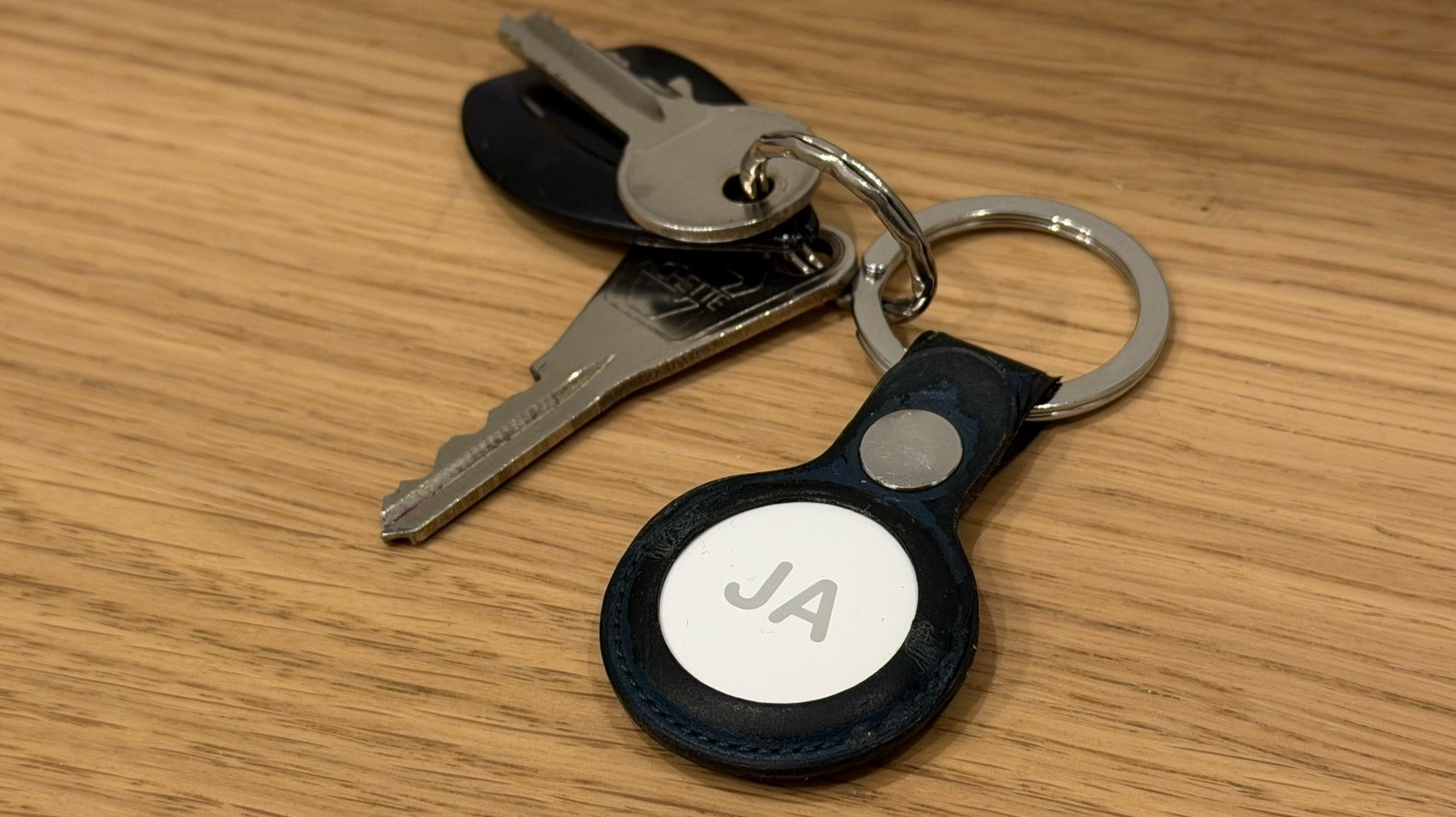
Besides all of these features, Apple promotes that the new AirTag continues to have all the great features from the previous model, including the ability to share item location with others and over 50 participating airlines. The company also continues to use the same CR2032 coin cell battery that lasts for over a year, and another slight tweak from the original mode is that the bottom side of the AirTag now has text all in capital letters to mention IP67 resistance, NFC, and Find My support. You can also customize the AirTag, like I did, with a custom, free engraving.

Should you buy the second generation AirTag?

José Adorno/BGR

While everything in tech seems to be getting more expensive, it’s kind of impressive that Apple continues to offer the AirTag for $29, or a pack of four for $99. What actually surprised me is that Apple only offers a single keychain accessory, which is the FineWoven Keychain. With the original release, Apple had a few different accessories so you could hold your item tracker.

Even though it’s unfortunate that Apple still requires users to buy an accessory to an accessory, the AirTag market is a lot more solid, and there are several cheaper third-party options available.

Whether you’ve been willing to upgrade your AirTag pack with newer models or you just want to add extra units to your collection, I think the second-generation AirTag can be a great purchase if you have some of the latest iPhones and Apple Watches, as the increased range and louder speakers can truly make a difference in your everyday usage. After all, you should forget about your AirTags until you need to open Find My and locate an item you misplaced. Then, at this time, you’ll really be pleased with these extra improvements.

Source

Posted on

Wave of ShinyHunters vishing attacks spreading fast

A distinct wave of voice phishing (vishing) attacks attributed to the notorious ShinyHunters hacking collective is spreading fast, with defenders urged to be on their guard following breaches affecting at least three major organisations so far.

The campaign appears to involve custom vishing kits targeting Google, Microsoft and Okta environments – as Okta itself warned last week – and may have already ensnared business intelligence specialist Crunchbase, music streaming platform SoundCloud, and financial planning and investment firm Betterment.

Charles Carmakal, chief technology officer at Google Cloud’s Mandiant, is among those following the campaign as it develops.

“Mandiant is tracking a new, ongoing ShinyHunters-branded campaign using evolved vishing techniques to successfully compromise SSO [single sign-on] credentials from victim organisations, and enrol threat actor controlled devices into victim MFA solutions,” he told Computer Weekly via email.

“This is an active and ongoing campaign,” said Carmakal. “After gaining initial access, these actors pivot into SaaS [software as a service] environments to exfiltrate sensitive data. An actor that identifies as ShinyHunters has approached some of the victim organisations with an extortion demand.

“While this is not the result of a security vulnerability in vendors’ products or infrastructure, we strongly recommend moving toward phishing-resistant MFA [multi-factor authentication], such as FIDO2 security keys or passkeys where possible,” he said.

“These protections are resistant to social engineering attacks in ways that push-based or SMS authentication are not. Administrators should also implement strict app authorisation policies and monitor logs for anomalous API [application programming interface] activity or unauthorised device enrolments.”

Researchers at the Sophos Counter Threat Unit (CTU) told our sister title, Cybersecurity Dive, that they had been tracking about 150 hacker-controlled domains used in the campaign, most of which seem to have been created in December 2025.

CTU threat intel director Rafe Pilling said he was unable to confirm if all of those domains had been used, but noted that the attackers appeared to be using them to create target-specific phishing websites, often impersonating authentication providers, including Okta.

Victims speak out

Crunchbase has already confirmed that hackers stole and leaked a 402MB compressed archive after failing to extort its victim, but that day-to-day operations were not affected, and it has otherwise fully contained the breach. It is working with the US authorities on its investigation, and is reviewing the leaked data to determine if it needs to legally notify any users.

Separately, SoundCloud and Betterment have also disclosed data breaches. SoundCloud, which was breached in December 2025, said the intrusion took the form of unauthorised activity in an ancillary service dashboard – although its notification makes no mention of social engineering or vishing as its source. It said the compromised data took the form of email addresses and publicly available information posted on about 20% of SoundCloud user profiles.

Betterment, meanwhile, said it detected a breach on 9 January, when “an unauthorised individual gained access to certain Betterment systems through social engineering” against its marketing and operations teams. The attackers used their access to send a fraudulent cryptocurrency-related message to some customers, all of whom have been notified.

Adaptive vishing

In Okta’s advisory, the supplier warned that threat actors are rapidly iterating custom vishing kits to meet the specific needs of their social engineering staff.

Such kits – which likely evolved from the same lineage – are “sold” on an as-a-service basis and designed not only to intercept an unwitting victim’s credentials, but also to provide their users with the supporting, on-the-fly context they need to get their targets to approve MFA challenges or take other actions as needed.

For example, Okta said, they could be adapted to control what pages are presented in the user’s web browser to sync to the caller’s script.

“Once you get into the driver’s seat of one of these tools, you can immediately see why we are observing higher volumes of voice-based social engineering,” said Moussa Diallo, threat researcher at Okta Threat Intelligence.

“Using these kits, an attacker on the phone to a targeted user can control the authentication flow as that user interacts with credential phishing pages,” he said. “They can control what pages the target sees in their browser in perfect synchronisation with the instructions they are providing on the call.

“The threat actor can use this synchronisation to defeat any form of MFA that is not phishing-resistant,” said Diallo.

Source