Posted on

AirPods Max get lossless audio and ultra-low latency audio next month

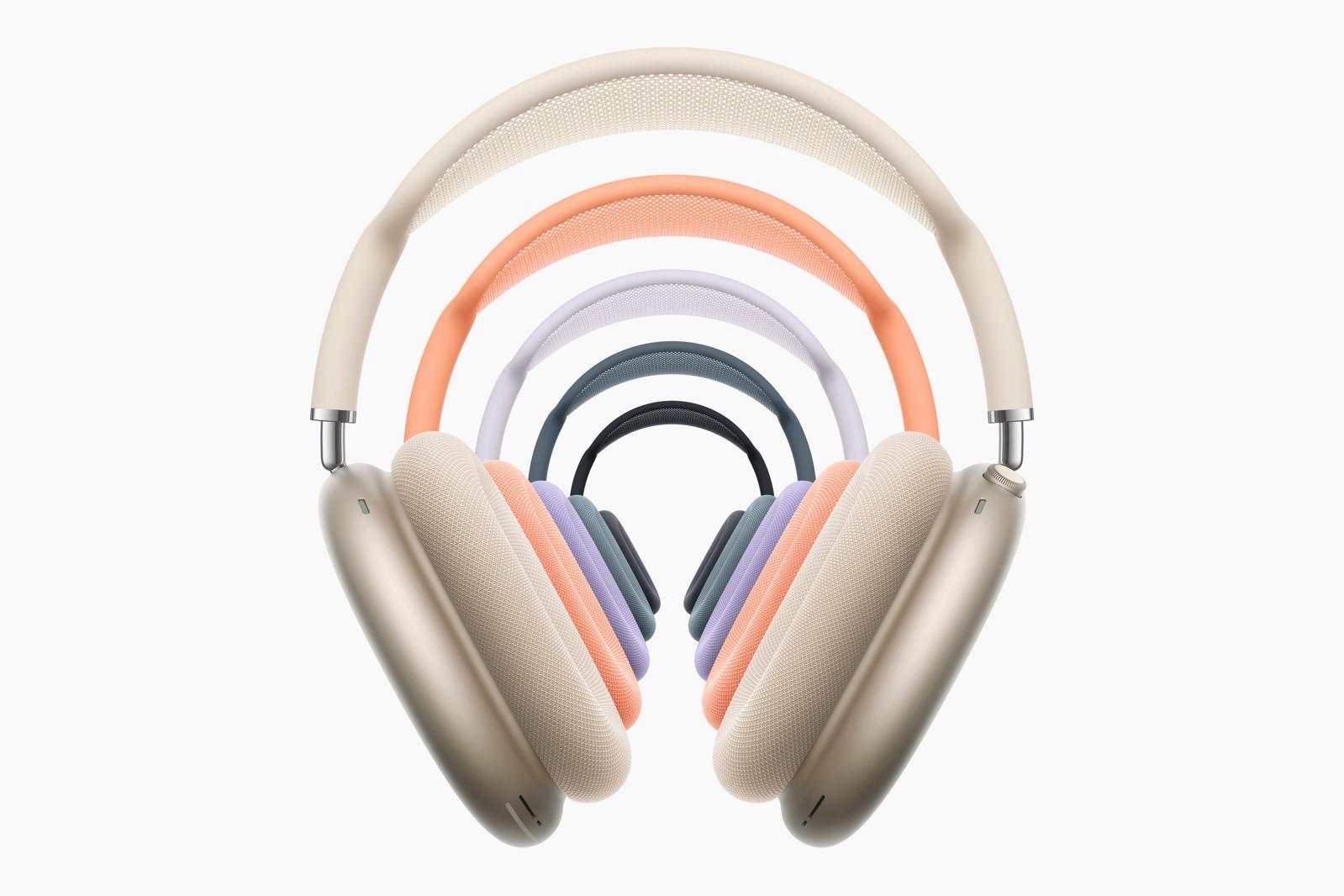
Apple finally gave customers a good reason to buy the recently released AirPods Max with a USB-C port. According to the company, a software update will finally give these headphones the long-awaited lossless capabilities and ultra-low latency audio.

A press release shows AirPods Max with USB-C will unlock 24-bit, 48 kHz lossless audio, which preserves the integrity of original recordings. In addition, it will be possible to listen to lossless while still enjoying Personalized Spatial Audio.

Apple says users will be required to use the included AirPods Max’s USB-C cable with their iPhone, iPad, and Mac devices to take advantage of lossless. More interesting than that, gamers and live streamers can also take advantage of ultra-low latency audio to experience no response delay while playing or live streaming, which, according to Apple, becomes “reliably smooth and even more immersive for users.”

That said, it’s important to note that lossless support for AirPods Max is only included with the USB-C version. The original model with a Lightning port technically can’t stream in this higher quality. With that, the USB-C AirPods Max are Apple’s second headphones to support this feature, as the Beats Studio Pro was the first one.

Tech. Entertainment. Science. Your inbox.

Sign up for the most interesting tech & entertainment news out there.

By signing up, I agree to the Terms of Use and have reviewed the Privacy Notice.

When Apple announced the new AirPods Max last year, it was criticized for delivering virtually the same headphones but with new colors and fewer features, as wiring these headphones wouldn’t bring lossless support.

A few months later, the company revealed that this major feature will be part of the iOS 18.4, iPadOS 18.4, and macOS Sequoia 15.4 releases. The company will most likely also offer a firmware update for AirPods Max to unlock this experience.

While users might finally have a reason to upgrade to these headphones, it’s important to note that they still feature the same H1 chip and lack several functions available with AirPods Pro 2 because they don’t have the latest technologies.

It’s unclear if Apple will ever release a revamped version of its most expensive headphones.

Source

Posted on

Gemini just got live video AI features, while Siri can’t even tell me what month it is

Google has had a great month when it comes to Gemini AI announcements, beefing up its chatbot across the board. The new Gemini 2.0 Flash experimental model powers better Deep Research features, Personalization, and incredible photo editing features. Also, Gemini got Canvas for improved collaboration with the AI, and Audio Overview, a feature that turns document summaries into podcasts.

Google also confirmed at MWC 2025 that Gemini Live would get a couple of amazing new video features in March, and they’re now rolling out to users. Gemini Live can see the live video from your camera in real time and chat with you about it. It can also see the contents of your screen if you’re looking to talk to the AI about something on your phone. 

All of this happened while Apple has had a terrible month when it comes to Apple Intelligence. The company was forced to delay the smart Siri until next year, making us realize that the Siri AI vision demoed at WWDC 2024 was just vaporware. Also, while the Gemini Live assistant can talk to you about live video, Siri can’t even tell what month it is.

Gemini Live is the AI assistant Google built under Project Astra, a research project Google demoed at I/O, showing what an AI assistant with multimodal support would be able to do. That multimodality also included access to live video from the phone’s camera, and that functionality is rolling out to Gemini Live users who are also Gemini Advanced subscribers. That’s the premium Gemini tier which gets you access to the latest Gemini features.

Tech. Entertainment. Science. Your inbox.

Sign up for the most interesting tech & entertainment news out there.

By signing up, I agree to the Terms of Use and have reviewed the Privacy Notice.

A Reddit user discovered a new option to share the phone’s screen with Gemini Live. Tap it, and you’ll give the AI assistant access to the contents of your display. You’ll then be able to ask the AI questions about what’s on your screen.

The Redditor posted a clip to demo the Gemini Live capability that rolled out to their Xiaomi phone. That’s an indication the feature will not be restricted to Pixel phones at launch — here’s the short video:

Sharing the screen while talking to Gemini Live is even better than using Circle to Search to start a Google Search about the contents of your screen. You might be able to get answers even faster this way, as Gemini Live will look at what’s on your display and provide assistance when it can. As you can see in the clip above, Gemini Live can’t perform other tasks, like opening apps for the user.

More interesting to me is Gemini Live’s ability to see the world through the camera lens. That real-time video support should also be rolling out to Gemini Live users with Advanced subscriptions. It’s unclear if the Redditor above got the functionality, as they didn’t share a similar demo. I would expect users who are able to screen-share with Gemini Live also to be able to use live videos with the AI.

Google has Gemini Live demos that show a user interacting with the AI while showing Gemini Live their surroundings via live video. In this example, the user is asking the AI for paint suggestions for their home:

If you have a Gemini Advanced subscription, you’ll want to check if Gemini Live got the new live video features. It’s likely you’ll get them soon now that users have started spotting them in the wild.

Source

Posted on

ChatGPT now tells you its limits with Deep Research and GPT-4.5 chats

While ChatGPT is available for free and without an account, premium access gets you better features, fewer limitations, and the ability to try some of the company’s newest AI features before they roll out more widely. People can choose between the ChatGPT Plus ($20/month) and Pro ($200/month) models, with the latter offering the best perks. For example, ChatGPT Pro was the first tier to get ChatGPT Operator and Deep Research, OpenAI’s first AI agents. Since then, OpenAI has brought Deep Research to the cheaper subscription option, but with more limitations.

OpenAI also launched its newest model, GPT-4.5, which is fully available to premium users. However, again, ChatGPT Plus users have limits in place. Thankfully, now there’s an easy way to see some of these limits when using your ChatGPT Plus subscription to get Deep Research reports or chat with GPT-4.5.

I’ve been a ChatGPT Plus subscriber for over a year now, and I’ve generally been happy with the experience. I am willing to pay a subscription for better AI features rather than get an ad-based subscription. But I’m hardly ready to make the jump to the ChatGPT Pro tier. I’m yet to see a feature that would warrant spending $200/month to access all the AI tools OpenAI has to offer and increase limits significantly.

That said, I’m also aware of the limits on my Plus tier. I recently got Deep Research access in the EU, and I’ve already started using it. For example, I went to ChatGPT for a Deep Research report on visiting Tokyo, and it was an amazing decision.

Tech. Entertainment. Science. Your inbox.

Sign up for the most interesting tech & entertainment news out there.

By signing up, I agree to the Terms of Use and have reviewed the Privacy Notice.

Similarly, GPT-4.5 is available to ChatGPT Plus users, the model OpenAI is currently testing before a wider rollout and before the launch of GPT-5. But it also comes with limitations.

OpenAI gives ChatGPT Plus users 10 Deep Research reports a month, 12 times fewer than the Pro option. The GPT-4.5 limits for Plus aren’t clear, but Pro users have full access to all OpenAI models.

ChatGPT Plus now shows you Deep Research and GPT-4.5 limits.ChatGPT Plus now shows you Deep Research and GPT-4.5 limits. Image source: Chris Smith, BGR
When using these two features, I’ve noticed pop-ups appear above the ChatGPT composer. They informed me how many Deep Research reports I have left this month and how many GPT-4.5 chats I have.

The pop-ups have an upgrade option for ChatGPT Pro, not that I’m considering it. But they’re still great to see, allowing me to keep track of my current usage.

Even without the pop-ups, OpenAI developed a handy feature to let you quickly see the number of Deep Research reports left this month. Just hover the mouse over the Deep Research button, and you’ll see the number of reports left and the date the limits reset for your account. The screenshot above shows it in action. Pro users would also see how many Deep Research queries they have left this way.

I’ve also caught the GPT-4.5 limit warning in the screenshot above. As you can see, I have 5 responses from GPT-4.5 remaining until the limits reset later this week. I don’t care as much about this particular limit. I’ll just switch back to GPT-4o, which is good enough for most of my needs. 

However, there’s no other way to see your GPT-4.5 limits, at least not as easily as the Deep Research count. I’ll also say that the number of responses likely refers to distinct chats with the AI rather than independent responses across the AI experience. Or that seems to be the case right now.

Then again, this is the first month I’ve seen these limit counts in the ChatGPT user interface. I’ll have a better chance to explore them in April.

Source

Posted on

Siri needs its iCloud moment: A complete rebrand

Even without the current Apple Intelligence fiasco, we already realized that Apple needs to ditch Siri or rebrand it in favor of a new personal assistant. Long before Apple Intelligence or LLMs started taking over the internet, we already felt like Siri was lost in time.

In the past few years, reports suggested the issue with Cupertino’s personal assistant is bigger than it seems. In 2023, the New York Times reported about the rise and fall of the assistants, including why Siri struggles with what sounds like regular tasks. John Burkey, a former Apple engineer who worked on the virtual assistant, said it had a “cumbersome design that made it time-consuming to add new features.”

In 2014, he was given the job of improving Siri. But since its database contains a gigantic list of words in nearly two dozen languages, its vast knowledge bade it “one big snowball,” as if someone wants to add a word to Siri’s database, “it goes in one big pile.”

With that in mind, Burkey explained that what seemed like small updates, such as new phrases, would require rebuilding the entire database, which could take up to six weeks. More complex features like new search tools could take nearly a year, meaning Siri could never become a creative assistant like ChatGPT unless it’s completely rebuilt.

Tech. Entertainment. Science. Your inbox.

Sign up for the most interesting tech & entertainment news out there.

By signing up, I agree to the Terms of Use and have reviewed the Privacy Notice.

When looking back at this report, it makes sense why Apple decided to indefinitely delay Siri’s on-screen awareness capabilities, as it still doesn’t know which month we are. This is why I think Apple should rebrand Siri and do something similar to what the MobileMe-iCloud transition was.

Siri feels like MobileMe, but Apple was fast enough to address it

Before iCloud was a thing, Apple had MobileMe. The service was available from July 2008 until October 2011, when iCloud was introduced. However, this subscription-based service was very unstable and had several syncing issues.

This is why when Steve Jobs introduced iCloud and said the service “just worked,” he rhetorically asked: “Why should I believe them? They’re the ones that brought me MobileMe!” Still, iCloud was better than MobileMe, and even though it had a few issues over the years, it’s Apple’s main service.

With that in mind, I think Siri needed a similar approach. At this moment, Apple is focusing on reshaping the personal assistant’s command structure. However, I don’t think promoting executives is enough. If Apple wants to be serious about AI, it must catch up with major players and offer a different experience. Should it call the new assistant Newton, Siri 2.0, or Apple Assistant? It doesn’t matter.

Siri’s revamp is urgent, and Cupertino needs to offer a faster response and service to users.

Source

Posted on

iOS 18.4 RC now available ahead of official launch next month

Apple is likely almost done with the beta testing of iOS 18.4, as it has just released its RC. The Release Candidate version comes after Apple announced that AirPods Max will finally feature lossless support. Still, it’s unlikely this new build will bring this function.

This is the third beta since Apple announced the personalized Siri experience will take longer to arrive on the iPhone. Still, the company is including at least three new improvements for Apple Intelligence in iOS 18.4 RC:

  • New languages: Apple adds Chinese, French, German, Italian, Brazilian Portuguese, Spanish, Japanese, Korean, and localized English for Singapore and India.
  • Image Playground: The long-awaited Sketch style is now available alongside the Animation and Illustration options.
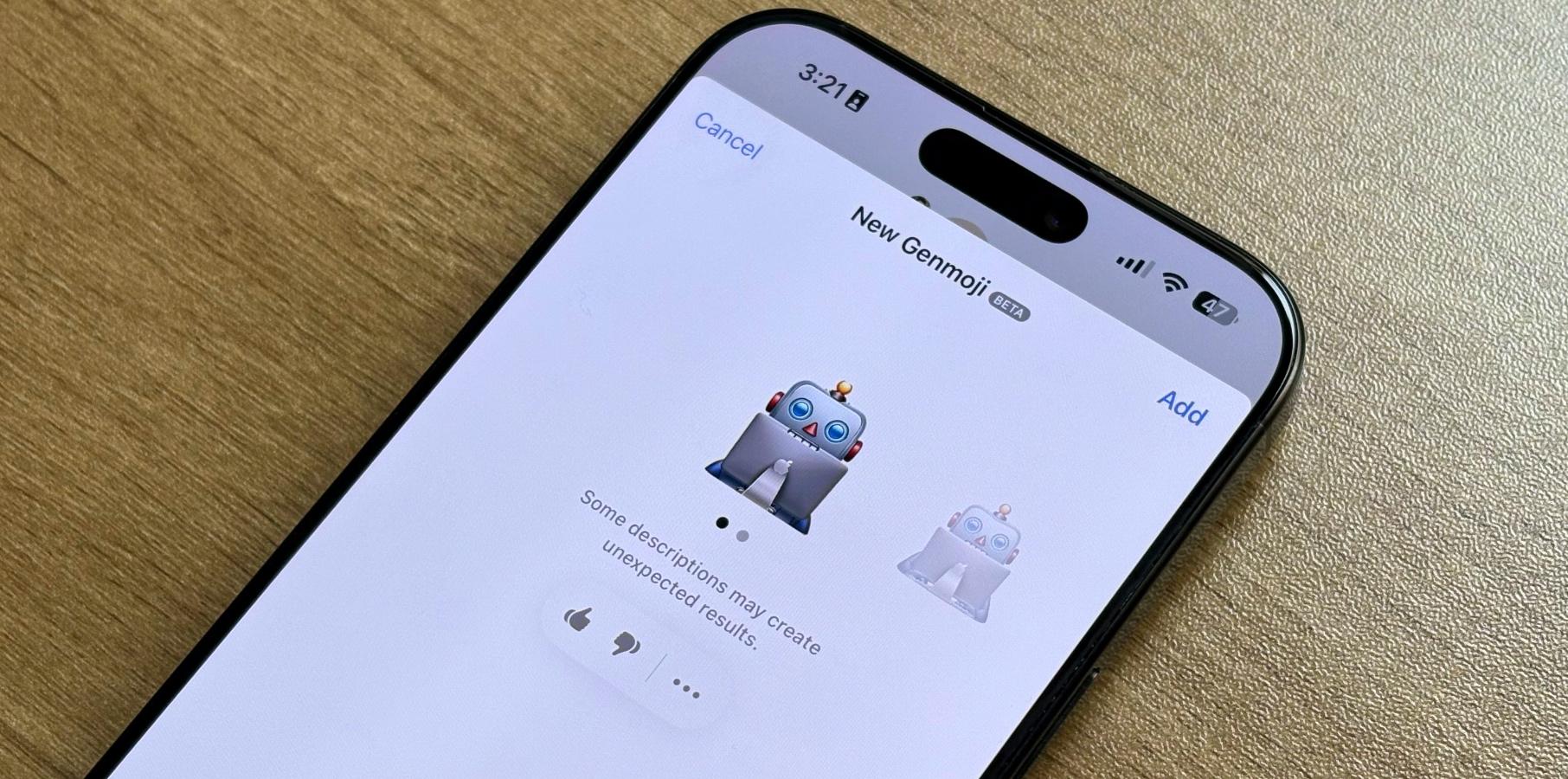
  • Genmoji: Apple tweaked the Genmoji icon on the keyboard, as it now reads “Genmoji.”

With iOS 18.4 RC, Apple added the seven emojis teased by the Unicode Consortium last year. The company also includes the following features:

Tech. Entertainment. Science. Your inbox.

Sign up for the most interesting tech & entertainment news out there.

By signing up, I agree to the Terms of Use and have reviewed the Privacy Notice.

  • Apple News+ Food: This update will bring a new Food section to Apple News. Subscribers can access recipes, tips for healthy eating, restaurants, and more.
  • Vision Pro app: With iOS 18.4, Apple Vision Pro will get its own iPhone app. It will help you download apps, visionOS content, tips, and information and even set up Guest Mode.
  • Apple Maps change: You can now set a Preferred Language to get directions instead of the one you use on your iPhone.
  • Ambient music: iOS 18.4 adds new Control Center toggles for Ambient Music, including Chill, Productivity, Sleep, and Wellbeing.
  • CarPlay update: Cars with bigger screens now get three rows of apps displayed.
  • Visual Intelligence: Apple added the Visual Intelligence feature to the Action Button while also adding support for the iPhone 15 Pro and iPhone 16e.
  • Control Center: The Control Center now displays an Apple Intelligence section with three options: Talk to Siri, Type to Siri, and Visual Intelligence.
  • Apple Vision Pro app: If you have an Apple Vision Pro, iOS 18.4 beta 2 added the already-announced Vision Pro app.

Source

Posted on

iPadOS 18.4 RC now available with these features

Apple nears the end of the iPadOS 18.4 testing with its RC version. After a mild iPadOS 18.3 update, Cupertino has much more to unveil for the company’s tablets. Here’s everything new with this upcoming software update, including new Apple Intelligence features.

The most important update coming with iPadOS 18.4 is the all-new Mail experience. This is what you can expect:

  • All-new Mail experience: After adding this new Mail to iOS 18.2, Apple is introducing new ways for users to manage their inboxes. On-device categorization organizes and sorts incoming emails into Primary for personal and time-sensitive emails, Transactions for confirmations and receipts, Updates for news and social notifications, and Promotions for marketing emails and coupons. Mail also features a new digest view that pulls together all of the relevant emails from a business, allowing users to quickly scan for what’s important at the moment.
  • New Apple Intelligence languages: Apple adds Chinese, French, German, Italian, Brazilian Portuguese, Spanish, Japanese, Korean, and localized English for Singapore and India.
  • Image Playground: The long-awaited Sketch style is now available alongside the Animation and Illustration options.
  • Genmoji: Apple tweaked the Genmoji icon on the keyboard, as it now reads “Genmoji.”

In addition to these Apple Intelligence features, iPadOS 18.4 RC adds the following functions and tweaks:

  • Apple News+ Food: This update will bring a new Food section to Apple News. Subscribers can access recipes, tips for healthy eating, restaurants, and more.
  • Ambient music: iPadOS 18.4 adds new Control Center toggles for Ambient Music, including Chill, Productivity, Sleep, and Wellbeing.
  • Apple Maps change: You can now set a Preferred Language to get directions instead of the one you use on your iPad.
  • New emoji: Apple finally added the seven emojis teased by the Unicode Consortium last year. Still, they’re not as fun as you’d expect.

Alongside this new build, Apple seeded the release candidate versions of iOS 18.4, macOS 15.4, watchOS 11.4, tvOS 18.4, and visionOS 2.4. We’ll let you know if we find anything new with it.

Tech. Entertainment. Science. Your inbox.

Sign up for the most interesting tech & entertainment news out there.

By signing up, I agree to the Terms of Use and have reviewed the Privacy Notice.

Source

Posted on

macOS 15.4 RC now available with four major features

Apple nears the end of macOS 15.4 beta testing with its RC build for developers. This version brings Apple Intelligence improvements and is a bit more feature-packed than the previous macOS 15.3 update. Here’s everything we know so far about macOS Sequoia’s latest update.

There are two main Apple Intelligence features landing on macOS 15.4 that are currently in beta testing:

  • All-new Mail experience: Mail is introducing new ways for users to manage their inboxes. On-device categorization organizes and sorts incoming emails into Primary for personal and time-sensitive emails, Transactions for confirmations and receipts, Updates for news and social notifications, and Promotions for marketing emails and coupons. Mail also features a new digest view that pulls together all of the relevant emails from a business, allowing users to quickly scan for what’s important at the moment.
  • New Apple Intelligence languages: Apple is adding Chinese, French, German, Italian, Brazilian Portuguese, Spanish, Japanese, Korean, and localized English for Singapore and India to Apple Intelligence.

In addition to these changes, Apple just added seven new emojis to the macOS 15.4 RC. The Unicode Consortium introduced these figures last May in beta. So far, the new emojis expected for iOS 18 include a face with bags under the eyes, a fingerprint, a leafless tree, a root vegetable, a harp, a shovel, and splatter.

Still, if you don’t care that much about emojis anymore, Apple now lets you create your own with Genmoji. With macOS 15.4 RC, Apple tweaked the Genmoji button on the keyboard so it’s more easily discoverable, even though they’re only considered emojis on Apple’s platforms.

Tech. Entertainment. Science. Your inbox.

Sign up for the most interesting tech & entertainment news out there.

By signing up, I agree to the Terms of Use and have reviewed the Privacy Notice.

Finally, the company announced that lossless support is coming to AirPods Max with macOS 15.4. Still, it’s unclear if Mac users can try this feature today.

Alongside macOS 15.4 RC, Apple has also seeded the release candidate versions of iOS 18.4, iPadOS 18.4, tvOS 18.4, visionOS 2.4, and watchOS 11.4. BGR will let you know if we discover anything new on these upcoming software updates.

Source

Posted on

visionOS 2.4 RC brings these Apple Intelligence features and more

After a mild visionOS 2.3 update, Apple is nearing the end of visionOS 2.4 beta testing with its RC. This upcoming software update, among other new features, readies support for Apple Intelligence.

Apple Intelligence has been available on iPhone, iPad, and Mac devices with A17 Pro or M chipsets for a few months. Now, it’s making its way to Apple Vision Pro, which is more than capable of running Apple Intelligence capabilities with the M2 chip and 16GB of RAM.

These are some of the features available with visionOS 2.4 RC:

  • Writing Tools: Users can rewrite, proofread, and summarize text nearly everywhere they write, including Mail, Notes, Pages, and third-party apps;
  • Image Playground: Users can create playful images in seconds, choosing from Animation, Illustration, or Sketch. This app is built right into apps like Messages and is also available in a dedicated app;
  • Memories in Photos: Users can create stories they want to see just by typing a description. Apple Intelligence will pick out the best photos and videos based on the description, craft a storyline with chapters based on themes identified from the photos, and arrange them into a movie with its own narrative arc;
  • Clean Up tool: This Photos app feature can identify and remove distracting objects in the background of a photo without accidentally altering the subject;
  • Siri: Users type to Siri and switch between text and voice to communicate with Siri in whatever way feels right for the moment.
  • ChatGPT integration: When you feel Apple Intelligence isn’t enough, you can allow ChatGPT to access Writing Tools and other features for a better response.

Even though better Apple Intelligence capabilities have been delayed, including the long-awaited personalized Siri, it’s nice to have the platform finally available on Apple Vision Pro, ahead of its rumored packed visionOS 3 update.

Tech. Entertainment. Science. Your inbox.

Sign up for the most interesting tech & entertainment news out there.

By signing up, I agree to the Terms of Use and have reviewed the Privacy Notice.

In addition to Apple Intelligence, visionOS 2.4 RC introduces Spatial Gallery, an app that features spatial photos, videos, and panoramas curated by Apple for Vision Pro. There’s also a new Apple Vision Pro for iPhone that users can take advantage of to queue apps and games to download, discover new content, and more. Guest User has also been revamped so Apple Vision Pro owners can customize everything from their iPhone or iPad.

Alongside visionOS 2.4 RC, Apple is also releasing the release candidate versions of iOS 18.4, iPadOS 18.4, macOS 15.4, watchOS 11.4, and tvOS 18.4. We’ll let you know if we find anything new with them.

Source

Posted on

tvOS 18.4 and watchOS 11.4 RC available with new emojis

Apple is nearing the end of its upcoming operating systems beta testing, including watchOS 11.4 and tvOS 18.4. At this moment, only one main feature—seven new emojis—has been confirmed for watchOS 11.4 RC. Besides that, we expect a few tweaks for Apple Watch and Apple TV users with tvOS 18.4 RC.

As mentioned above, watchOS 11.4 RC added new emojis. Back in May, Unicode previewed seven new emojis, including a face with bags under the eyes, a fingerprint, a leafless tree, a root vegetable, a harp, a shovel, and splatter.

With watchOS 10.4, Apple added the following figures: Mushroom, phoenix, lime, broken chain, and shaking heads. In addition, 18 people and body emojis were added, with the option to face them in either direction. With that update, Apple also added Siri improvements, which we could see again. Since Apple Intelligence is unavailable for Apple Watch users, it shouldn’t stop the company from improving its personal assistant on the watch.

For tvOS 18.4, there are two main features we are still waiting for:

Tech. Entertainment. Science. Your inbox.

Sign up for the most interesting tech & entertainment news out there.

By signing up, I agree to the Terms of Use and have reviewed the Privacy Notice.

  • New screensavers: Besides Snoopy screensavers, Apple promised another option for its Shows and Movies. During tvOS 18.2 beta testing, MacRumors found references to two other screensavers, but they have been removed on the following tvOS 18.3 beta; it’s unclear if Apple will bring new screensavers or if it’s already saving them for tvOS 19;
  • Robot vacuum support: While it was rumored to arrive later last year, Apple postponed this feature. It’s possible that tvOS 18.4 finally adds it.

Besides those features, watchOS 11.4 and tvOS 18.4 RC seem light on features. We also don’t know any rumors about the company’s focus on watchOS 12 and tvOS 19, even though there are reports that Apple plans to revamp its smart home offering with an Amazon Echo Show-like device, a doorbell ring with Face ID, and more.

Alongside watchOS 11.4 and tvOS 18.4 rc, Apple also seeded the release candidate versions of iOS 18.4, iPadOS 18.4, macOS 15.4, and visionOS 2.4.

Source

Posted on

Our data, our decisions, our AI future: why we need an AI Regulation Bill

There were many consequences of the extraordinary timing of last July’s General Election.  One was that my AI Regulation Bill, which had made its way through all stages in the House of Lords and was just about to go to the Commons, was stopped in its tracks. Almost a year later, a new government and another Parliament has provided the opportunity to reintroduce my AI Bill, as I did last week.

If the need for artificial intelligence (AI) regulation was pressing in November 2023, when I first brought my Bill to bear, that need is now well past urgent and, it seems, even further from fruition.

How the sands have shifted, both domestically and internationally.  A UK government, keen on AI regulation while in opposition, slated an AI Bill in the King’s Speech last summer. Now, some eight months later, there is still no sign of a Bill and what appears to be an increasing reluctance to do anything much until they have squared it with the US. 

Making the case for regulation

At the Paris AI Action Summit earlier this year, a declaration for inclusive and sustainable AI was signed by international participants, although both the UK and US decided not to put their pens to that paper. 

Further, the AI Safety Institute has been renamed the AI Security Institute signalling a definite shift towards cyber security rather than a broader focus on “safety” that would include mitigating risks associated with societal impacts of AI models

All of this makes the case – the more than urgent case – for UK AI regulation. It seems we still have to slay that falsehood which recurs with tedious inevitability – that you can have innovation or regulation but you can’t have both. This is a false dichotomy. The choice is not between innovation or regulation. The challenge is to design right-sized regulation – a challenge that has become much more pronounced in the digital age.

With no current AI-specific regulation, it is us, as consumers, creatives and citizens who find ourselves exposed to the technologies Lord Chris Holmes

Every learning from history informs us, right-sized regulation is good for citizen, consumer, creative, innovator, and investor. We all know bad regulation – sure, there’s some of that around but that’s bad regulation, that in no sense says to us regulation of itself is bad. 

Take the UK approach to open banking as an illustration, replicated by over 60 jurisdictions right around the world.  A determined, thought-through regulatory intervention created in the UK – good for consumer, good for innovator and investor.

We know how to get right-sized regulation, well, right. This could be no more important than when it comes to AI, a suite of technologies with such potentially positively transforming opportunities – economic, social, psychological.  All potentially positive if we regulate it right.

A regulatory approach

My attempt to design a flexible, principles-based, outcomes-focused and inputs-understood, regulatory approach for AI is set out in the provisions of the Bill.

First, an AI Authority.  Don’t think of a huge bureaucratic burdensome behemoth – not a bit of it. We need an agile, right-touch, horizontally focused, small “r” regulator, intended to range across all existing regulators to assess their capacity and competency to address the opportunities and challenges AI affords.  Through this, crucially, to identify the gaps where there exists no regulator or regulatory cover, recruitment being one obvious example. 

The AI Authority would stand as the champion and custodian of the principles set out for voluntary consideration in the previous government’s whitepaper – those principles, put into statute through this Bill.

The Bill would also establish AI responsible officers, to the extent that any business which develops, deploys or uses AI must have a designated AI officer. The AI responsible officer would have to ensure the safe, ethical, unbiased and non-discriminatory use of AI by the business and to ensure, so far as reasonably practicable, that data used by that business in any AI technology is unbiased. 

Again, don’t think unnecessarily bureaucratic and burdensome. Proportionality prevails and we already have a well-established and well-understood path for reporting through adding to the provisions set out in the Companies Act.

With no current AI-specific regulation, it is us, as consumers, creatives and citizens who find ourselves exposed to the technologies. Clear, effective labelling, as provided for in the Bill, would hugely help. 

It holds that, any person supplying a product or service involving AI must give customers clear and unambiguous health warnings, labelling and opportunities to give or withhold informed consent in advance. Technologies already exist to enable such labelling.

Similarly, the Bill supports our creatives through intellectual property and copyright protection. No AI business should be able to simply gobble up others property without consent and, rightly, remuneration.

Public engagement

The most important provisions in the Bill are those around the question of public engagement. The Bill requires the government to “implement a programme for meaningful, long-term public engagement”. It is only through such engagement that we are likely to be able to move forward together, cognisant of the risks and mitigations, rationally optimistic as to the opportunities. 

When the Warnock inquiry was established to do just this as IVF was being developed in the 1980s, we had the luxury of time. The inquiry was set up in 1982 and the Human Fertilisation and Embryology Act came into force in 1991.

Technologies, not least AI, are developing so rapidly we have to act faster. The technologies themselves offer some of the solution, enabling real-time ongoing public engagement in a manner not possible even a few years ago. If we don’t address this, the likely outcome is that many will fail to avail themselves of the advantages while simultaneously being saddled with the downsides, sharp at best – at extreme, existential.

To conclude, we need regulation – cross-sector AI regulation for citizen, consumer, creative, innovator, investor.  We must make this a reality and bring to life, for all our lives, that uniting truth – our data, our decisions, our AI futures.

Source